Claims and refunds
AI-Edited Product Photos in Refund Claims: A Review Workflow for Retailers
Review AI-edited product photos in refund claims with an order-to-parcel checklist, practical customer request, worked example and pilot metrics.
Published · 16 min read
On this page
A close-up of a cracked product can establish that an image depicts damage. It may tell you very little about which order the product belongs to, whether the customer received that item, or when the damage occurred. AI editing adds another uncertainty, but the retailer's decision still depends on those ordinary commerce questions.
The useful response is a short, evidence-led review: connect the order, item, parcel and claimed condition; identify the missing connection; request evidence that could resolve it; then record a human decision under the applicable returns process. An image-analysis result can inform that review. It should not become an automatic refund-denial rule.
This guide is for ecommerce operations, customer support and merchant risk teams handling damaged-item or not-as-described claims. Use the decision table for a live ticket and the measurement section to evaluate a pilot.
Keep the problem narrower than “AI refund fraud”
For photo review, distinguish three questions. Does the file have signs of generation or manipulation? Does the depicted item connect to this transaction? Does the full record support the requested remedy? A genuine photograph can show another purchase. An edited photograph can accompany a real defect. A photo of a damaged box can be authentic while the product inside is undamaged.
The review should resolve the claim-relevant uncertainty. If the customer says an appliance will not switch on, a photograph may establish model identity but cannot establish every functional failure. Move to appropriate troubleshooting or inspection rather than repeatedly asking for sharper pictures of an invisible fault.
AI assistance with a customer message is different from fabrication of product evidence. Riskified's June 2026 research announcement describes a commissioned consumer survey about AI assistance with return or refund claims, including drafting requests. That is commercial research about reported behavior, not a measured prevalence of fabricated damage photographs. It cannot establish that a particular customer's polished complaint or unusual image is fraudulent. Riskified's research announcement
Returns fraud, wardrobing and refund scams: where photo review fits
Returns fraud is any deception used to get money or goods back, and wardrobing and refund scams are two forms of it. Photo review helps with some forms and not others, so decide which problem you are solving before you buy or tune a tool.
- Returns fraud is the broad term: obtaining a refund or replacement by misrepresenting the purchase, the item, its condition or the reason for the return.
- Wardrobing is buying an item, wearing or using it, then returning it for a refund as if it were unused. The deception concerns use, not damage.
- A refund scam has two meanings. For merchants, it is a false claim made to obtain a refund while keeping the goods or their value: an empty-box or swapped-item return, or a damage or “not as described” claim that is false or exaggerated. For consumers, the phrase also describes impersonators who offer a fake refund to obtain payment details or remote access, as in the FTC's description of tech support scams. This guide covers the merchant meaning.
- First-party fraud, also called first-party misuse or friendly fraud, is when the genuine customer rather than an identity thief makes the false claim. Card networks use the term for a cardholder who reports fraud on a purchase they actually made; merchants also use it for false return and refund claims.
| Scenario | Can photo evidence address it? | What addresses it |
|---|---|---|
| Damage, defect or “not as described” claim supported by customer photos, including AI-added or AI-generated damage | Yes. The photo is the evidence, so the integrity of the file and its link to the order matter | Image analysis of the file, then the four connections below |
| Wardrobing | No. It usually involves no photo claim; the evidence is the physical condition of the returned item | Inspection at receipt, tamper-evident tags, return-window and return-history policy |
| Empty-box or swapped-item return | No. A customer's photo cannot show what a returned parcel contains | The merchant's own receiving inspection, serial numbers, weights and packing records |
| First-party chargeback | In part. A documented photo review supports a response to a “not as described” dispute, not to “I did not make this purchase” | See the next subsection |
Chargeback fraud prevention and first-party fraud
Chargeback fraud prevention starts with a documented decision record, and a photo review record contributes to it only for some disputes. When a customer disputes a purchase with the card issuer, saying the goods were damaged or not as described, the merchant's response can include the listing at purchase, fulfillment records, the customer's original photos and messages, return-inspection findings and the documented review of those photos. The file's SHA-256 fingerprint and timestamp show which exact file was examined. Card networks code these disputes separately from “I did not make this purchase” disputes: Visa's code 13.3 is “Not as Described or Defective Merchandise/Services,” which Stripe groups as “product unacceptable.” Stripe, dispute reason code categories
Visa's Compelling Evidence 3.0 is a different tool for a different dispute. It applies to Visa disputes coded 10.4, “Other Fraud - Card Absent Environment,” where the cardholder says they did not make the purchase. It relies on earlier undisputed transactions from the same cardholder and matching identifiers such as device ID, IP address or delivery address, not on photographs, and submitting it does not guarantee a win because the issuing bank decides. Stripe, how Stripe supports Visa Compelling Evidence 3.0 Network rules change, so confirm current requirements with your acquirer or payment provider. The ticket record described in closing the ticket is what you will draw on if a product dispute follows.
Build four connections before interpreting a detector result
Start with the records already available to the merchant. Do not ask the customer to supply information your team can retrieve reliably from the order system.
| Connection | What the reviewer compares | What remains unproven |
|---|---|---|
| Order to item | Order line, SKU, variant, quantity, fulfillment record and visible model or identifier | A matching SKU identifies a product type, not necessarily one individual unit |
| Item to parcel | Shipment allocation, parcel reference, available packing record and a view connecting item with packaging | A tracking label beside an item is a contextual link, not proof of its entire journey |
| Item to claimed condition | Overview, relevant close-up, other views and the customer's description | Visible damage alone does not establish when or how it happened |
| Condition to remedy | Applicable policy, requested refund or replacement, prior resolution and inspection findings | A technical image concern does not itself settle eligibility |
For split shipments, identify the parcel carrying the disputed order line. For a multipack, record which unit and how many units are affected. For serialized products, compare the visible serial with a serial actually recorded during fulfillment; an inventory SKU alone cannot support a unit-level mismatch allegation. If the merchant did not record a serial, state that limit.
Walmart's WFS guide, for example, asks sellers disputing certain damaged returns to provide clear images of the package and tracking label, plus the damaged product with order ID and UPC attachment. That is a specific seller reimbursement process, not a universal rule for customer refund requests. It illustrates why product condition and transaction linkage both matter. Walmart WFS required documentation
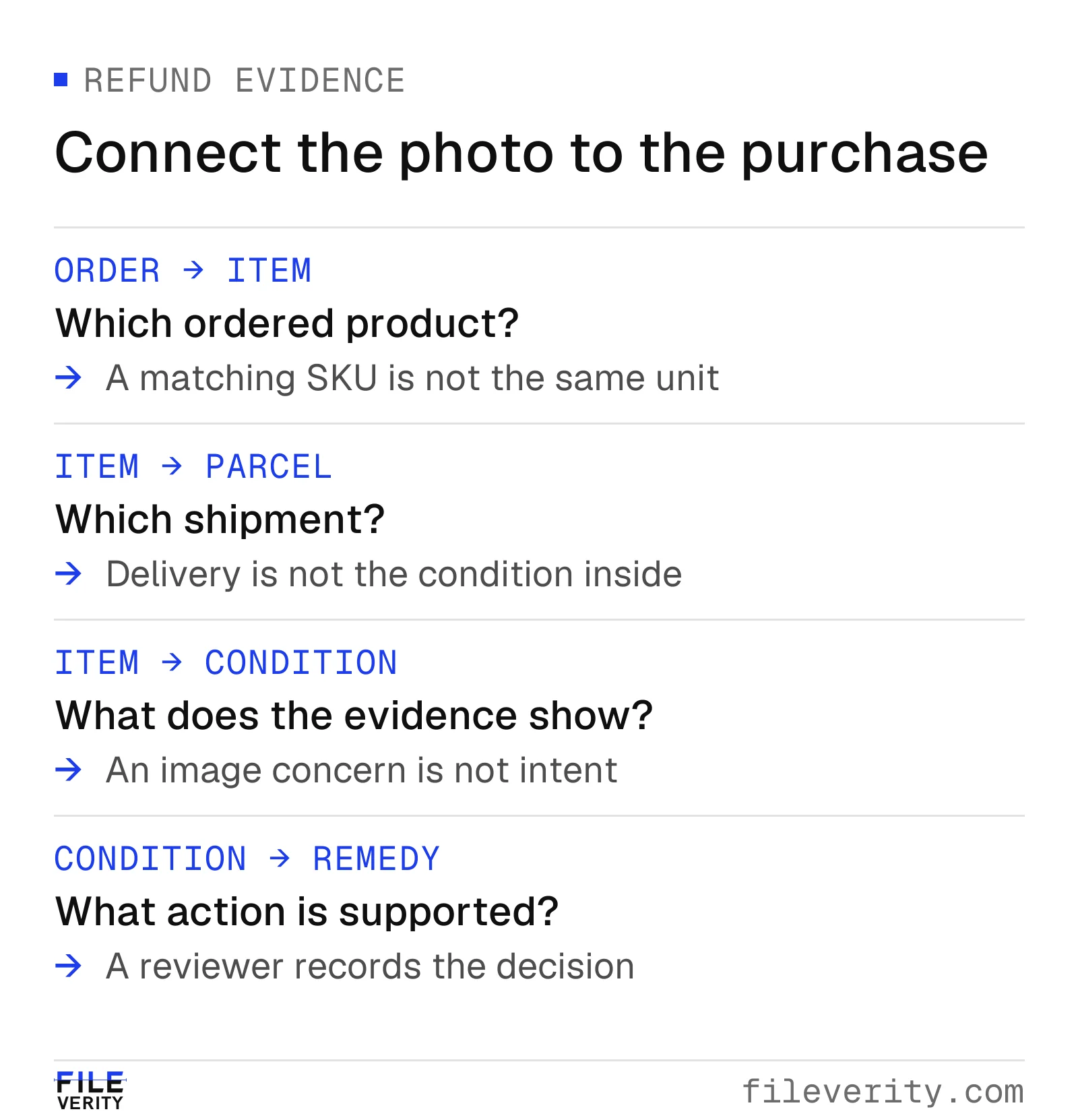
Connect the order, photographed item, parcel and condition before deciding the remedy.
Preserve the submission and choose one useful next action
Keep the received attachment, ticket ID, order line, received time and channel together. Retain the customer's accompanying explanation. If the support platform supplies both an uploaded file and a compressed preview, identify which version was examined. Save annotations separately so another reviewer can revisit the unmarked evidence.
Before escalating, write a concrete observation: “The close-up shows a crack on the lid, but neither image connects that lid to the model in the order.” Avoid “obvious AI fraud,” which merges an uncertain technical judgment with a judgment about intent. A vague label is also difficult for the next agent to resolve.
| Finding in the ticket | Next action and owner | When that question is resolved |
|---|---|---|
| Relevant damage and item linkage are sufficiently supported | Support completes the ordinary remedy review | The remedy and its basis are recorded |
| Damage is visible but the item or variant cannot be linked | Support requests one linking view or checks existing fulfillment records | Identity is supported, contradicted or explicitly unresolved |
| File is too compressed to assess the relevant feature | Support requests the available source attachment through an approved channel | A usable file arrives or an alternative route is selected |
| A relevant alteration concern remains after context checks | Technical reviewer examines the preserved file and specific feature | Concern is explained, substantiated within scope or inconclusive |
| Return inspection conflicts with the submission | Returns lead reconciles item identity, receipt condition and customer account | A responsible owner documents the contradiction and decision |
Set the follow-up limit and next review time in the ticket. One targeted request is usually more useful than a generic demand for “more proof.” If it cannot be fulfilled, choose an available policy route such as an approved return inspection or supervisor review. Do not turn nonresponse, discarded packaging or a missing camera file into a technical finding of manipulation.
Use image analysis for the question it can actually address
A whole-image generation result is not automatically an assessment of a small crack, stain or changed serial. Before using an output, establish the tool's supported task, relevant input requirements and interpretation. Record the file reference and returned result in the tool's own terms; do not convert an image score into a probability that the customer committed fraud.
Fileverity image verification checks the photos your help desk retains for AI generation, local manipulation and provenance and shows which region a finding concerns, so a reviewer can choose a useful follow-up for the disputed feature, such as a linking view of the item.
If a screenshot is the only available file, record that limitation. Requesting the source may help the reviewer, but a larger file does not guarantee a conclusive answer. The companion guide on screenshots and compressed images addresses this input problem in more detail.
Keep a clean separation between the analyst's observation and the support action. “The supplied file leaves a local-edit concern unresolved” can justify a bounded review. It does not establish who edited it, whether the product is intact, or whether the claim is ineligible. Conversely, an output that raises no concern does not verify the parcel, purchase or product condition.
How to measure whether a finding concerns the claimed damage
Fileverity's manipulation analysis retains spatial regions and relates them to the submitted image. That is one technical principle within its broader analysis: location is evidence that an image-level label discards. For a refund claim, it allows a reviewer to ask whether a finding concerns the alleged crack or merely another part of the photograph. The reviewer identifies which feature matters to the claim.
Two overlapping boxes make the distinction measurable. Let R be a reviewer-defined region containing the disputed feature, and B a candidate box from an image assessment. Both must use the same image, orientation and coordinate system. Define I = area(R ∩ B), the intersection area.
Two useful geometric summaries answer different questions:
- Coverage of the review region:
I / area(R). - Intersection over union (IoU):
I / [area(R) + area(B) − I].
IoU is a standard spatial comparison metric in computer vision. Here, it measures geometric overlap. Rezatofighi et al., CVPR 2019
Consider a constructed example using end-exclusive pixel coordinates. The review region is R = [100,100,200,200], an area of 10,000 square pixels. The candidate box is B = [150,100,250,200], also 10,000. Their intersection is 50 × 100 = 5,000. Review-region coverage is 50%, while IoU is 5,000 / 15,000, or 33.3%. Neither number is the probability that the claim is fraudulent.
The denominator matters. A huge candidate box covering the entire image could give 100% coverage of a tiny crack region while being poorly localized. IoU helps expose that mismatch, but even a perfect box match does not verify the crack: a box encloses an area and may contain unchanged pixels. Map resolution, resizing and ordinary image processing can also limit boundary precision.
Use this geometry to make the follow-up specific. Record whether the supported finding intersects the disputed feature and whether the overlap is precise enough to be informative. Then obtain a source view or other evidence of that same item. A concern confined to a background poster should not become a reason to deny a damage claim. Conversely, the absence of overlap does not establish that the item belongs to the order.
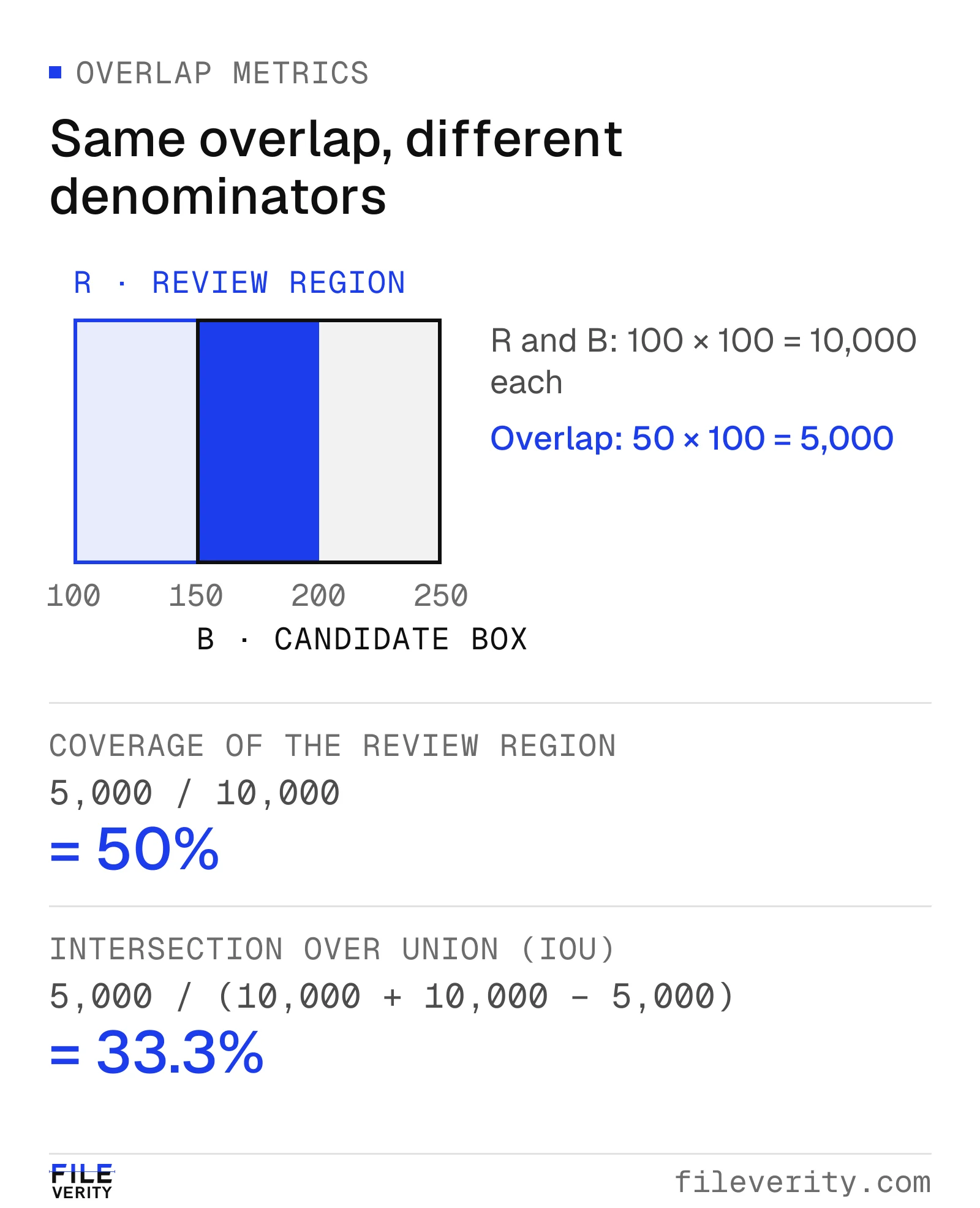
The same overlap covers 50% of the review region but gives 33.3% IoU because the denominators differ.
Visual illustration: adding a crack to a real photograph
The source is a real kitchen photograph taken by Eli Christman in 2019. Fileverity used AI to add a fictional crack to the transparent jug in a separate derivative. This pair illustrates why an ordinary-looking scene can still contain a consequential edited feature. The hypothetical ticket below is a separate example.
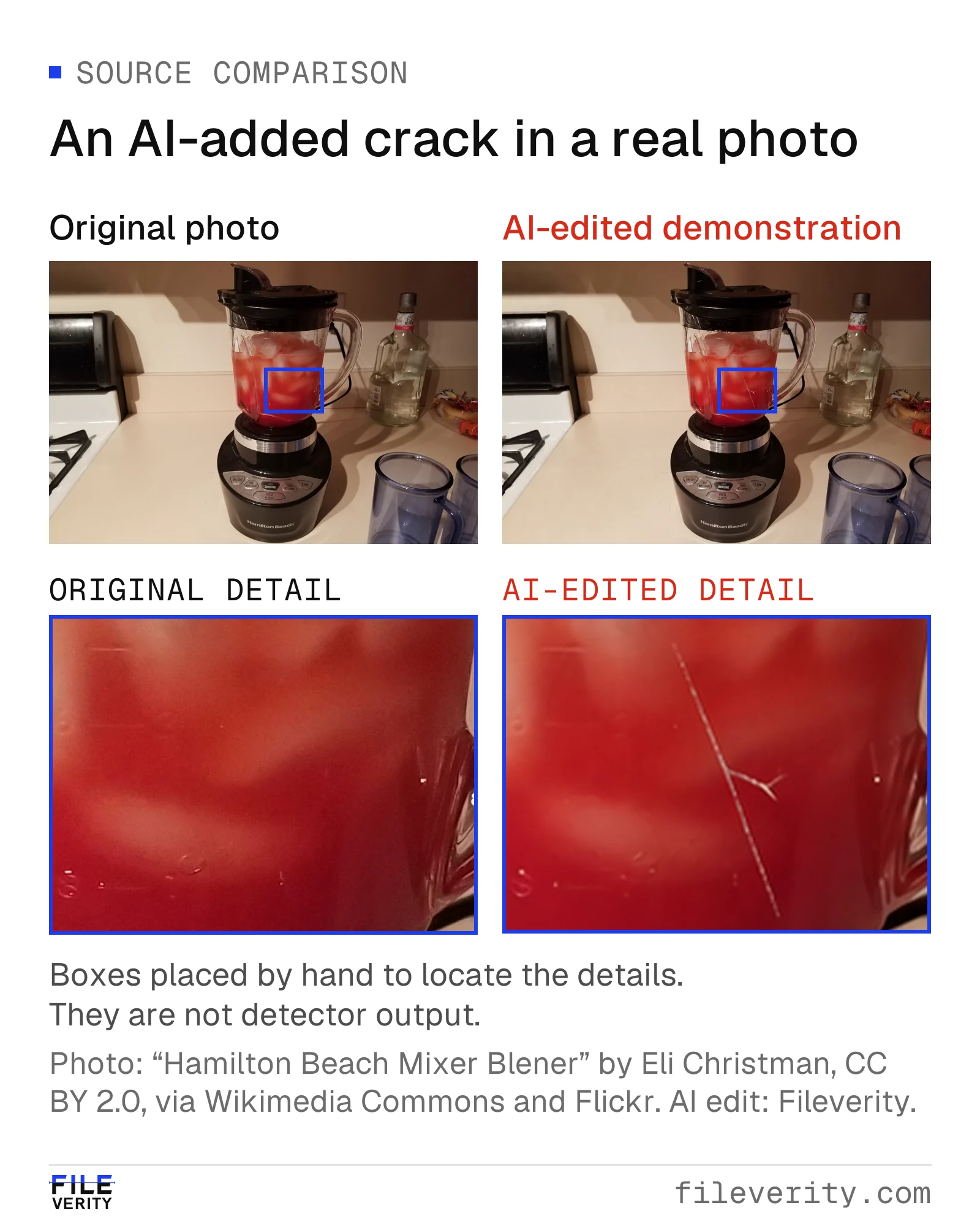
A real kitchen photograph beside its AI-edited copy. Matched crops show the added crack in the jug wall.
Source: “Hamilton Beach Mixer Blener” by Eli Christman (Gamma Man), CC BY 2.0, via Wikimedia Commons and Flickr. AI crack alteration and comparison layout: Fileverity.

Worked example: a cracked blender jug
This entire case is hypothetical. A customer orders a charcoal blender with a clear 1.5-litre jug and requests a replacement jug after delivery. The order contains a second accessory shipped separately. The ticket includes P01, a tight screenshot showing an apparent crack; P02, a wider view of the blender; and P03, a photograph of an outer box label.
The support agent checks the shipment allocation first. P03 corresponds to the accessory parcel, not the blender parcel. P02 shows the expected model, but its angle does not show the same part of the jug as P01. A technical review tool also raises a manipulation concern for P01. There is no recorded unit serial for the jug.
There are now two distinct gaps: the parcel label is for the other shipment, and the apparent crack cannot be compared across views. Neither establishes dishonesty. The label could be an understandable mix-up; the screenshot could have passed through a messaging app. The agent checks whether existing records can answer the parcel question, then sends one tailored request.
A copyable customer-support request
Thanks for sending the photographs. We want to connect the damaged jug to the blender in your order so we can review the replacement request. The label received appears to be for the separately shipped accessory.
If available, please attach the photograph used for the close-up directly from your device, rather than a screenshot. If safe, please also send one wider photograph showing the crack and enough of the jug and blender to identify the model. Please do not handle broken edges or use the appliance to demonstrate the problem.
You do not need to resend your address or payment details. If the blender packaging is still available, use our approved upload channel for its parcel reference; otherwise let us know. If another photograph is unavailable, reply here so we can discuss the appropriate return or inspection option. We will update this ticket by [date/time].
The agent should remove requests already answered by merchant records and replace the bracketed time before sending. Ask for evidence the customer can still provide safely.
Branch A: a legitimate customer receives a remedy
The customer supplies the camera photograph and an overlapping wider view. Both show the crack on the same distinctive molding line of the jug. The support agent confirms the model and blender shipment from existing records; the customer explains that both parcel labels were on the kitchen counter. The technical reviewer finds that the original concern does not persist on the source photograph and comparison views.
The merchant's ordinary damaged-item review now has sufficient support. The agent arranges the replacement under the applicable process, closes the image concern and records why the extra request ended. The first alert is not retained as “confirmed abuse.” The technical result helped direct a check, and the additional evidence helped a legitimate customer receive a resolution.
Branch B: a material concern remains
Instead, suppose the customer returns the jug through the approved process. The receiving team documents the parcel, contents and condition on arrival. A distinctive production mark connects the received jug with P02, but the crack shown in P01 is absent. The technical reviewer still has a concern about the crack region in the submitted file.
The returns lead now has a specific discrepancy to reconcile. They check for a swapped component, inspection error or explanation of the photograph, and give the customer a chance to clarify. The technical record and inspection record remain separate. For this hypothetical branch, suppose the customer clarifies that P01 showed an older jug from a different purchase. The returned jug is intact, and the stipulated ordinary-return policy permits a refund at this stage. The lead records an ordinary return and refund, rather than a damage replacement, and links the resolution so another agent cannot issue a second remedy. The mismatch is resolved by item identification and the clarification; any remaining technical concern about P01 is recorded separately, without claiming AI authorship or intent has been proven.
Branch C: the evidence remains unresolved
Alternatively, the customer no longer has the packaging or source file and cannot provide a safe linking view. The screenshot remains unsuitable for a reliable technical conclusion. Support records “image assessment inconclusive; item-condition linkage incomplete,” then routes the case to the supervisor for the available return, inspection or policy-exception decision. If an exception is granted, it is recorded as an exception, not confirmation that the image was authentic. If another action is chosen, its basis is the applicable process and available evidence, not a fabricated certainty about AI.
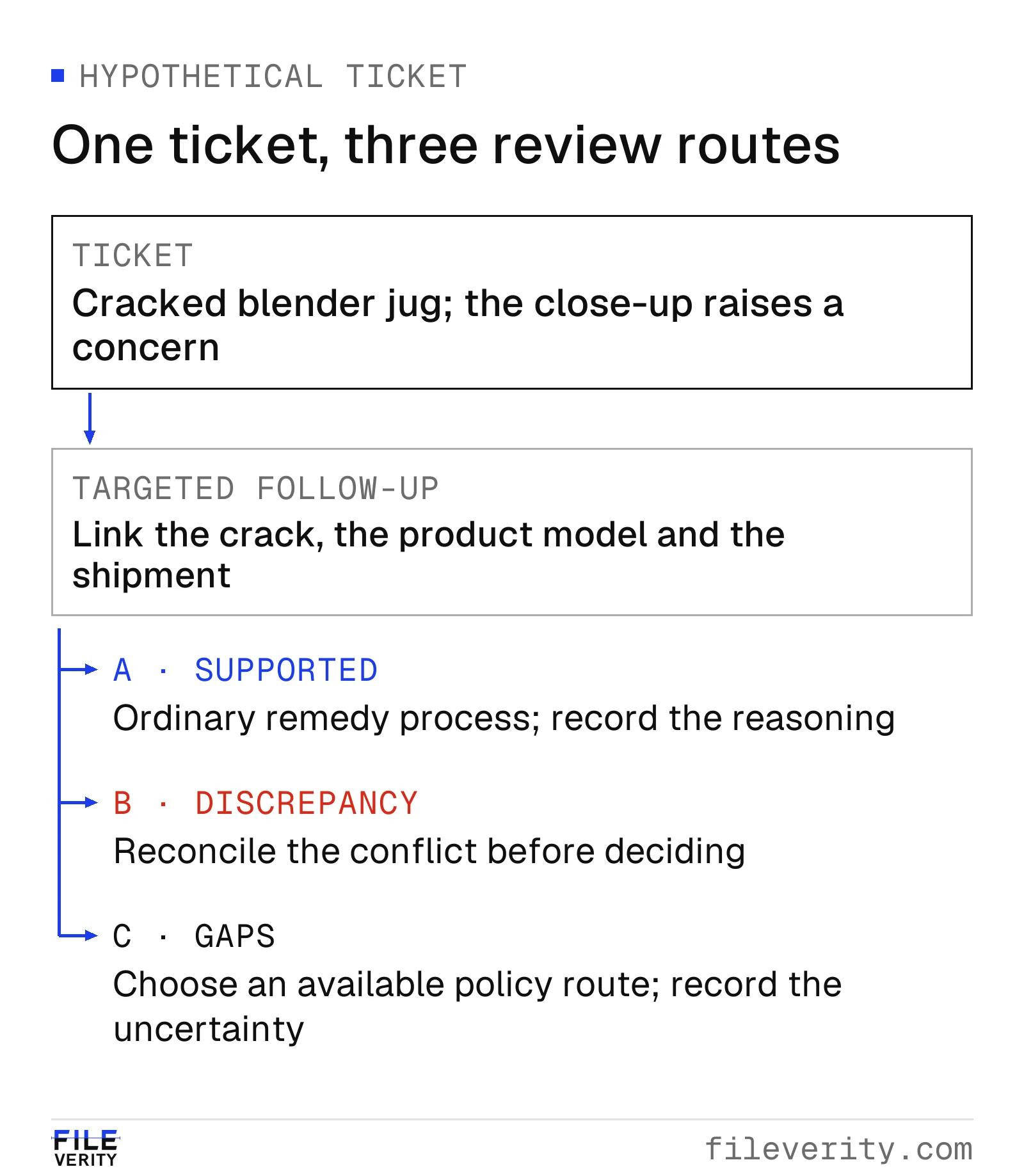
Three routes from the same ticket: resolve the concern, reconcile a discrepancy, or choose an alternative review route.
The branches share a stopping rule: finish the evidence question when the available record supports a decision or a documented alternative. Do not keep running analyses until a preferred label appears.
In Fileverity, the technical step for this ticket is an image analysis of the customer's photo: the report marks the region of the jug that a finding concerns, so the support lead can see whether it touches the claimed crack, and records the examined file's SHA-256 fingerprint and timestamp validation status for the ticket.
Close the ticket so another team can understand it
Use a compact closure record: order and line; parcel reference; claimed condition; preserved file IDs; relevant observation; follow-up and response; inspection or technical finding; decision owner; remedy; and unresolved limitations. Link any replacement, refund or return authorization so a later agent sees what has already happened.
That record is useful if a payment dispute follows, but a refund review and a chargeback response are different processes. Shopify's guidance for product-unacceptable disputes includes the listing at purchase, fulfillment records, available pre-shipment photographs, customer communications and resolution history. A delivery scan alone addresses delivery more directly than the condition inside the box. Shopify's dispute guidance
Stripe likewise describes evidence about product specifications, transaction context, policy and support resolution for product-unacceptable disputes. Prepare a relevant, readable account using the payment provider's current instructions; do not assume a detector screenshot satisfies the required evidence or guarantees a dispute outcome. Stripe's sample evidence packets
Measure resolution quality, not just flags
Run a limited pilot on a defined cohort of photo-supported damage claims. Include ordinary tickets as well as escalations; otherwise the dataset cannot reveal friction imposed on customers whose evidence was sufficient. Track ticket-level outcomes separately from file-level analyses, since one ticket may contain many images.
| Measure | Definition and population | What it helps reveal |
|---|---|---|
| Additional-request rate | Tickets sent a new evidence request / all eligible tickets in the pilot | Added customer effort |
| Request resolution rate | Requested tickets where the target question was resolved / requested tickets with completed follow-up by the reporting cutoff | Whether requests were useful; report pending follow-ups separately |
| Inconclusive assessment rate | Images marked technically inconclusive / all images assessed | Input or tool coverage limits |
| Decision reversal rate | Reviewed decisions changed after reconsideration / reviewed decisions receiving reconsideration | Problems within that selected group, not all decisions |
| Time to remedy | Elapsed hours or days from ticket receipt to remedy, among tickets receiving one by the reporting cutoff | Customer delay; report median and a high percentile, with pending tickets counted separately |
For example, in a hypothetical cohort of 100 tickets, 20 receive a request. By the reporting date, 16 have completed follow-up and 12 have resolved the target question. The request rate is 20/100 = 20%; the completed-follow-up resolution rate is 12/16 = 75%. Report the four pending follow-ups separately. Counting 12/20 without explaining unfinished cases answers a different question.
Do not label the other tickets “fraud caught” or count every withheld refund as prevented loss. Review a sample of completed cases against independent evidence where available, and report unresolved outcomes openly. Changes in product mix, damage rate or return policy can change these measures without any improvement in image analysis.
Add Fileverity at the technical-review step
Run the photos your support channels retain through Fileverity image verification with the specific generation, manipulation or provenance question your reviewers need to resolve. Include clear legitimate photos, screenshots, ordinary processing, relevant edits and cases whose correct answer is inconclusive.
Before widening use, check whether the resulting observation helps the next reviewer select a better action, whether legitimate customers face unnecessary requests, and whether the decision record remains understandable. Agree which outcomes to track: useful request resolution, unnecessary customer requests, inconclusive assessments and time to remedy. Send us the claim type, available image formats and review question, and we will walk your team through real cases; talk to sales. Fileverity analyzes files on servers operated by Entogo in Toronto, Canada and deletes them once the analysis is complete. The Trust & security page sets out data handling, including private deployment for Enterprise on request.
By Yang Zheng