Images
Can AI Detectors Check Screenshots and Compressed Images?
Learn what screenshots and compression change, which file to submit, how to interpret limited results, and when to request an original or independent evidence.
Published · Updated · 17 min read
On this page
Yes, within limits. A detector can analyze a screenshot or a compressed copy, but resizing, compression and cropping remove some of the signals it relies on, so the result is less conclusive than for the original file. A screenshot may still contain useful image signals, a detectable watermark or recognizable scene details, while lacking the detail needed to answer a narrow question. Request the original attachment whenever you can.
Here, the task is assessing generated or edited content inside a screenshot. Identifying that a file is itself a screenshot is a separate question. If your question is whether the conversation or page shown in a screenshot is real, go straight to how to tell if a screenshot is fake.
The practical first step is to identify what you have: the saved source image, a downloaded copy, a screenshot, or a photograph of a display. Then identify what must be established. Detecting whole-image generation, investigating an altered digit and verifying recorded provenance place different demands on the file.
If the original attachment is available, keep it alongside the received copy. If it is not, a screenshot can still help direct a review. The useful outcome may be a targeted request for one missing piece of evidence rather than another detector score.
Choose the file that answers your question
“Original” should mean a specific file obtained through an identified route, not simply the largest image someone can provide. A large file can be an enlarged derivative; a camera file can depict a screen. Record how each version was obtained and what relationship to the disputed image has actually been established.
| What you have | Useful first action | What to keep separate |
|---|---|---|
| Original attachment or camera/source export | Preserve it and check the tool's supported task and file conditions | Its origin claim still needs evidence; the filename is not proof |
| Download from a website or messaging service | Record the channel and ask whether a source attachment is available | Do not assume that the download preserved the sender's file unchanged |
| Screenshot with an image inside an interface | Preserve the whole screenshot; identify the embedded image and the question | The screenshot file's properties describe that capture, not necessarily the embedded image |
| Tight crop of a disputed region | Obtain the parent image and crop coordinates if possible | A close-up may hide item identity or scene context |
| Photograph of a screen or printed page | Treat it as a new capture of another representation | Evidence about the capturing camera does not establish how the displayed content was made |
| Image inside a PDF | Preserve the PDF and identify the page and image | A page screenshot is a further derivative, not an extraction of the original embedded image |
For a single-file check, Fileverity image verification checks the file you submit for AI generation, manipulation and provenance, and reports when an input cannot support a conclusion. Match the supported analysis to the question, and keep the submission's processing history with the result. A changed payment digit needs a different follow-up from uncertainty about whether an entire scene was generated.
Before you upload
Keep the received file unchanged, then use this short checklist:
- Choose the earliest available attachment whose relationship to the received image you can explain. Keep both versions when they differ.
- Name the question: whole-image generation, a suspected local change, or recorded provenance.
- Check the current Fileverity upload requirements for file type, size and dimensions. Accepted format does not by itself establish screenshot suitability; confirm the relevant analysis requirements.
- If the tool requires a crop or conversion, retain the parent file and label the derivative. Do not enhance or reconstruct disputed details.
- Keep the returned result attached to the exact version submitted, including any unsupported or inconclusive status.
What changes when an image becomes a screenshot?
A screenshot records a rendered view. The picture may have been resized to fit a window, partially covered, displayed with interface elements or combined with other images. The screenshot does not automatically contain the original picture's file structure or its embedded history.
The Content Authenticity Initiative's FAQ explicitly distinguishes a screenshot from the source image's embedded C2PA metadata. It also explains that photographing an image with a signing camera records the new capture; that does not establish the origin of the picture being photographed. CAI FAQ: screenshots and photographs of existing images
This matters when someone submits a screenshot containing a “verified” badge. The badge is visible content in the screenshot. To rely on a validation result, obtain the relevant file or verification record, establish which asset it concerns and inspect the actual result. A picture of an interface cannot substitute for that link.
Missing embedded credentials do not end every provenance inquiry. C2PA describes soft-binding mechanisms that can help locate separated manifests using supported watermarks or fingerprints and a repository. Whether recovery is available depends on the assets and implementation; many screenshots will have no recoverable history. C2PA 2.5 Soft Binding API, section 1
Keep three statements distinct in your notes: “no embedded credential found,” “recovery was attempted with this supported method,” and “no relevant record was recovered.” None is equivalent to “the depicted scene is genuine.”
How to tell if a screenshot is fake
To tell if a screenshot is fake, check its source rather than the picture. A screenshot is a re-rendered image of whatever was on a screen, so the strongest evidence is seeing the same conversation, page or account on the original device or platform, not studying the image more closely.
Source checks come first:
- See it at the source. Ask the person to open the conversation, order page or account on their own device while you watch, or to scroll through the whole thread on a screen recording. A recording is better than a single screenshot, but it can also be staged.
- Ask the other side. The other participant in a conversation can show their copy. Two independent devices showing the same thread are far stronger than one screenshot.
- Request an export or a link. Some platforms let users export a chat or share a link to a post or ticket, such as WhatsApp's chat export. An export is a better lead than a screenshot, but the sender still controls the file, so confirm what you can on the platform itself.
- Check records where the stakes justify it. In a serious dispute, the platform or carrier may be able to confirm that an account sent or received something at a given time, through the channel it provides for such requests. What is available varies by provider and country, and message content is often not retained.
- Verify what the screenshot claims. If it shows a payment confirmation, a delivery notice or an order status, confirm that fact with the bank, carrier or merchant system instead of trusting the image.
For the full source-tracing routine, see how to tell if an image is AI generated.
Interface checks are weak hints
Inconsistencies in the interface can justify asking for the source, but a clean-looking screenshot proves nothing, because a careful edit or a mock-up can reproduce a genuine interface. Compare against a real screenshot from the same app, device type and period, and treat each mismatch as a question to ask rather than a verdict.
| What to compare | What can look wrong | Ordinary explanations to rule out |
|---|---|---|
| Status-bar clock against message times | A clock earlier than the newest message, or battery and signal icons that do not match the claimed device | Screenshot taken later, another time zone, scheduled or delayed messages |
| Fonts, bubble spacing and alignment | Text weight, line spacing or emoji style that differs from the app on that system | App and system versions, text-size and accessibility settings, themes |
| Sender name, number and avatar | A name that differs from the saved contact, a number format that does not fit the country, a missing profile photo | Renamed contacts, unsaved numbers, privacy settings |
| Timestamps and day dividers | Dates out of sequence, gaps that do not fit the story, a “Today” label that contradicts the claimed date | A conversation that spans midnight, time zones |
| Delivery and read indicators | Read receipts for a contact who has them disabled, or indicators from a different app version | Settings and versions differ between users |
| Crop | A crop that hides the header, the contact name or the status bar | Cropping for privacy |
Fake chat screenshots are usually assembled in a mock-up template or made by editing a real screenshot, not necessarily with AI generation. A result that shows no AI generation therefore does not clear a screenshot, and an AI flag does not explain how a screenshot was made.
What image analysis can and cannot add
Image analysis can add evidence about the file. When the file is suitable, it can flag AI generation or local AI edits in the screenshot's pixels, read any embedded metadata or provenance, and record the file's SHA-256 so everyone can refer to the exact version examined. In Fileverity, an image analysis checks the submitted file for AI generation and AI edits, reads any C2PA Content Credentials, EXIF/XMP metadata and AI labels it carries, reports when the input cannot support a conclusion, and issues a report that records the file's SHA-256 with an RFC 3161 timestamp when validation succeeds.
It cannot prove that a conversation took place or that the content shown is real. A faithful screenshot of a fabricated message, or a photograph of a screen showing a mock-up, can contain no edited pixels at all. Screenshots also usually carry no camera metadata, so there is no capture record to read, and edits made without AI may leave nothing that a detector reports. A negative result never proves authenticity; record it as “no concern found in this file” beside what the source checks established.
Fake text message screenshot
A fake text message screenshot shows an exchange that never happened or was altered, often to fabricate a promise, a threat, a payment confirmation or a delivery notice. The same logic applies: the image cannot settle it, so move the check to where the conversation lives.
- Ask for the whole thread, with the contact details visible, on the original phone, rather than a snippet.
- Ask the other party to confirm the exchange from their own device.
- Match what the messages claim to records that do not depend on the screenshot: a bank or payment record, a carrier tracking event, an order or booking in your system.
- Check that the messaging service, bubble style, number format and country fit the claimed source, then apply the interface hints above as questions, not proof.
- Preserve the file as received, with who supplied it, when, and its SHA-256, and write down what was verified and what was not.
Compression, resizing and watermarks affect different evidence
Lossy compression changes the encoded image information. Resizing changes the spatial sampling. A crop removes surrounding content. These operations can occur together, but identifying one does not tell you exactly which others occurred or how a particular detector will respond.
SWGDE's image compression guidance distinguishes lossless and lossy methods and discusses the implications of formats and compression for image use. Treat compression as a file-processing condition to document, not as an independent allegation of deception. SWGDE Digital Image Compression and File Format Guidelines, version 3.0
There is no defensible universal rule that “compression removes AI detection.” Embedded provenance, invisible watermarks and learned image analysis are different mechanisms. Google describes SynthID image watermarks as designed to withstand modifications including lossy compression. That design claim does not guarantee every transformed file will return a usable result, or that a particular verification service covers every generator. Google DeepMind's SynthID overview
Learned manipulation methods also need evidence under the relevant conditions. Robustness analyses of manipulation detectors routinely report performance changes after resizing and compression, which is why an evaluation should reflect the input pipeline your team actually receives.
For the wider distinction between these checks, use the C2PA, watermarks and image detection comparison. Here, the operational question is which information your received file still supports.
A small feature can become a much smaller review target
Consider a hypothetical source image measuring 4,000 × 3,000 pixels. A box around a disputed label measures 120 × 80 pixels. If the entire image is proportionally reduced to 1,000 × 750, the corresponding box is approximately 30 × 20 pixels.
The width and height are each one quarter of the original. The box contains 600 pixel positions instead of 9,600: one sixteenth as many. This is a geometric calculation, not a claim that detection accuracy drops by the same proportion. The recognizability of a character also depends on its strokes, contrast, processing and the method used.
Dimensions under proportional resizing:
| Measurement | Source image | Reduced copy |
|---|---|---|
| Full image dimensions | 4,000 × 3,000 | 1,000 × 750 |
| Label review box | 120 × 80 | 30 × 20 |
| Pixel positions in the box | 9,600 | 600 |
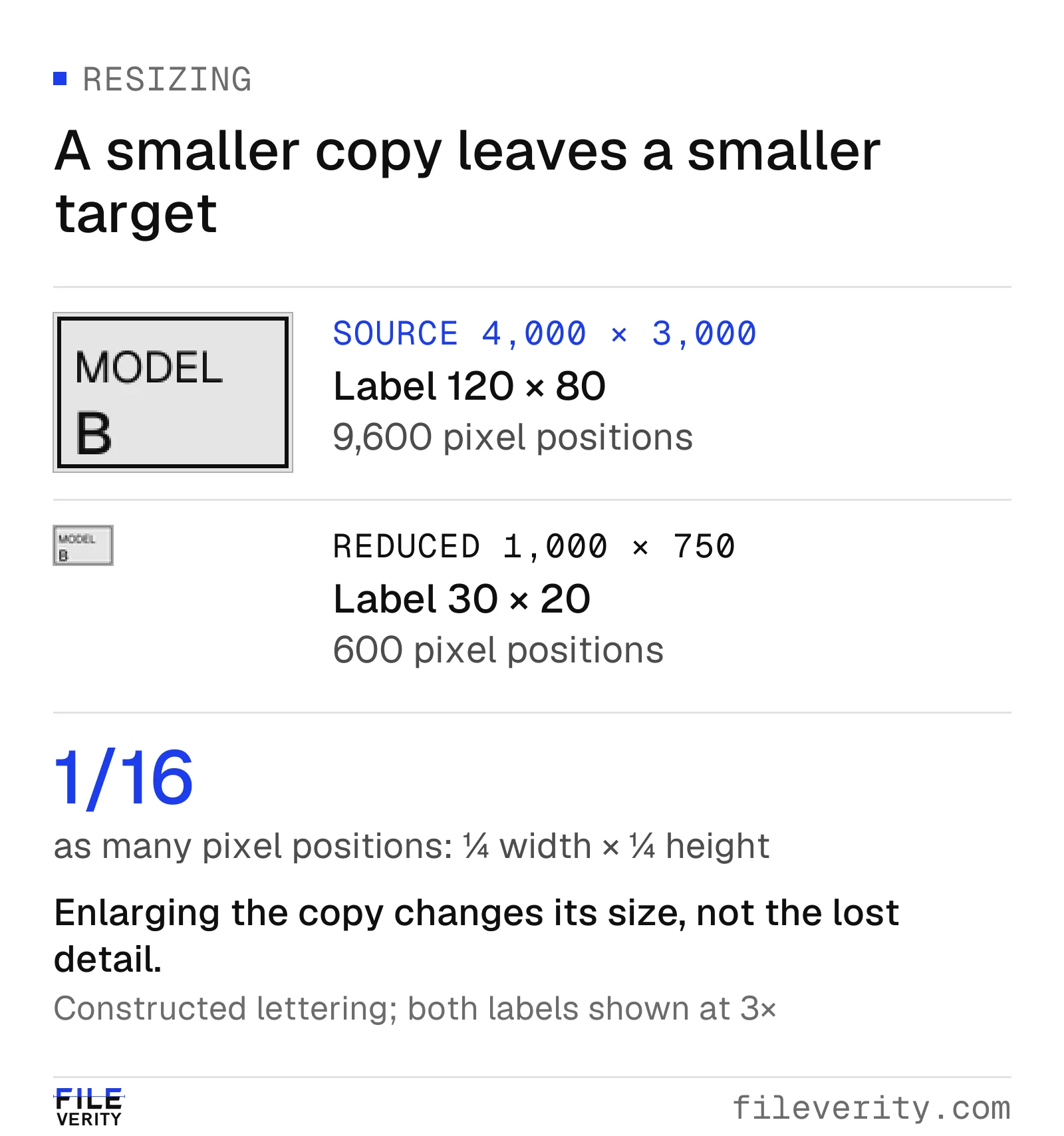
Reducing each dimension to one quarter leaves one sixteenth of the pixel positions in the label region.
Making the smaller copy four times larger on screen does not reverse the earlier reduction. Interpolation can help a reviewer see the available structure, but the enlargement is not the original label. If a character cannot be read reliably, record it as unreadable rather than choosing the interpretation that best fits a suspicion.
Do not use generative enhancement to create the detail needed to settle the case. An apparently clearer number produced by reconstruction is not independent evidence of the number in the submitted file. If you retain an enlarged working view, label how it was made and keep its parent copy available.
Why downsampling can destroy evidence that enlargement cannot restore
Fileverity's image pipeline uses resized analysis views where needed while examining available metadata from the submitted file. One principle behind interpreting those views is sampling theory: fewer samples can preserve useful large-scale structure while losing distinctions at smaller scales. A format being accepted does not mean every original feature survives the delivery and analysis pipeline.
Downsampling commonly involves filtering before sampling on a coarser grid. Filtering suppresses spatial variation that the new grid cannot represent reliably. Without suitable filtering, fine patterns can appear as different, lower-frequency patterns—aliasing. The sampling theorem explains the conditions for reconstruction of a band-limited signal; it does not promise recovery of arbitrary detail removed from a photograph. Steven W. Smith, The Scientist and Engineer's Guide to DSP, chapter 3
To isolate the information loss, consider a simple block average: replace each 2 × 2 block with the average of its four grayscale values.
| Original block | Values by row | Averaged output |
|---|---|---|
| Vertical edge | [0, 100] / [0, 100] | 50 |
| Horizontal edge | [0, 0] / [100, 100] | 50 |
Both different structures produce exactly the same output: (0 + 100 + 0 + 100) / 4 = 50. Given only that output, there is no unique way to determine which original edge existed. Enlarging 50 into a bigger square does not supply the missing orientation. A generative enhancer can propose plausible detail, but the proposal is not evidence of which input was present.
This many-to-one transformation loses the distinction between the two inputs. Production filters use different weights and neighborhoods, but the review question remains: does enough detail survive to assess the feature?
For a disputed label, the practical question is whether its relevant strokes remain resolved in the actual file the reviewer or detector receives. Preserve the submitted file, any analysis copy and the relationship between their coordinates. When the feature is unresolved, request a better source rather than interpreting an enlarged blur as a negative finding. In procurement, test source-and-transformed pairs from your delivery channels and inspect which review questions remain answerable; do not infer an accuracy loss from pixel count alone.
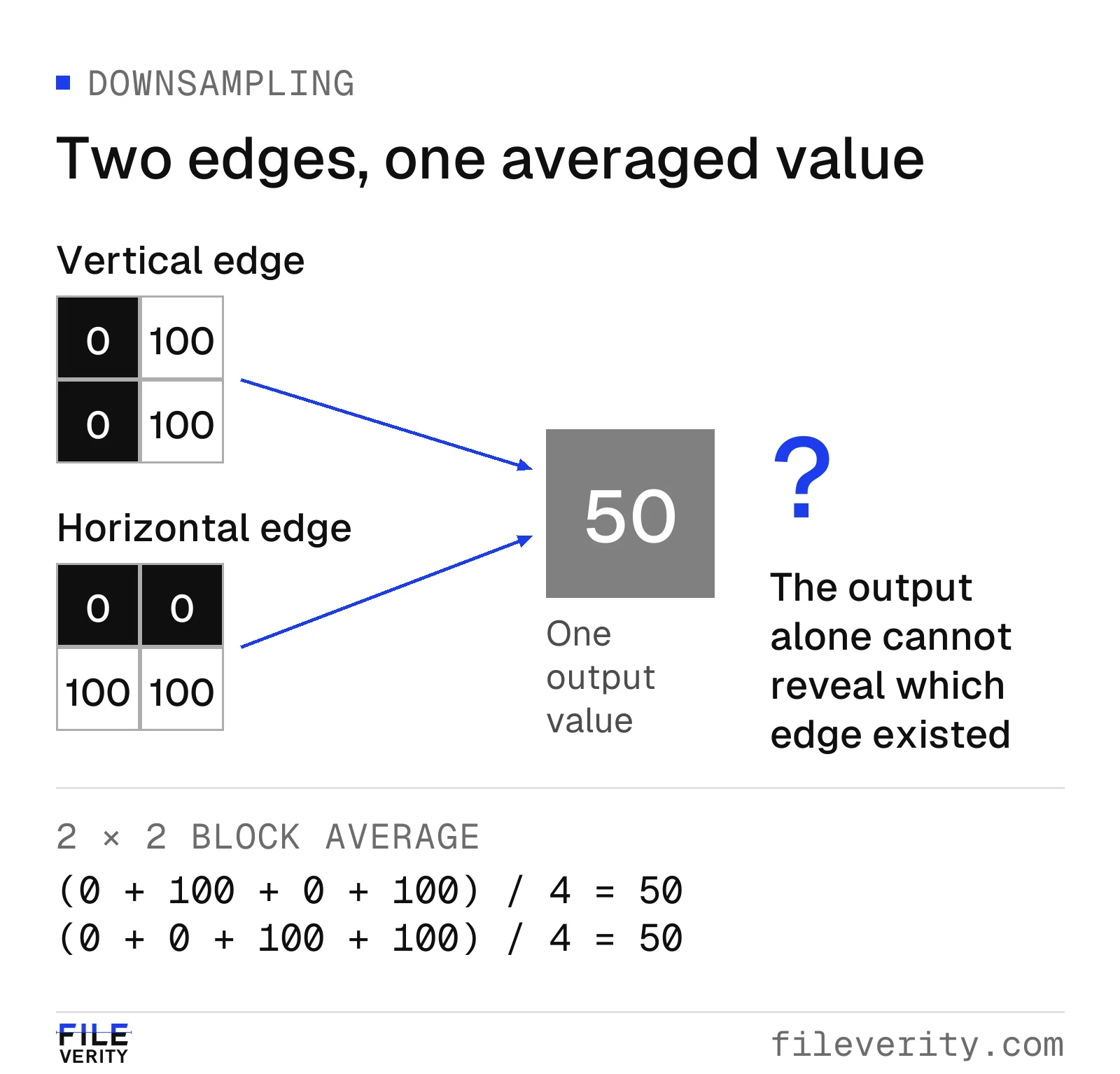
Two different edges produce the same average. Enlargement cannot tell which edge was present.
Use a repeatable intake sequence
Start with the file as received. Record a stable case reference, channel, dimensions and any known processing. A hash, if your workflow uses one, identifies that exact file; it does not establish the truth of the content. Keep later crops and transformations under separate references.
Next, write down the narrow question. “Was this image generated?” differs from “does this label show the ordered model?” The second question may be settled by an item inspection even when the image's full creation history remains unknown.
Check the tool's input guidance before preparing a derivative. Some services prescribe an image-only crop when checking screenshots. For example, Google's Gemini verification help, checked October 28, 2026, gives screenshot-specific cropping guidance. That instruction belongs to that service; it should not be treated as a universal preprocessing rule for other detectors. Preserve the complete screenshot even when an approved working crop is used. Gemini verification input instructions
After analysis, record the file reference, task, result label and any reported input limitation. If the result concerns a region, make sure the displayed coordinates refer to the same orientation and crop you reviewed. A finding on a thumbnail should not be described as a finding on a separately uploaded source image.
Finish by choosing the next evidence request. If missing source detail is the obstacle, ask for the attachment. If item identity is missing, ask for a view that connects the disputed feature to the item. If a transaction is disputed, seek the relevant transaction record. Repeating the same upload cannot supply a fact the file does not contain.
Worked example: an unreadable product label
A purchasing team receives a screenshot of a supplier message containing a photograph of an equipment label. In this hypothetical case, acceptance depends on the model suffix “B,” but the small screenshot does not let the reviewer distinguish “B” from “8.” The supplier says the image was reduced for messaging. That explanation is recorded, not assumed to be verified.
The reviewer opens a case with one question: does the supplied item match the ordered model? The screenshot is kept as received. Its label region is recorded as unreadable. A manipulation check, if appropriate for that input, may direct further inspection, but it cannot turn an unreadable character into a confirmed model number.
If image analysis is part of this hypothetical review, route its outcome separately from label reading. A usable manipulation concern warrants review of the stated region and a source request; it does not decide whether the label says “B.” An inconclusive result keeps the image question open. An unsupported input calls for a suitable file or an alternative evidence route. Use the provider's actual result terms rather than inventing a status or treating a failed analysis as a negative finding.
In a Fileverity report these outcomes stay distinct: an image analysis includes an input quality assessment that states whether the file can support a conclusion, so an unsuitable screenshot is reported as such instead of passing as a clean result.
The next request has two parts: the saved image attachment before messaging, and a separate view linking the equipment and its label. The supplier should use the established transaction channel; the request should not ask them to generate, sharpen or redraw the label.
| Evidence received next | What it can establish | Next decision |
|---|---|---|
| A clearer source file with a documented relationship to the screenshot and a readable “B,” supported by the relevant item record | The earlier unreadability has a plausible processing explanation; the model question has supporting evidence | Record the linkage and complete the normal acceptance checks |
| A readable “8” that conflicts with the order | A specific model discrepancy needs reconciliation | Ask whether a different item, revision or incorrect photograph was supplied |
| Another enlarged version of the same unreadable screenshot | No independent resolution of the label | Request inspection or another approved record; keep the question open |
| A new photograph of an unconnected label | A label is readable, but its connection to the supplied equipment remains unresolved | Obtain an item-linked view rather than treating the isolated label as confirmation |
If neither a suitable source nor an independent record becomes available, assign the model question to the purchasing acceptance owner, set the next review date, and record the authorized hold or acceptance-exception decision. Repeated requests should not leave the case without an accountable owner.
These outcomes do not require a fraud verdict. A successful review can establish that the item is correct, identify a delivery error or define the evidence still needed. File history and item conformity should remain separate findings when only one is resolved.
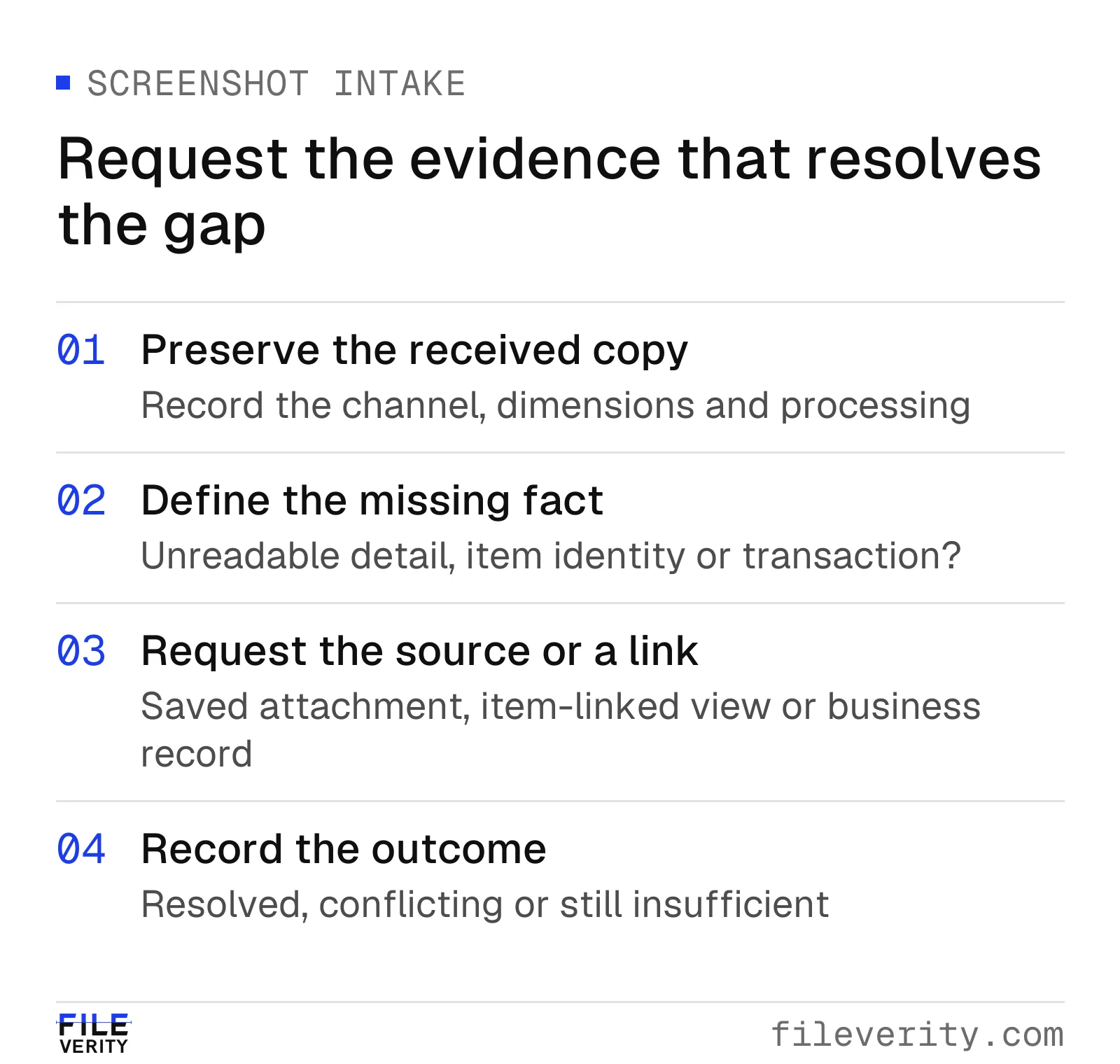
Request source detail for an unreadable feature, a linking view for item identity, or a record for a transaction question.
Ask for a better file without creating more uncertainty
Use a specific, neutral request that explains what is missing:
We cannot read the model suffix in the image as received. Please attach the saved image file before it was inserted into the message, if available. Please also provide a view connecting the equipment to its label through the usual order channel. Avoid enlarging, sharpening or reconstructing the text. If that file or view is unavailable, tell us so we can arrange another way to confirm the model.
Specify which sensitive information is necessary and use the team's approved transfer route. If redaction is required, retain the controlled source under the appropriate access arrangements and label the redacted derivative. Do not send unrelated personal or payment information merely to obtain a higher-resolution picture.
When a source file is unavailable, record that limitation without assuming deliberate withholding. A different authorized source, inspection or business record may be more useful than continuing to request an inaccessible original.
Evaluate the files your team actually receives
For recurring intake, compare methods on representative delivery conditions. Separate source files, downloads, screenshots and rephotographed displays. Define the task independently: whole-image origin, local manipulation or provenance retrieval. A general “supported JPEG” statement is not evidence of performance on a small screenshot containing several pictures.
Keep related versions of one image together when dividing an evaluation into development and held-out sets. Otherwise, nearly identical content may appear on both sides and make the evaluation less representative of new submissions. Record results by source family and received-file condition rather than treating every derivative as an independent scene.
Measure usable-result coverage alongside error counts and the effort to resolve exceptions. A workflow that asks for better evidence on difficult inputs may be useful, but its unassessed files must stay visible. Do not silently exclude them and describe the remaining accuracy as applying to the whole intake. The detector accuracy guide explains those denominators in detail.
Fileverity's detector for AI-generated images offers a free result summary for your first screenshot or compressed copy. A credit unlocks detailed evidence, including the input quality assessment. To see how your own delivery channels behave, send us typical image sizes, local features of interest and the review action you expect, and we will walk your team through real cases; talk to sales. Measure whether the results help reviewers resolve the original question with fewer repeat requests. Fileverity analyzes files on servers operated by Entogo in Toronto, Canada and deletes them once the analysis is complete. The Trust & security page sets out data handling, including private deployment for Enterprise on request.
By Yang Zheng