01
Free result summary
Check one document free and review the assessment, risk level and recommended action. Use a document credit to unlock detailed evidence and downloads.
- Save before temporary evidence expires
Document verification
Review submitted documents before approving a claim, paying an invoice or relying on a written statement. Check file history, signatures, scanned fields and AI-written text, with evidence your team can follow back to the source.
Check a documentLast updated
Document verification example
Signed-version comparison · page 1
Version covered by the signature

Received version

The signature is still visible
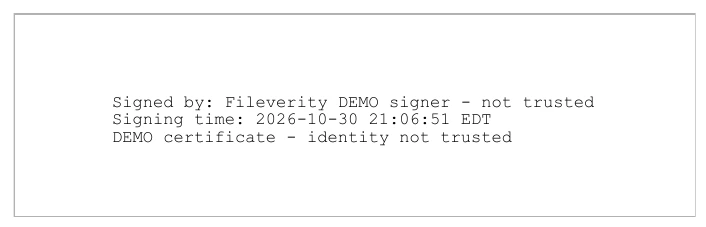
Page 1 changed after signing; the update violates signature permissions
Signature valid for its original revision · later changes not permitted
Hold the payment. Obtain the signed original and confirm the account through an independent channel.
Connecting
Analysis steps04
Files are deleted after analysis. Extracted evidence waits temporarily for delivery and is deleted from the server after this tab confirms receipt or the full PDF is downloaded; undelivered results expire. It is not used for training.
Review claim narratives, estimates and supporting files. Give adjusters the passages and file observations they need to request originals and investigate inconsistencies.
Investigate suspicious invoices and expense evidence. Review applicable scanned amounts and dates alongside source material before confirming transactions with the issuer.
Screen submitted statements and supporting documents for file-level concerns. Pair the report with issuer and account checks in your existing verification process.
Check file changes, hidden content and AI-written passages in Word, PDF and presentations. Share the supporting evidence with the reviewer responsible for the next decision.
Open the actual PDF generated from this sample. Read the conclusion, inspect the source evidence and see which checks were completed.
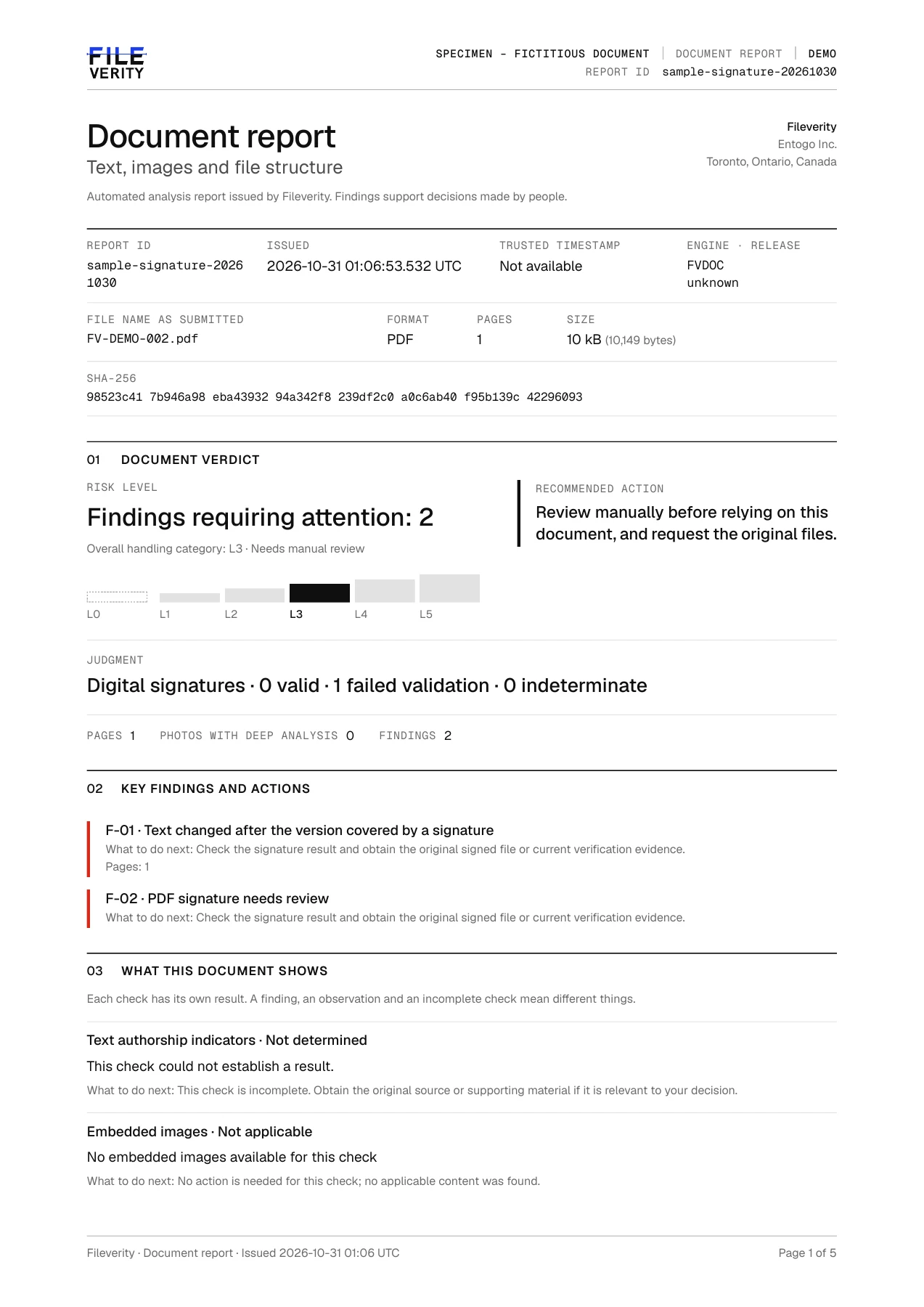 Enlarge page
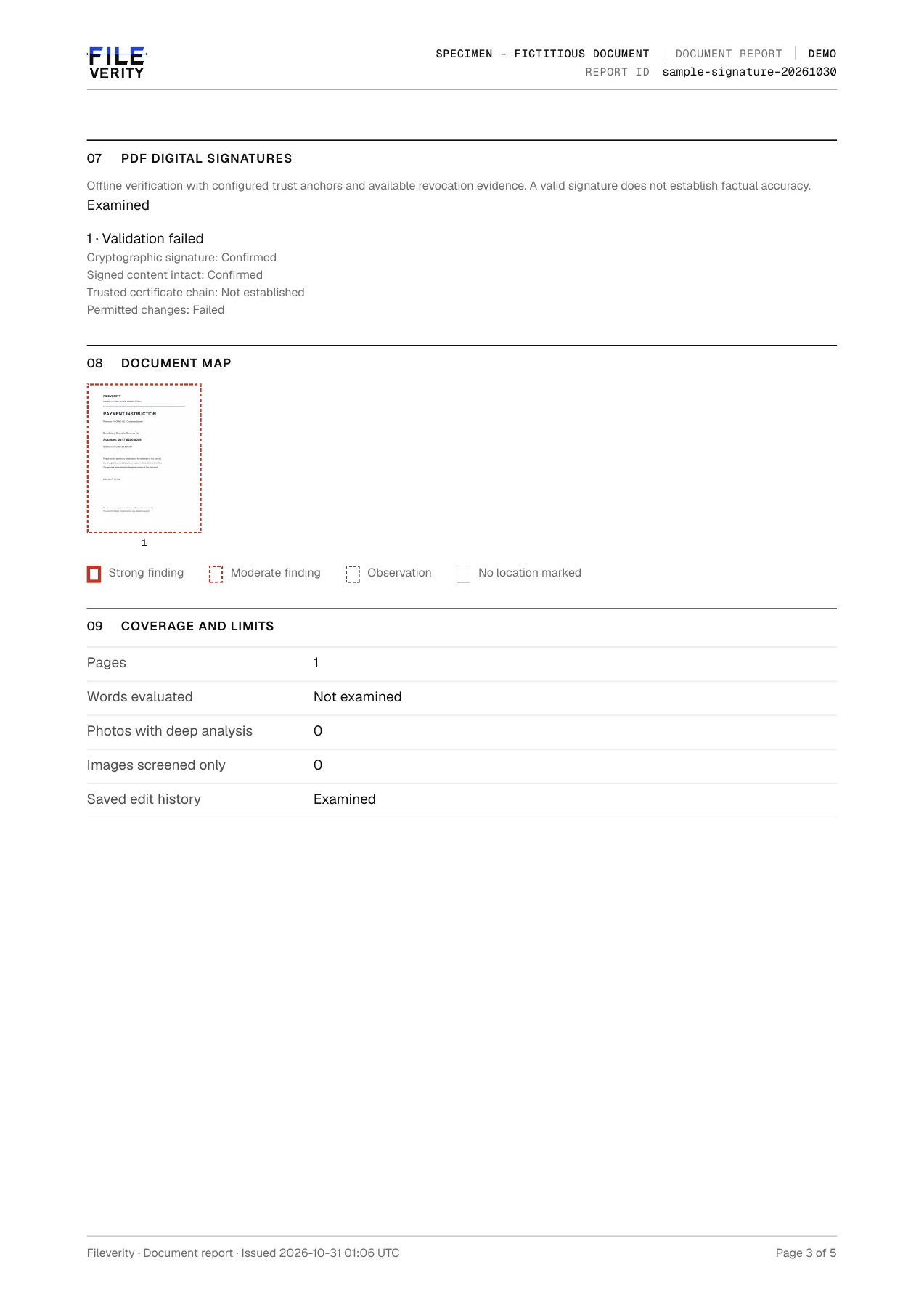 Enlarge page
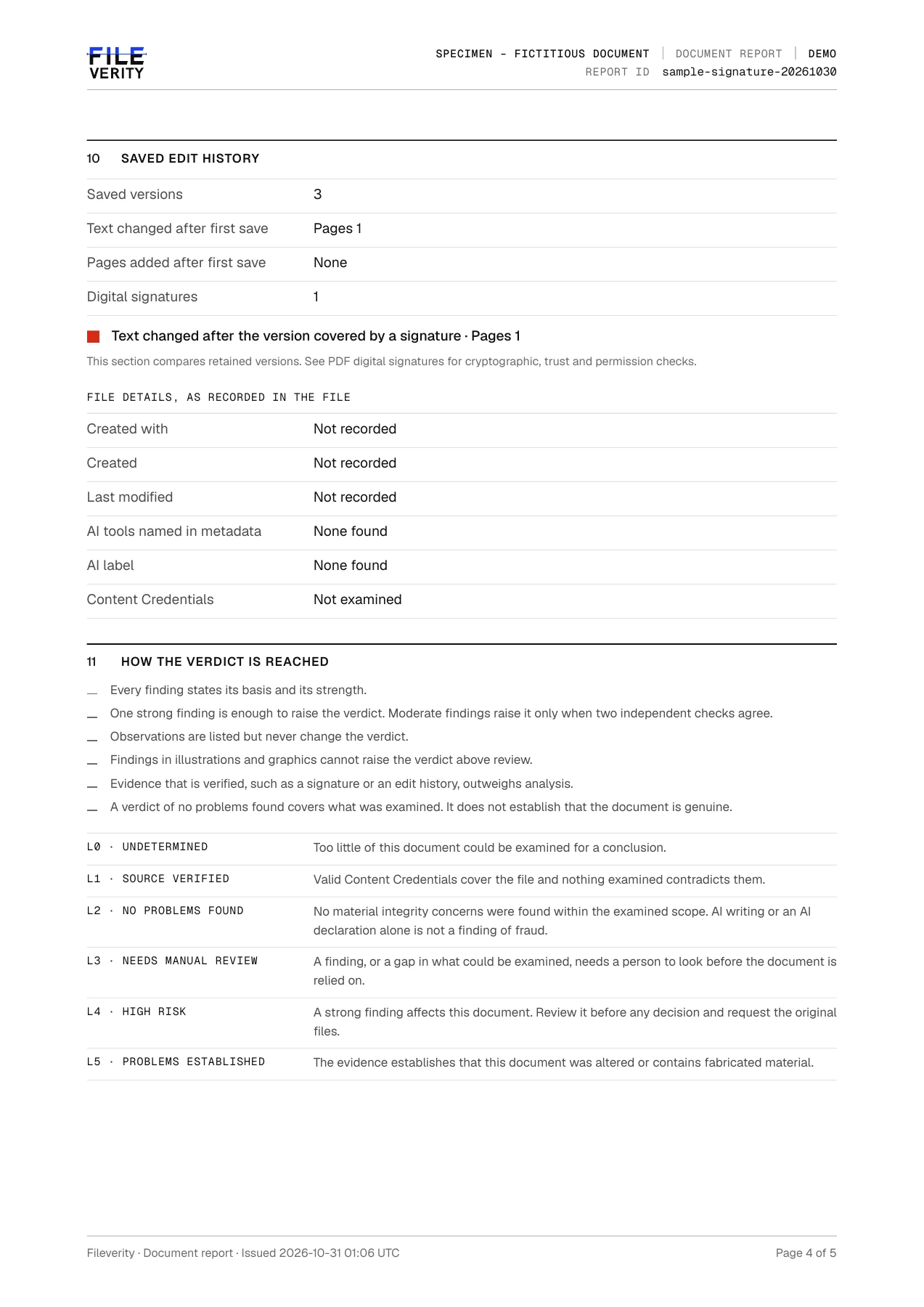 Enlarge page
See the observations behind each risk level, from an amount discrepancy to an editing trace, with the status of each check.
Follow findings back to flagged passages, scanned fields and image regions, with page references and coordinates where available.
See when to request an original, contact the issuer, compare fields or obtain validation material. The web page gives an overview; the full PDF supports review and handoff.
Find passages that show characteristics of AI-written text, with PDF page or paragraph references, coverage and evidence strength. Review writing origin alongside the file’s other findings.
Examine supported Word and presentation revisions, hidden content, comments, notes and package relationships. PDF checks cover attachments, annotations and actions.
Review extracted amounts and dates on applicable scanned pages, with field locations and the relationships behind each discrepancy. OCR quality and rule applicability are stated to guide your review.
Inspect emails, URLs and other key identifiers in extractable native text for mixed-script look-alikes, zero-width characters and directional controls. Original fields remain available for comparison.
Review PDF signature integrity, certificate chains, available revocation evidence and permitted changes against configured trust material, with distinct valid, invalid and indeterminate results.
SHA-256 fingerprints identify the exact file and report data. Evidence references and source locations give your team a traceable record for review, verification and handoff.
01
Check one document free and review the assessment, risk level and recommended action. Use a document credit to unlock detailed evidence and downloads.
02
One document credit per document.
US$8.99plus applicable tax
| File | Supported checks |
|---|---|
| Native text, recoverable saved revisions, file structure and digital signatures, plus OCR and applicable field checks on scanned pages. | |
| DOCX / PPTX | Supported revisions, comments, notes, hidden properties and package records, with presentation text analyzed after conversion. |
| DOC / RTF / ODT | Text extracted through conversion for writing analysis and supported content checks. |
| TXT | Decodable text for writing analysis, with checks for look-alike and invisible characters in key fields. |
Upload files up to 50 MB, 100 pages and 60,000 words. Each report states which checks completed and identifies partial, indeterminate or unexamined results. See the accuracy page and report guide for detailed coverage and interpretation.
Review findings, coverage and recommended actions on the web page. Download the full PDF from the current tab, or send a copy to your verified account email.
Save the full report promptly. Private evidence remains in the current tab for at most 3 hours from receipt; refreshing does not extend this window, and closing the tab or signing out may clear it earlier. Temporary server evidence is deleted after acknowledged delivery or expiry. Summaries and verification records remain; email copies follow your mail provider’s retention policy.
SHA-256 fingerprints identify the exact file and report data. Evidence references and source locations give your team a traceable record for review, verification and handoff.
Validated timestamps record when report data existed; validated PDF seals help recipients check for later changes. Each report identifies the proof available for verification.
Fileverity checks supported signs of alteration and inconsistency, file records and AI-written passages, with evidence and coverage in the report. Use it to prioritize review and request supporting material; authenticating the underlying transaction also requires issuer and business checks.
Supported PDF checks inspect file structure, recoverable text revisions and digital signatures. The report distinguishes observations, validation status and missing information. It cannot recover every deleted version.
It can support the review of submitted invoices and receipts, including applicable scan fields and amount relationships. Compare the source and OCR first, then verify the transaction and payee independently.
No. Writing signals, edit records, field discrepancies and signatures are different evidence. Review their basis and limits alongside the original, issuer and business facts.
L3 calls for human review, not one shared cause. Read the findings, completion status, locations and next steps. Limited checks and observed discrepancies are presented separately.
Where applicable, the report shows the scanned page, fields and boxes, with the amount relationship or date rule. Check OCR and context first; a discrepancy alone does not prove alteration.
It includes deliverable flagged excerpts and bound evidence, up to 60 passages and 1,500 characters per passage, with truncation disclosed. It is not an unlimited full-text archive.
No. It concerns the signature and signed data under the stated conditions, not the truth of a transaction or narrative. Missing trust or revocation evidence requires an indeterminate result.
Private evidence remains in the current tab for at most 3 hours; refreshing does not extend it. Download promptly. Closing the tab, signing out or server expiry may prevent recovery of full evidence.
Guides
What each check establishes, where it stops and which evidence to request next.
Documents
How to spot a fake utility bill, pay stub or bank statement, then confirm with the issuer. Choose fraud detection software by what each tool proves.
19 min read ·
Documents
Check a PDF with trusted copies, signature validation and metadata. Learn how to view PDF and Word metadata and what each field can and cannot prove.
16 min read ·
Documents
Review suspected fake receipts with checks for AI-generated images, altered totals, duplicate claims and transaction support, plus a worked expense audit.
12 min read ·
Documents
Verify invoice amounts, receipt records, revisions, prior payments and payee changes before approval. Use a worked AP case and reusable approval record.
14 min read ·
Review submitted documents before approving a claim, paying an invoice or relying on a written statement. Check file history, signatures, scanned fields and AI-written text, with evidence your team can follow back to the source.