Documents
How to Verify an Invoice Before Payment: Changed Amounts, Payees and Supporting Records
Verify invoice amounts, receipt records, revisions, prior payments and payee changes before approval. Use a worked AP case and reusable approval record.
Published · Updated · 14 min read
On this page
To verify an invoice before payment, establish what your organization ordered, what it received or accepted, what remains payable and who is authorized to receive the money. Reconcile those answers against the current invoice and the payment instruction. A plausible document and a correct sum are useful starting points; approval requires the supporting transaction records.
This guide is for accounts payable and procurement reviewers deciding whether to release a particular payment. It covers changed amounts, partial deliveries, replacement invoices, duplicate payment exposure and new payees. The worked example follows a partial delivery, replacement invoice and changed payment destination through to release.
Define the payment you are approving
Start with a case or invoice record that identifies the purchasing entity, supplier record, invoice number and revision, currency, proposed payment amount and due date. Preserve the received invoice and accompanying instruction. Link the purchase order, contract, receiving or acceptance record, credit notes and payment history rather than relying on an email summary of them.
Keep the invoice face amount separate from the amount proposed for this payment. Deposits, previous installments, credits and deductions can make them different. A supplier statement may summarize several invoices; establish which underlying liability is being settled before using the statement as payment support.
If the invoice is unreadable or incomplete, request the full document through the usual supplier channel. Check extracted fields against the visible source before opening an exception: OCR reading 60 units as 80 is an extraction problem until confirmed otherwise. The PDF edit-checking guide covers file comparison and signature questions when the document itself requires investigation.
If a scanned invoice or screenshot raises a specific concern about a changed amount or beneficiary field, keep that image question alongside the transaction checks below. Fileverity image verification checks a scanned invoice or screenshot for AI generation, local manipulation and provenance and shows which region a finding concerns, so your AP team knows which field to confirm with the supplier. Run a sample invoice through the detector for AI-generated images, or talk to sales about your exception volume.
Assign the work to the people who can answer it. Procurement confirms the authorized commercial terms; receiving or the service owner confirms performance; AP reconciles amounts and payment history; the vendor-master and payment approvers resolve destination changes. One person's familiarity with a supplier does not replace these separate approvals.
Match the obligation, not just the grand total
Microsoft's Dynamics 365 documentation distinguishes two-way price matching from three-way matching, which also compares invoice quantities with selected product receipts. It separately describes charges and invoice-total checks, with discrepancies assessed against configured tolerances. Those are specific matching functions, not a general authenticity verdict. Microsoft invoice matching overview
Use a comparison that fits the purchase:
| Review item | Compare against | Resolve before approval |
|---|---|---|
| Supplier and purchasing entity | Approved vendor and purchasing records | Wrong entity, duplicate supplier record or unexplained trading name |
| Item, unit price and discount | Approved PO revision or contract | Price change, different unit of measure or missing discount |
| Quantity or service milestone | Receipt, inspection or service-owner acceptance | Unreceived items, rejected goods or incomplete deliverable |
| Freight and other charges | Agreed terms and relevant approval | Unapproved charge or a charge already billed |
| Tax and currency | Invoice components and approved accounting treatment | Wrong currency, unexplained tax basis or rounding difference |
| Remaining balance | Credits, prior settlements and pending payments | Replacement billed again or payment already in progress |
| Payment destination | Approved vendor-master record and change authorization | Unverified payee or account change |
For services, specify the acceptance evidence: a dated milestone approval, authorized timesheet or service-period confirmation. A PO authorizes a purchase; it does not demonstrate that the service was delivered. For non-PO spending, use the contract and the organization's authorized exception process rather than inventing a purchase order after the fact to make a match appear complete.
Inspect quantities cumulatively across related invoices and receipts. A valid receipt cannot support the same units repeatedly. Record which receipt lines have already been allocated and whether rejected or returned items reduce the accepted quantity. An invoice for a full order can be premature even when its unit prices match perfectly.
Treat a tolerance as an approval rule with a defined scope. A permitted rounding variance does not authorize a new beneficiary. Record the applicable rule and who may approve an exception; do not alter the tolerance simply to clear this invoice.
Recalculate tax, currency and revisions explicitly
Rebuild the total from quantities, prices, discounts, charges and displayed tax. Check whether discounts apply per line or to the subtotal and whether freight is included in the stated tax base. If the basis is unclear, request clarification from the supplier and the responsible accounting reviewer. A mathematically consistent calculation does not establish the correct tax treatment for a jurisdiction.
Use an explicit currency code. An invoice labeled only with a dollar sign may need clarification where a supplier trades in multiple currencies. When payment uses another currency, retain the invoice-currency obligation, approved conversion basis and payment-currency amount separately. Do not classify an exchange-rate difference as an altered invoice total without reconciling the conversion.
For a revised invoice, obtain a clear replacement trail: what changed, which version it supersedes and whether a credit or cancellation accompanies it. Keep the earlier document linked but prevent both versions from creating payable balances. A changed date or a suffix such as “R1” should not automatically create a second liability.
Search beyond an exact invoice-number match. Oracle's documented optional duplicate check combines supplier, invoice type, amount, currency and date when enabled. Confirm what your own system actually checks and which records it includes. Oracle duplicate-invoice check, Financials 26D
For candidate duplicates, inspect the underlying obligation and payment status. Similar recurring invoices can be valid; different filenames can represent the same invoice. Include posted, pending and scheduled payments, and verify whether a reported cancellation or reversal completed. “Not yet settled” is insufficient if a payment instruction is already queued for release.
Verify changed payees through a known route
A correct amount can still be directed to an unauthorized destination. Compare the requested beneficiary, bank details and payment method with the approved vendor record. Keep a destination change separate from price or quantity exceptions so that clearing the commercial dispute cannot silently clear the payment instruction.
The FBI recommends independently obtaining company contact details and verifying account-number or payment-procedure changes. It also identifies urgency as a reason for caution. FBI business email compromise guidance
Use the contact route established during onboarding or another route independently approved by your organization. Do not take the callback number from the disputed invoice or its accompanying message. Confirm that the person reached has authority to instruct this change, then complete the organization's vendor-master verification and approval process. A familiar voice or a person who recognizes the invoice is not, alone, sufficient authorization.
Record the callback date, route source, representative's name and role, fields confirmed, supporting change reference and internal approver. Store full banking details in the controlled supplier record; use restricted references or masked identifiers in general case notes. If the usual representative is unavailable, leave the change unresolved until an authorized alternative is established. Urgency does not supply the missing authority.
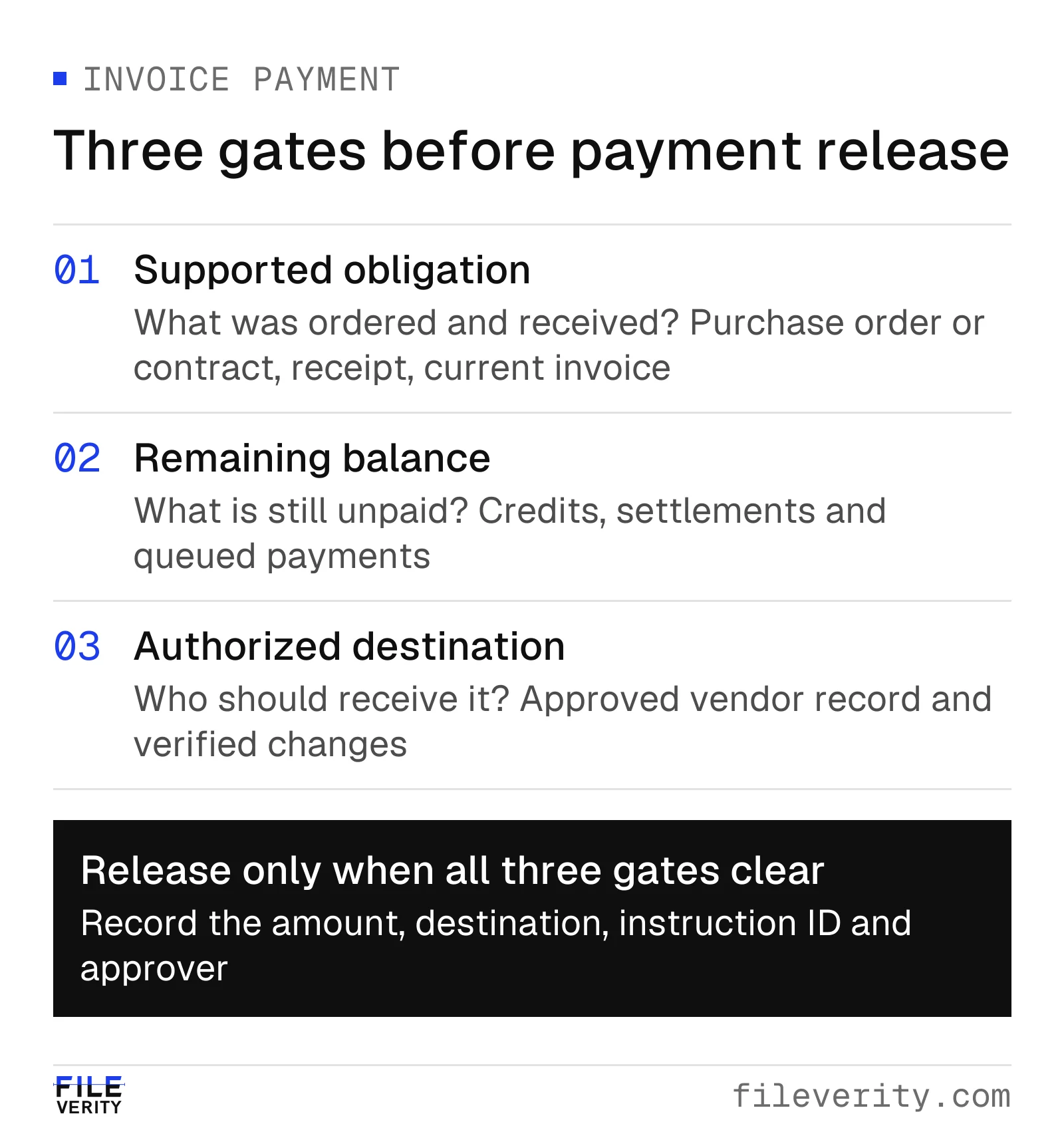
Approve the obligation, remaining balance and destination separately before releasing payment.
In practical terms, establish the obligation, subtract completed settlements to determine the unpaid balance, account for pending instructions before creating another payment, and validate the destination. Keep any unresolved gate visible to the final approver.
Use a cryptographic digest to identify the exact invoice reviewed
Every Fileverity report records a SHA-256 digest of the file it was run on, so a later reviewer can confirm that the report belongs to exactly that file; Verify a report checks it in the browser. The same control works in your own AP process: after someone reviews an attachment, how can a later reviewer establish that a result belongs to the same byte sequence rather than another file with the same name?
SHA-256 maps the input to a 256-bit digest, conventionally written as 64 hexadecimal characters. It is designed so that finding different inputs with the same digest is computationally infeasible; equal digests are strong practical evidence of byte identity, not a mathematical guarantee that collisions cannot exist. NIST defines the algorithm and its role in detecting changes to messages. NIST FIPS 180-4
The following two short ASCII records demonstrate the calculation. Each ends with one LF newline byte, shown below as \n:
| Exact input notation | SHA-256 digest |
|---|---|
Invoice 1042 | USD 250.00\n | 953ed64cc57dab96c5775f88ae6e9cea8ebebd63e5ca9816a3be6f942a528588 |
Invoice 1042 | USD 251.00\n | 807860d2583af6da46bee66b2bfc46a2c32be08142dc0aecad80dca4d1bfd3af |
The one-character amount change produces a different digest. A line-ending change or other byte change can also change it, even if the displayed text looks identical. Consequently, a digest mismatch means different bytes, not necessarily a changed amount or fraud. A freshly exported PDF may render identically while containing different metadata or object serialization.
The inverse limit is equally important: the same invented invoice has the same digest every time. Hashing does not prove who issued it, whether goods arrived or whether the beneficiary is authorized. It is not a digital signature, because an ordinary digest contains no authenticated statement from a signing party. A trusted comparison record is essential: hashing a disputed attachment and accepting a matching digest supplied by the same disputed sender adds no independent authority.
In an AP review, retain the digest with the received attachment, case reference and review result. When a replacement arrives, identify it separately and repeat the required transaction checks; do not carry the earlier approval across merely because the filename is unchanged. If a digest changes, use document comparison and supplier records to determine what matters. If it matches, you have a stronger connection between the reviewed bytes and the recorded result—but still need the ordinary payment authorization. That is the useful role of exact-file identification. To compute the digest yourself on Windows, macOS or Linux, and to see how a trusted timestamp fixes the date a received invoice was recorded, read the guide to SHA-256 checksums and trusted timestamps.
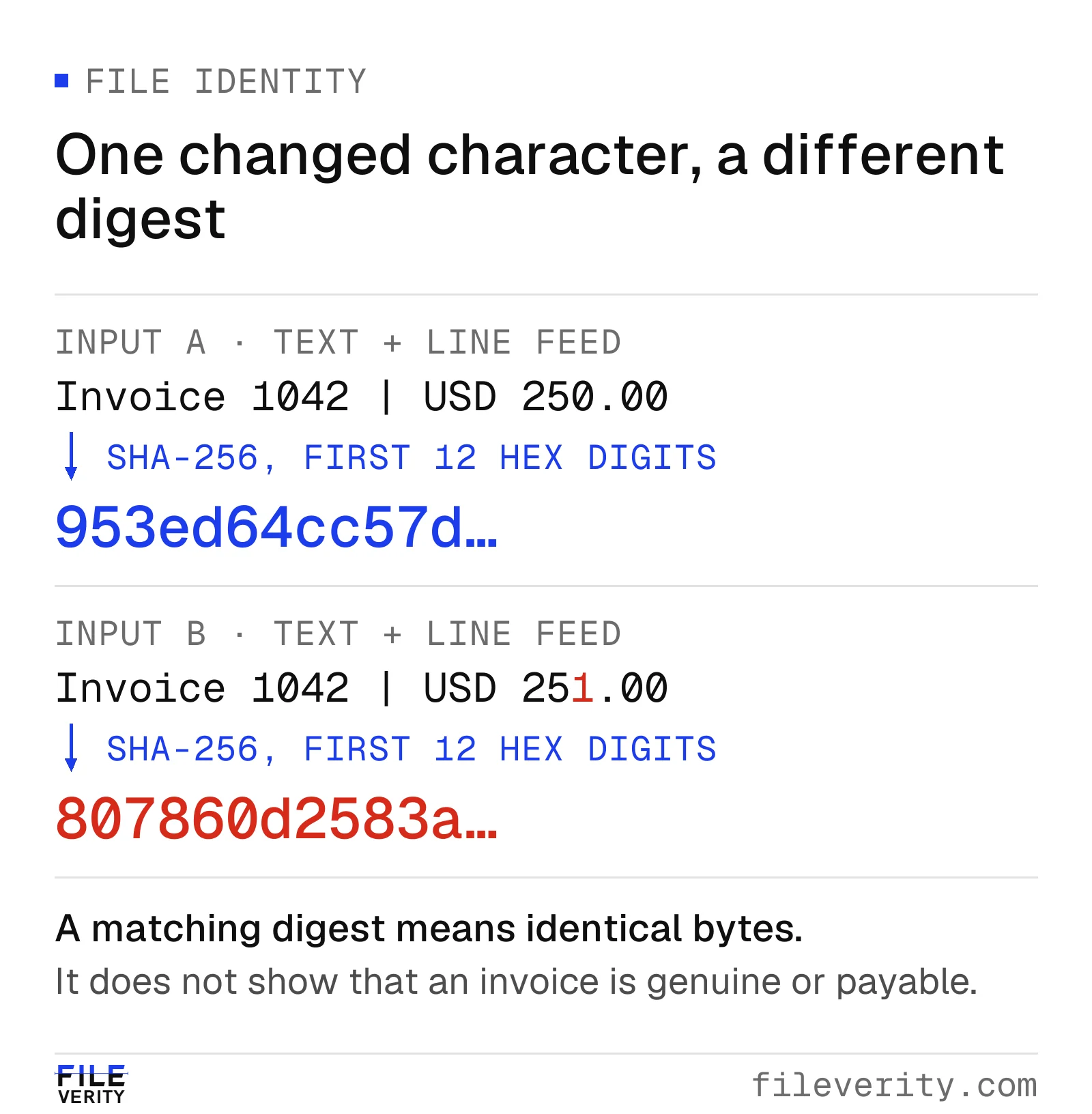
A one-character change produces a different SHA-256 digest, allowing the two versions to be tracked separately.
Worked case: partial delivery, replacement invoice and new payee
This fictional USD case assumes a 10% tax rate for the calculation. The contract permits invoicing only accepted units, applies a fixed $150 freight charge to the first delivery, and taxes goods plus freight at that assumed rate. No deposits, discounts or credits apply.
PO-482 authorizes 100 units at $75 each, plus the one-time freight charge. Receipt GR-77 records 80 accepted units and 20 outstanding. Invoice INV-632 revision A nevertheless bills all 100 units:
First-delivery reconciliation, in USD:
| Component | Received revision A (USD) | Supported first-delivery amount (USD) |
|---|---|---|
| Units × price | 100 × $75 = $7,500 | 80 × $75 = $6,000 |
| Freight | $150 | $150 |
| Tax base | $7,650 | $6,150 |
| Assumed tax, 10% | $765 | $615 |
| Total | $8,415 | $6,765 |
Revision A adds correctly, but it exceeds the supported first-delivery amount by $1,650: $1,500 for 20 unreceived units plus $150 of associated tax. This is a quantity and billing-timing exception, not an arithmetic error. The organization has evidence for a real $6,765 obligation, subject to the remaining checks.
Resolve the commercial difference and replacement
Procurement confirms that no approved term permits advance billing for the outstanding units. Receiving confirms that GR-77 is complete and no second delivery has arrived. The supplier acknowledges a billing error through its established portal and issues revision B for $6,765, explicitly replacing revision A.
AP links both revisions under the same obligation, records the supersession and ensures revision A cannot also be paid. The remaining 20 units stay open on the PO; a later receipt and invoice will require their own match. Freight cannot be charged again merely because the delivery was split.
This resolves the quantity exception. It does not establish that the new invoice balance is entirely unpaid, nor does it clear the new payment details in a separate email received after revision B.
Determine the balance still available for payment
The payment search finds a $2,200 partial settlement already applied to INV-632 and a separate $4,565 scheduled payment awaiting release. The remaining instruction was scheduled against the corrected $6,765 liability before the payee-change email arrived. Treasury confirms the first settlement completed and was not reversed.
The unpaid balance is $6,765 − $2,200 = $4,565. However, that entire balance is already represented by the scheduled instruction. AP therefore must not create another $4,565 payment, and certainly must not create a new $6,765 payment from revision B. The scheduled instruction is held while the destination exception is resolved.
Payment-status reconciliation, in USD:
| Status | Amount (USD) | Effect on the release decision |
|---|---|---|
| Supported obligation | $6,765 | Current corrected liability |
| Completed settlement | $2,200 | Reduces the unpaid balance |
| Unpaid balance | $4,565 | Still owed, subject to release controls |
| Existing scheduled instruction | $4,565 | Already covers that balance; not yet settled |
| Additional instruction to create | $0 | Review and release the existing instruction only once |
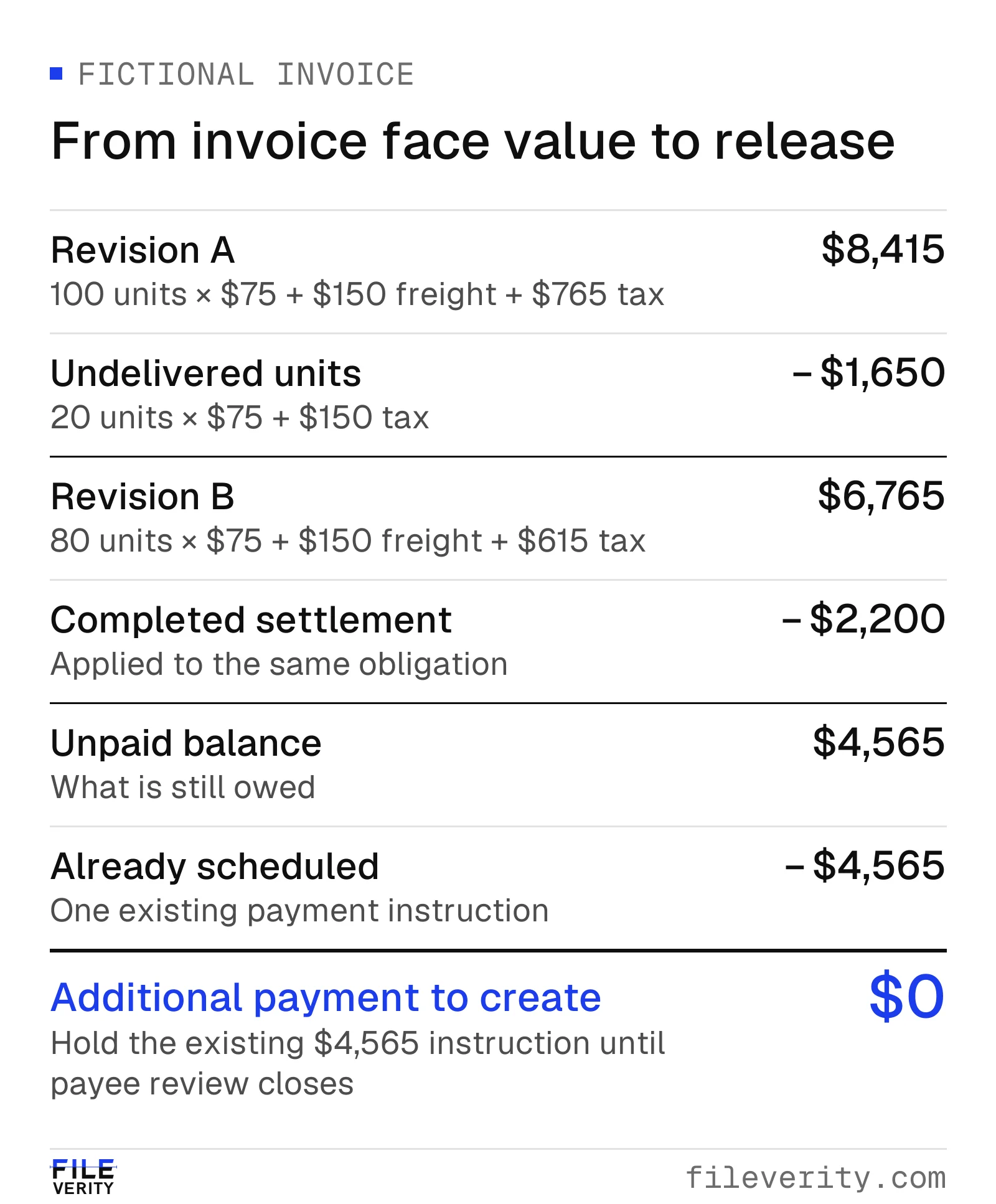
The $4,565 balance is already scheduled. Hold that instruction for payee review instead of creating another payment.
Resolve the payee instruction separately
The new email directs payment to a beneficiary different from the approved vendor record. AP calls the supplier finance contact using the onboarding record, confirms that contact's authority and asks specifically about the beneficiary change and INV-632. The supplier's finance contact confirms revision B and denies requesting a new account; the confirmation is saved in the case record.
AP retains the disputed email and routes the contradicted instruction to the designated security or fraud-response owner. The confirmation supports a narrow conclusion: the supplier recognizes the corrected invoice but does not authorize the new destination. It does not establish who sent the email or how it was produced.
The payment approver then verifies the existing vendor destination through the required controls, inspects the held instruction's actual beneficiary and approves release of one $4,565 payment to that destination. The other exceptions are closed with their evidence. If destination confirmation remained unresolved, the payment would remain held despite the amount being supported.
The final record therefore shows three distinct outcomes: an ordinary quantity error corrected, a duplicate payment avoided by finding the queued instruction, and an unauthorized destination request escalated. Labeling the whole invoice “fake” would obscure the valid obligation and the actual payment decision.
If the payee-change request had arrived as a screenshot, or the invoice as a scan, this is the point to run it through image verification: the report shows whether the bank-detail block was edited and records the exact file examined, while the supplier call still decides the destination.
Use an exception matrix with clear exit conditions
| Finding | Immediate action | Evidence needed to release the affected payment |
|---|---|---|
| Units exceed accepted receipt | Refer to procurement and receiving | Additional acceptance, corrected invoice or authorized contractual basis |
| Price, tax or currency differs | Reconcile the exact component | Approved change or documented correction with accounting review where needed |
| Replacement or possible duplicate | Link versions and payment records | Single payable obligation; prior and pending amounts reconciled |
| New destination, not confirmed | Hold affected payment and route vendor change | Confirmation through an independently established route with an authorized supplier representative, plus required destination approval |
| Supplier denies instruction | Block disputed instruction and escalate | Responsible owners establish permitted payment route and response |
| Unusual invoice imagery | Preserve source and inspect material fields | Corroboration resolving the consequential field or an authorized unresolved-case decision |
Scope the hold to the affected action under your organization's policy. Partial payment is an option only when the supported portion, contractual treatment, allocation and approval are explicit. Do not improvise a short payment by subtracting a disputed line if tax, credits or supplier acceptance of the allocation remain unclear.
Give every open item an owner and deadline. An evidence request should name the discrepancy: “INV-632 bills 100 units; GR-77 records 80 accepted. Please confirm the billing basis or issue a replacement, identifying what it supersedes.” This is easier to resolve than asking whether the invoice is “real.”
Keep a reusable payment-approval record
| Record field | Required entry |
|---|---|
| Identity and scope | Case, purchasing entity, supplier, invoice and revision, currency, proposed release |
| Source records | Original submission, current supplier reference, PO/contract, receipts and acceptance |
| Reconciliation | Quantities, unit prices, discounts, freight, tax basis, credits and calculations |
| Payment history | Completed settlements, reversals verified, pending instructions and search scope |
| Payee authority | Approved destination reference, change request, independent route and authorized confirmer |
| Exceptions | Exact discrepancy, owner, requested evidence, deadline and disposition |
| Approval | Remaining payable amount, instruction identifier, beneficiary reference, approver and time |
| Closure | Released/held/cancelled status, retained evidence and outstanding follow-up |
Refresh the payment status before release if investigation took time. A colleague may have queued another instruction while the case was open. Record the actual released amount and destination reference, not just an earlier intention to approve them.
Add image analysis where it answers a remaining question
Some AP cases contain scanned invoices, photographs or screenshots with suspicious changes around amounts or beneficiary fields. Image verification can support investigation of generation, manipulation or provenance questions. It does not establish delivery, invoice issuance, account ownership or payment authority, and a reassuring result does not clear an unmatched receipt or changed payee.
For example, suppose ordinary matching checks reconcile the amounts, but a supported image assessment raises a local concern around a beneficiary block in a scan. That finding can focus a request for the supplier-held invoice version and a comparison of the payment fields. If the copy matches, record that result and resolve any remaining authorization question through the established destination controls. If no usable technical finding is available, continue the same records-based route.
For recurring invoice-image exceptions, try Fileverity image verification on authorized samples representative of your intake: ordinary scans, screenshots, known local edits and generated document images. Define one review question for each sample, such as whether an amount-field concern warrants obtaining the supplier-held copy, and judge whether reviewers can select a useful records request from the report.
A Fileverity report records the examined file's SHA-256 fingerprint and timestamp validation status, so the image check sits in the same payment-approval record as the matching checks. Send us a sample of your exception invoices and we will walk your team through the report on real cases; talk to sales about volume and systems, and see pricing for current rates. Fileverity analyzes files on servers operated by Entogo in Toronto, Canada and deletes them once the analysis is complete. The Trust & security page sets out data handling, including private deployment for Enterprise on request.
By Yang Zheng · Reviewed by Bill Liu