Documents
How to Detect Fake Receipts: AI-Generated Images, Altered Totals and Duplicate Claims
Review suspected fake receipts with checks for AI-generated images, altered totals, duplicate claims and transaction support, plus a worked expense audit.
Published · 12 min read
On this page
To detect a fake receipt, compare the submitted image with the expense details, reconcile its amounts, search for earlier claims and confirm the transaction through an independent record. Image analysis can help investigate generation or manipulation, but the payment decision also depends on who paid, what was purchased and whether the expense has already been reimbursed.
A convincing receipt can support an invalid claim. A poor photograph can support a legitimate one. For finance teams, the useful question is therefore specific: What must be established before this expense can be approved?
Separate four problems before choosing a tool
“Fake receipt” bundles together several failures with different remedies. More than one can occur in the same claim.
| Suspected problem | What you need to establish | Most useful next evidence |
|---|---|---|
| Generated receipt image | Whether the submitted visual was synthesized, and whether it represents an actual purchase | Original submission, image analysis and independently obtained transaction or merchant record |
| Altered field | Whether a total, date, merchant or item differs from the relevant source | Same-transaction merchant copy and comparison of material fields |
| Duplicate real receipt | Whether the same expense is being reimbursed or paid again | Earlier claims, payment status, corporate-card records and allocation details |
| Unsupported transaction | Whether the claimed purchase and business purpose are substantiated | Payment evidence, itemized record, business context and required approval |
A duplicate receipt may be completely genuine. Conversely, an invented purchase may use an image that shows no obvious visual inconsistency. Keep those possibilities separate in the case record: a result about pixels cannot resolve a question about prior reimbursement.
Also distinguish an AI-fabricated image from an authorized digital reconstruction. Ramp documents receipt creation from merchant and card-network data for eligible transactions, as well as a separate reconstruction method using historical Ramp data. A system-created receipt therefore needs a recorded source and applicable policy; its digital appearance alone is not a fraud finding. Ramp's auto-generated receipts documentation
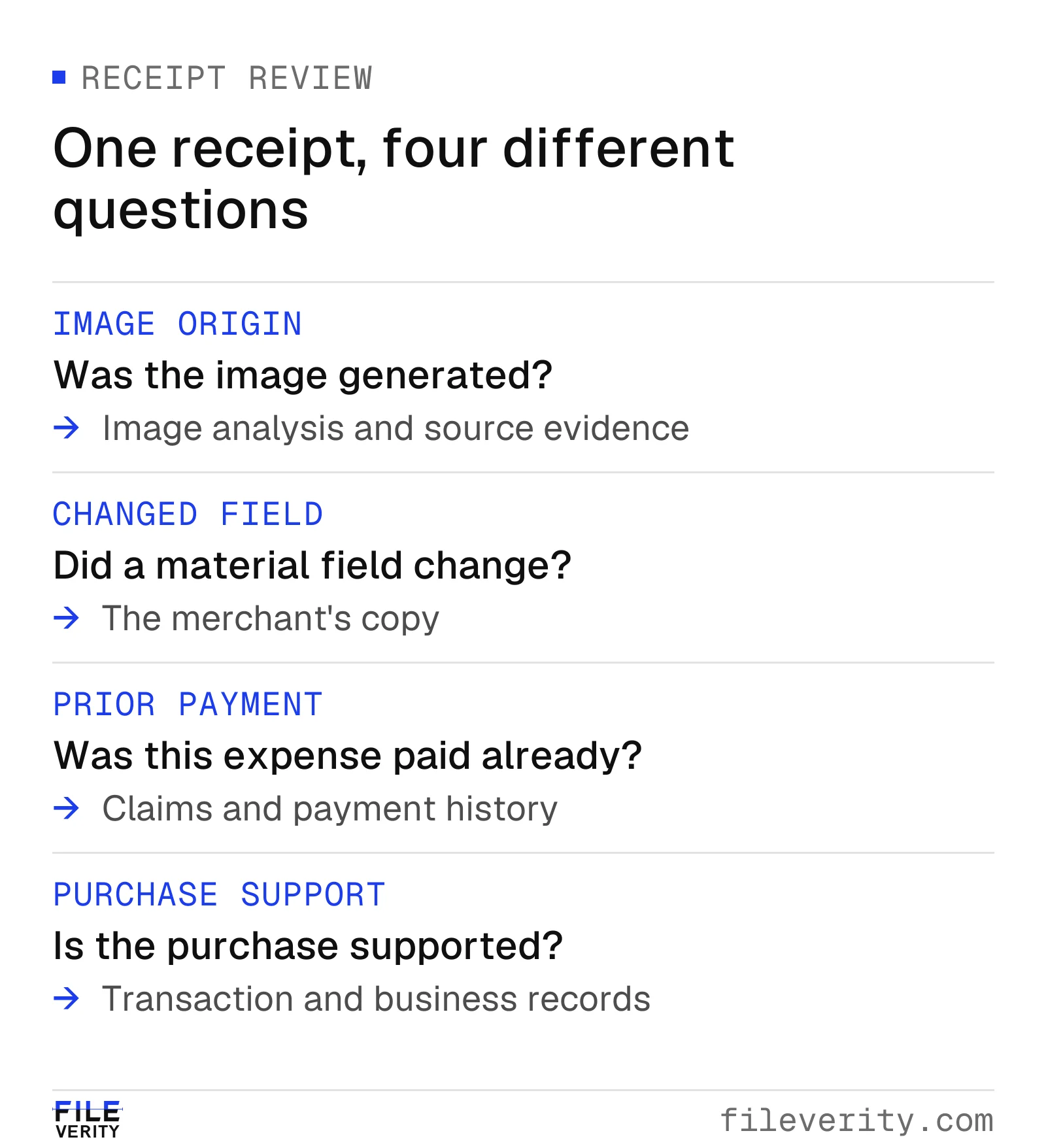
A receipt can require several checks: image origin, field accuracy, prior reimbursement and transaction support.
Start with a usable submission
Preserve the received image or attachment before cropping, annotating or running OCR. Keep the expense ID, submitter, submission time and available source information with it. Work on a copy. If the receipt arrived as a screenshot, ask for the original merchant email, downloaded receipt or full camera image when that would resolve a material gap.
Record the merchant, transaction date, receipt number, currency, line items, taxes, tip, total and payment method where present. Compare extracted values against the visible receipt. A missing decimal or misread digit is an extraction issue until the source shows otherwise. Do not let OCR silently turn a blurry $18.60 into a confident $186.00.
Read the whole receipt before deciding which number is the payable total. A restaurant bill may show a pre-tip amount and a later final charge. A hotel folio can list deposits, charges and settlement separately. Request missing portions when a crop hides the information needed to reconcile them. A cropped footer is a reason to obtain the complete record, not proof that the crop was deceptive.
Decide whether the input is usable, incomplete or unsuitable for the intended check. If key fields cannot be read, route it as incomplete evidence. Applying more detectors to the same unreadable image rarely answers the missing transaction question.
Reconcile the receipt, expense line and payment
Use three separate comparisons. First, check the receipt's internal arithmetic: quantities, prices, discounts, displayed taxes, service charges and tip should explain the total. Second, compare the receipt with the claimed amount and currency. Third, compare the relevant total with the payment record, allowing for documented differences such as a settled tip, split tender or currency conversion.
Do not silently invent a tax rate to make the arithmetic work. Use the amounts actually shown and request clarification of an unexplained charge. For foreign-currency claims, retain both currencies, the conversion basis and any separately claimed fee. A difference between a receipt in one currency and a card settlement in another is not an altered-total finding.
Automated matching can assist with these checks, but read the meaning of its status. Ramp's documentation says its receipt verification compares amount and requires either date or merchant to match the transaction. Its “Auto-verified” label describes those conditions. It does not, by that definition alone, establish image provenance or expense eligibility. Ramp receipt verification
SAP Concur describes pre-submit checks for missing information, possible duplicates and mismatches between receipt and expense fields. Confirm which checks are available in your configuration. SAP Concur's pre-submit receipt check overview
When the arithmetic fails, identify the exact gap: “Displayed total exceeds the listed components by $45.00.” When arithmetic passes, continue. A fabricated receipt can be mathematically correct.
Search for the same expense across payment routes
A duplicate review needs payment history, not just an image match. Search previous and pending claims using merchant, date, amount, currency and receipt or order number. Include corporate-card records and other relevant reimbursement channels available to the reviewer. An exact file match is useful, but a second photograph, crop or export may represent the same purchase with different bytes.
For each candidate match, establish the underlying transaction and status. Was the earlier claim paid, rejected, withdrawn or replaced? Is the new entry a correction, a valid allocation or a second request for the whole amount? Two employees can legitimately attach the same group receipt while claiming different portions; the combined allocation and payer evidence determine whether the amount is duplicated.
Ramp describes comparing receipt images and fields against prior reimbursement submissions and presenting potential duplicates for reviewer confirmation or override. That vendor workflow reinforces the distinction between a candidate match and a resolved duplicate. Ramp's duplicate reimbursement explanation
Document the scope of your search. “No match in this month's submitted reports” is narrower than “not previously paid.” If records from an acquired business or another expense system were unavailable, keep that gap visible. A search cannot clear records it never examined.
Use image findings to target corroboration
Look at the fields that could change approval: amount, date, merchant identity and purchased items. Unusual text alignment, inconsistent local sharpness or an unexpected patch around a total may justify closer inspection. Ordinary capture and processing can also produce uneven appearance. Describe the observation without assigning an editor or intent.
An image-origin or manipulation result can help prioritize a case, especially where no reliable reference is initially available. Retain the submitted file, tool result and check date. Ask whether the result concerns likely generation, possible manipulation, provenance information or simply insufficient evidence. Those outputs require different follow-up.
If image generation or manipulation remains unresolved after the ordinary expense checks, run the receipt through Fileverity image verification. It checks the image for AI generation, local manipulation and provenance and marks the region a finding concerns, so your reviewer knows which source record to request, such as the merchant copy for the total.
If a merchant copy can resolve the amount directly, obtain it through an approved merchant portal or contact route established independently of the disputed attachment. Confirm the receipt number, date, currency and final amount, including any replacement or adjustment. A second file supplied through the same disputed source is another submission, not independent confirmation.
For PDF attachments, structural and signature questions belong in a PDF edit review. Receipt tables and short transaction fields are not suitable substitutes for running prose in a text-origin detector. Choose image checks for the image question and records for the purchase question.
How JPEG quantization can reveal a receipt's processing history
Fileverity's manipulation-analysis capabilities include examination of JPEG compression evidence. Double quantization is one of the principles behind this analysis: saving an image more than once can change the statistical distribution of its encoded values. Its availability depends on the file format and selected analysis.
In ordinary lossy JPEG, the encoder transforms 8 × 8 sample blocks into frequency coefficients using the discrete cosine transform, or DCT. It then divides each coefficient by a quantization step and rounds the result. Decoding multiplies that integer by the step; the discarded remainder is unavailable. The JPEG standard defines this transform-and-quantize process. ITU-T T.81, sections 4.3 and A.3
For one coefficient, a simplified quantize-and-reconstruct calculation is Qq(c) = q × round(c/q). Consider a hypothetical coefficient of 37:
| Path | Calculation | Reconstructed coefficient |
|---|---|---|
| One save with step 6 | 6 × round(37/6) | 36 |
| First save with step 10 | 10 × round(37/10) | 40 |
| Then another save with step 6 | 6 × round(40/6) | 42 |
The paths end differently even though their final quantization step is identical. This simplified calculation isolates quantization, leaving out pixel-domain rounding and other encoder operations. Across many coefficients, successive quantization can produce distribution patterns that help investigate earlier compression. Public forensic research examines how differing JPEG histories can leave local evidence in composites. Farid, Exposing Digital Forgeries from JPEG Ghosts
For a receipt, the relevant question is whether a supported local compression finding concerns a material field, such as the payable total, rather than only showing that the whole attachment was resaved. A legitimate expense platform may recompress every submission. A local difference may also have an innocent explanation, and some recompression histories leave weak or ambiguous traces. Absence of this signal does not establish that a total is genuine.
That is why the practical output is a targeted evidence request: compare the questioned field with the merchant-held record. Ask a prospective provider whether the relevant JPEG check actually ran, whether the result concerns global resaving or local inconsistency, and whether your screenshots and exported receipt formats preserve the evidence it needs. The published mechanism explains why a check can help; its sensitivity on your intake still requires evaluation.
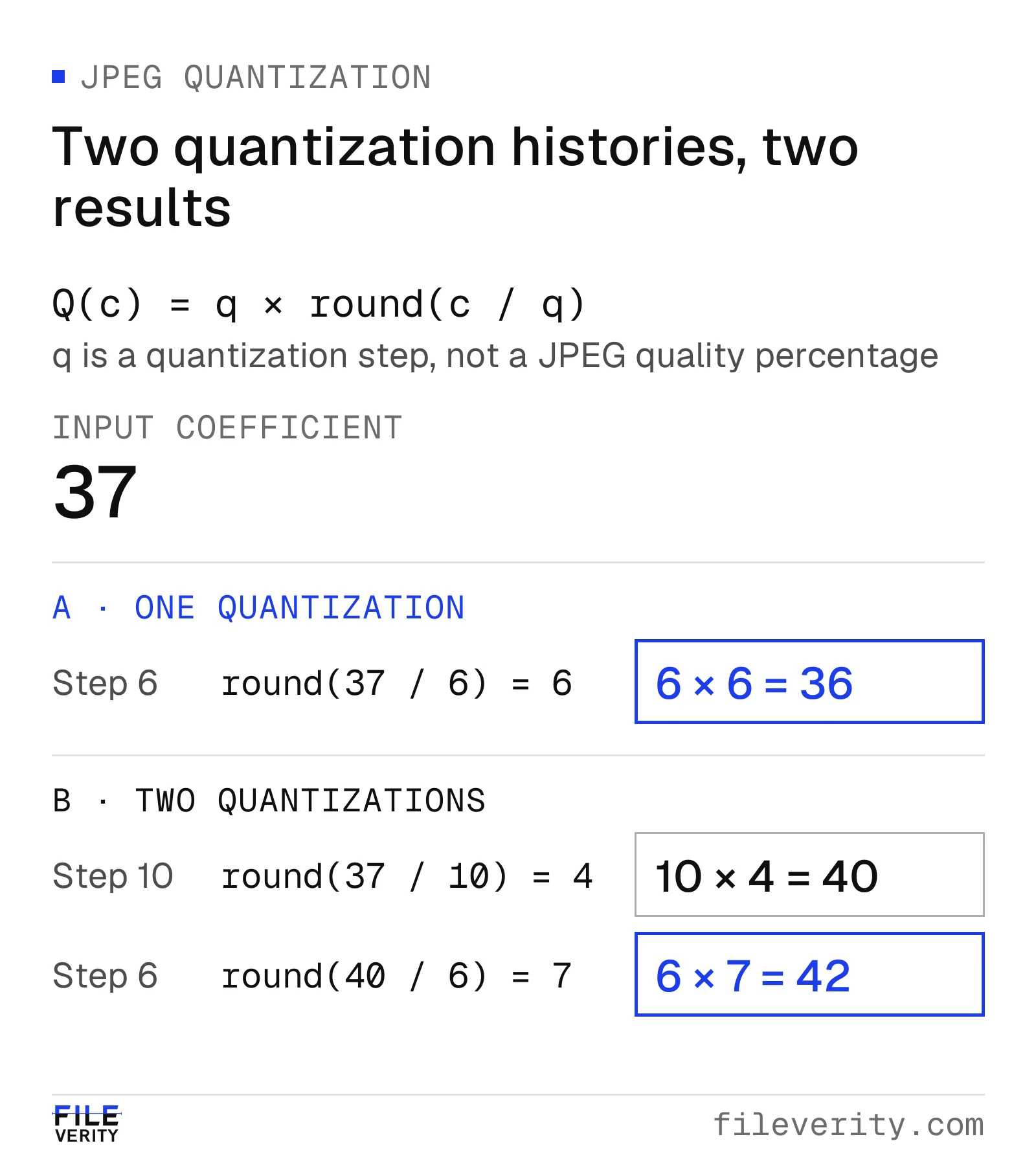
Successive quantization leaves a different coefficient value even when the final step size is the same.
Worked case: a changed total meets a prior reimbursement
In this fictional USD expense case, a changed total and a prior reimbursement affect the same claim.
Claim R-217 requests $184.80 for a team meal at Harbor Table on October 14. The submitted receipt image shows meals of $120.00, a $10.00 discount, tax of $8.80 and a $21.00 tip. It displays a final total of $184.80. Assume the full receipt lists no other fees or charges, and the organization's policy allows the meal and tip once supporting evidence is complete.
1. Establish the arithmetic discrepancy
The reviewer checks the visible figures rather than relying solely on OCR:
$120.00 − $10.00 + $8.80 + $21.00 = $139.80.
The requested $184.80 exceeds that sum by $45.00. This justifies an evidence request. At this stage, an omitted charge, a merchant error or an altered total remain possible explanations. A visual detector result is not necessary to establish the arithmetic gap.
2. Obtain the transaction reference
The reviewer requests the final itemized receipt and relevant payment evidence, with unrelated transactions excluded. Through the merchant's established contact route, the reviewer obtains a copy for the same receipt number and date. It confirms the listed components and a final total of $139.80, with no replacement or additional charge. The provided personal-card transaction also shows a settled charge of $139.80.
The finding is now stronger: the submitted image's total differs from the merchant-confirmed total by $45.00. These records support the purchase amount. They still do not establish whether reimbursement remains due or who caused the image discrepancy.
3. Resolve the candidate duplicate
A search finds claim R-188, already reimbursed at $139.80, with the same receipt number and meal date. Its attachment is a different photograph of the receipt. The reviewer verifies that it concerns the same payment and that it has not been reversed. The submitter confirms R-217 was not intended as a replacement or an allocation of a different expense.
Hypothetical USD reconciliation for R-217; the earlier reimbursement is confirmed paid and not reversed.
| Reconciliation item | Amount (USD) | Meaning |
|---|---|---|
| Merchant-confirmed eligible expense | $139.80 | Supported total for this hypothetical case |
| Earlier reimbursement, R-188 | $139.80 | Already paid and not reversed |
| Remaining amount due | $0.00 | $139.80 − $139.80 |
| New request, R-217 | $184.80 | No additional reimbursement supported |
| Excess displayed above merchant total | $45.00 | $184.80 − $139.80 |
The two problems overlap. Paying R-217 would create $184.80 of additional unsupported reimbursement, comprising $139.80 already paid plus $45.00 above the supported total. Do not add $45.00 to $184.80 and report $229.80: that double-counts the amount discrepancy.
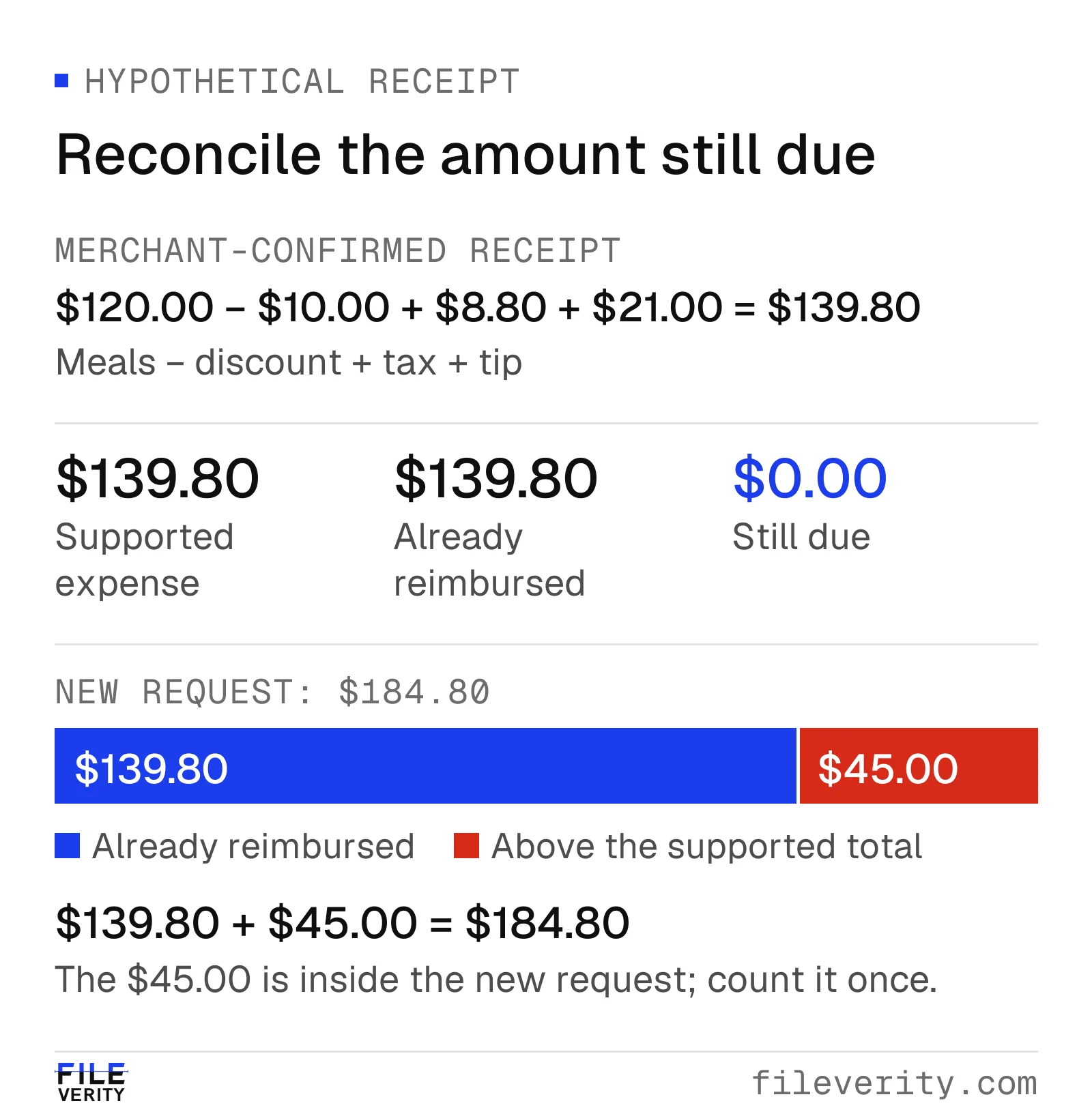
The $184.80 request includes both the $139.80 already reimbursed and the $45.00 excess. Adding the excess again would double-count it.
4. Make and record the operational decision
Keep R-217 from payment and route the confirmed amount discrepancy through the organization's expense exception process. Link R-188, its payment status, the merchant copy and the submitter's explanation. Record the receipt discrepancy and duplicate reimbursement as separate findings, with the same affected request.
The case can be resolved for payment without claiming “AI-generated receipt detected.” The evidence establishes that no additional reimbursement is due and that the submitted total is inconsistent with the confirmed record. Attribution and any further organizational response require their own authorized process.
Where a Fileverity report helps: if the receipt image itself is in doubt, an image analysis marks the region around the total, shows provenance separately from the pixel evidence and records the examined file's SHA-256 fingerprint and timestamp validation status, so the case record shows exactly which file was checked.
A review matrix that produces an action
Use the following matrix for exceptions. Apply your organization's approval rules and assign an owner when the case remains open.
| Evidence state | Reviewer action | What permits closure |
|---|---|---|
| Unreadable or incomplete receipt | Request full itemized source; keep affected claim pending | Required fields become readable, or authorized missing-evidence process decides disposition |
| Arithmetic or payment mismatch only | Request explanation and final payment details | Documented tip, fee, conversion or correction reconciles the difference |
| Potential duplicate | Link both claims and check payment, reversal and allocation status | One transaction's total entitlement and prior payments reconcile |
| Image flag with transaction facts untested | Obtain source record and inspect material fields | Relevant claim is supported, contradicted or explicitly unresolved |
| Merchant contradicts a material field | Keep disputed claim from payment and escalate to designated reviewer | Responsible approver records resolution using retained evidence |
| Facts supported; policy approval incomplete | Complete remaining expense approval | Authorized approver confirms eligibility and amount |
Set an evidence-request deadline and a named decision owner. If a merchant cannot provide a copy, record what remains unknown and use the established exception route. “Could not confirm” and “merchant denied this transaction” are materially different outcomes.
For a neutral request, reuse this wording:
For claim [ID], the submitted [field] is [value], while [specific record or calculation] shows [value]. Please provide the full final itemized receipt, the relevant payment evidence and an explanation of the difference. Please also confirm whether this expense was submitted elsewhere, paid by a company card or included in an earlier claim. Exclude unrelated transaction information. Please respond by [response date]. The affected claim remains pending; [owner] will provide the next review update by [update date].
Evaluate receipt verification against the gap you actually have
Map the unresolved receipt-image question alongside your expense system’s existing matching and payment checks. Duplicate detection needs accessible claim history. Transaction matching needs reliable payment data. Image verification addresses generation or manipulation questions. Ask each provider to identify its supported inputs and outputs rather than accepting “receipt fraud detection” as a coverage specification.
First describe your input formats and unresolved image question without sharing sensitive files, and confirm the provider supports that scope. Then agree an authorized evaluation set with ordinary receipts, legitimate scans and screenshots, known changed fields, generated examples, repeat claims and valid split allocations. Duplicate and allocation cases test whether the combined workflow interprets the image result appropriately; they do not require image software to discover reimbursement history. Keep the known history for each case separate from the review material. Include small edits as their own category; strong performance on wholly generated images does not establish reliable detection of a changed total.
Measure whether each result leads to the right next action, how often genuine expenses receive unnecessary follow-up and how many cases remain unresolved. Record unsupported inputs rather than counting them as cleared. Assess reviewer time and the evidence retained alongside price. The AI image detection software selection guide provides a fuller procurement framework.
Send us a sample of the receipts your team reviews and we will walk you through the Fileverity image verification report on real cases; talk to sales about volume and systems. Keep merchant confirmation, payment matching and duplicate reimbursement controls in the expense workflow, with the authorized reviewer making the payment decision. Fileverity analyzes files on servers operated by Entogo in Toronto, Canada and deletes them once the analysis is complete. The Trust & security page sets out data handling, including private deployment for Enterprise on request.
By Yang Zheng · Reviewed by Bill Liu