Images
How to Tell If an Image Is AI-Generated
Was this image generated by AI? Check its source, Content Credentials, watermarks and visual clues, then run a detector. Includes AI art, a worked example and a checklist.
Published · Updated · 19 min read
On this page
To tell whether an image is AI generated, check its source, look for validated creation records or a supported watermark, and use an image detector to investigate what the file's content suggests. These checks answer different parts of the question. Together, they can support an origin finding and identify what to examine next.
Keep a second question alongside origin: does this image support the claim attached to it? A camera photograph can show the wrong item or an earlier incident. An openly generated illustration can be entirely appropriate for its intended use. AI involvement and deception are different findings.
Quick check: is this image AI?
To tell if a picture is AI generated, work through these steps in order. Each one is explained in more detail below.
- Keep the file you received and ask where it came from. Request the original attachment rather than a screenshot, and note who sent it and when.
- Look for a declared origin. Check for a platform's AI label, Content Credentials or a metadata field stating that generative AI was used. Treat an unsigned label as a claim, not a verification.
- Search for earlier copies. A reverse image search can show whether the picture appeared before the event it is said to show.
- Inspect the details that matter to the claim at full size. Hands, lettering, shadows and backgrounds can give you leads; the visual clues section explains why they are not proof.
- Run an AI image checker built for the question. Fileverity’s detector for AI-generated images gives a free check with a risk level and a recommended action; a full report adds the evidence behind it.
- State what the evidence supports. “AI origin is supported,” “flagged for review” and “origin remains unresolved” are different findings. Pick the one your evidence actually reaches.
Choose your starting point
| What you have | Start here | What to do with the result |
|---|---|---|
| An image file, with little source information | Trace earlier appearances and check for provenance; use a detector suited to whole-image generation | Record any source evidence and the detector's finding separately |
| A screenshot or messaging preview | Preserve it and request the source attachment | Analyze the received copy only with its quality and delivery history in view |
| Content Credentials or a generation label | Read the assertion; where it is signed, check validation and signer trust | A trusted, validated generation assertion supports an AI-origin finding; an unsigned label remains a declaration |
| A photo with one questionable object or detail | Identify that region and use a local-edit workflow | Continue with detecting AI edits in a photo |
For a single-image check, start with Fileverity’s detector for AI-generated images. It checks the image for AI generation, local manipulation and provenance in one report and states how strong the evidence is. Use the result to decide whether the next step is an origin check, a closer look at an edited region or a request for a better source file. A result about image origin still needs to be connected to the claim you are reviewing.
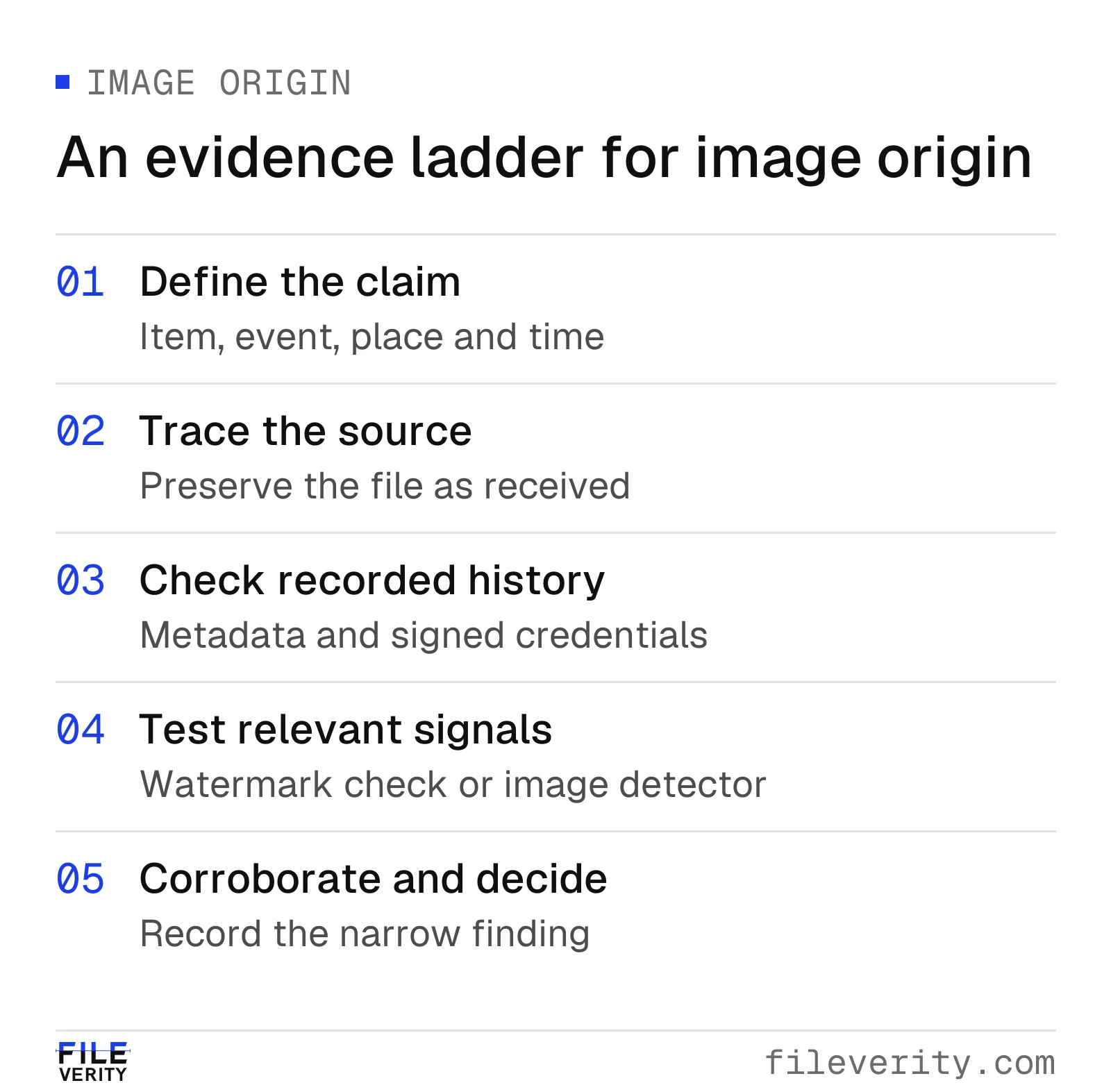
Follow the evidence from the image's source through technical checks to a corroborated finding.
1. Define what you need the image to establish
Write a sentence that identifies the subject, time and context. “This bicycle arrived with a cracked frame on Tuesday” gives a reviewer something to verify. “Is this image real?” combines several questions that may require different evidence.
For that bicycle, separate four questions: camera origin, a possible added crack, item identity and damage timing. Whole-image detection helps with the first; local analysis addresses the second; transaction and delivery evidence address the others. Keeping these tasks separate makes each check more useful.
Set the decision rule before looking at a detector result. For example: “A damage claim requires a clear image of the defect and evidence connecting the pictured item to the transaction.” This prevents an impressive score from quietly replacing the actual requirement. Choose a next step that fits the stakes: disclosure may resolve an illustration review, while a disputed transaction may need another view and a matching item identifier.
2. Trace the source and preserve the received version
Preserve the received attachment unchanged, with its sender, receipt time and claimed capture context. Give each version a stable reference; a file hash can identify the exact bytes analyzed. Keep later attachments and analysis outputs linked to that reference.
Request the original attachment or earliest available export when you have only a screenshot or messaging preview. Specify what you mean: “Please send the file as an attachment, rather than taking a screenshot of it.” An original export may itself come from a generator, so treat the request as a way to obtain better evidence, not as an authenticity test.
Separate source tracing from source reputation. An established contact may accidentally forward a misleading image. Contacting that person through a known channel can establish where they obtained it, but their confidence does not replace the file history. Ask whether they captured the image, received it from someone else, or downloaded it, and note which parts they can personally confirm.
When appropriate for the material, use reverse image search to look for earlier appearances. Open the matching page and compare distinctive details rather than relying on a thumbnail. A different crop of the same defect may be more useful than a visually similar product. Record the page URL and the date it actually supports; a displayed publication date is not necessarily a capture date. A search with no match means nothing was found; it does not show the image is original. Avoid sending confidential submissions to public search or analysis services unless that use is authorized.
3. Separate ordinary metadata from signed provenance
Metadata can offer leads such as camera information, timestamps and attribution. EXIF, IPTC and XMP are established metadata formats, but seeing a camera field is not the same as verifying a signature. NIST discusses those formats separately from protections for provenance records. NIST AI 100-4, section 3.1.2
Read the exact field name before interpreting a date: file modification, export and capture dates answer different questions. Record a discrepancy exactly as observed, without explaining it away. Do not infer that a software name means generative editing, or that missing camera fields mean there was no camera. An absent field is especially weak evidence when you do not know the delivery history.
Content Credentials add signed assertions associated with an asset. Validation can check the record's integrity, its binding to the file and signer trust. This differs from merely reading metadata. C2PA also distinguishes provenance from factual truth: a valid credential does not verify the depicted event. Adoption is optional, histories may be incomplete, and provenance metadata can be removed. See the C2PA 2.2 explainer, sections 2 and 7.
For a practical review, save the validator's result and identify exactly what it describes. Does the record concern capture, generation, an edit or a later export? Does it cover this attachment or an earlier ingredient? Is the signer recognized by the validator? Those details show what the credential actually proves.
Distinguish “not present,” “could not validate” and “validated with these assertions.” They are different observations. If validation fails, preserve the diagnostic rather than translating every failure into deliberate tampering. If the record describes AI generation, report that assertion and its validation status instead of suggesting that the entire depicted story has been disproved.
4. Inspect the image: visual clues and their limits
Visual review is most useful when it identifies what to investigate next. Inspect the areas that matter to the claim at a useful display size: the defect, serial label, background landmarks, reflections or boundaries between objects. Enlargement can help you see the available pixels, but it cannot create missing evidence.
These are the clues people most often check. Each has an ordinary explanation that you should rule out before treating it as a sign of generation:
| Where to look | What can suggest generation | Ordinary explanations to rule out |
|---|---|---|
| Hands, teeth, ears and jewelry | Fused or extra fingers, merged teeth, earrings that differ in shape from one side to the other | Motion blur, overlapping objects, lens distortion at the frame edge |
| Lettering, labels and signs | Characters that dissolve into shapes, words that change spelling across one sign, logos that are nearly right | Compression, a steep viewing angle, an unfamiliar script |
| Shadows, reflections and perspective | Shadows falling in different directions under one light, a mirror or window showing a different scene | Several light sources, curved or uneven surfaces |
| Repeated textures and background logic | The same pattern of leaves, bricks or faces repeated, railings that merge, stairs or doors that lead nowhere | Real repeating architecture, panorama stitching |
| Skin and surfaces | Uniformly smooth, waxy or polished skin and materials with no fine texture | Beauty filters, phone noise reduction, retouching |
| Signatures and watermarks | Smeared pseudo-signatures or fragments of a stock-photo watermark | A genuine watermark that was cropped or resized |
| How objects work | A bicycle chain that does not reach the gears, a chair without a way to support weight, clothing that defies how it is worn | Unusual but real designs, an unfamiliar cultural context |
A research guide from Northwestern University groups these cues into anatomical, stylistic, functional, physics and sociocultural implausibilities. Its authors note that such artifacts are not always present in generated images and that pixels alone often cannot settle an image's origin without context. Kamali et al., “How to Distinguish AI-Generated Images from Authentic Photographs”
Write “the item identifier cannot be read” or “the wheel edge and floor appear discontinuous” rather than “this looks AI.” The first wording records an observation another person can check. The second bundles appearance, cause and confidence into an unsupported verdict.
Consider ordinary explanations before attributing an oddity to generation: motion, shallow focus, glare, compression and routine editing can affect what is visible. Conversely, newer generators avoid many of the familiar mistakes, so a lack of errors in hands, text or shadows does not settle origin. Do not make a checklist of visual defects your sole acceptance test.
A useful follow-up targets the uncertainty. If the label is unreadable, request a close view that also connects it to the item. If the disputed detail occupies only a small area, investigate local manipulation rather than assuming a whole-image classification can locate or explain it.
5. Choose a check that answers the remaining question
Watermark verification and learned detection are different mechanisms. A watermark check looks for a particular embedded signal; a learned detector evaluates patterns in the content. NIST treats provenance tracking and content-based detection as distinct approaches and emphasizes that no single technique is comprehensive. NIST AI 100-4, sections 3.1–3.2
For a concrete example, Google's SynthID embeds imperceptible watermarks into supported generated content. A positive verification can provide a specific lead about that system's output. A negative result leaves other generators and editing methods open. Check the verifier's supported products and input requirements. Google DeepMind's SynthID overview
Match each check to the question it can answer:
| Evidence or check | Question it can help answer | Defensible interpretation | What it does not establish |
|---|---|---|---|
| Plain metadata | What descriptive fields are present? | “The file contains these fields.” | Verified capture history |
| Signed provenance | What assertions validate for this asset? | “The validator reports this history and signer status.” | That the caption or event is true |
| Supported watermark verification | Is this system's signal detected? | “The verifier found a supported watermark.” | Coverage of all generators or all pixels |
| Learned image detector | Does the content trigger its trained classification? | “This file crossed the tool's stated review threshold.” | A complete editing history or dishonest intent |
| Reverse image search | Can an earlier or related publication be found? | “A matching image appears on this page.” | That unindexed copies do not exist |
| Independent corroboration | Does other evidence support the specific claim? | “The item and timing are supported by these records.” | Universal authenticity of the file |
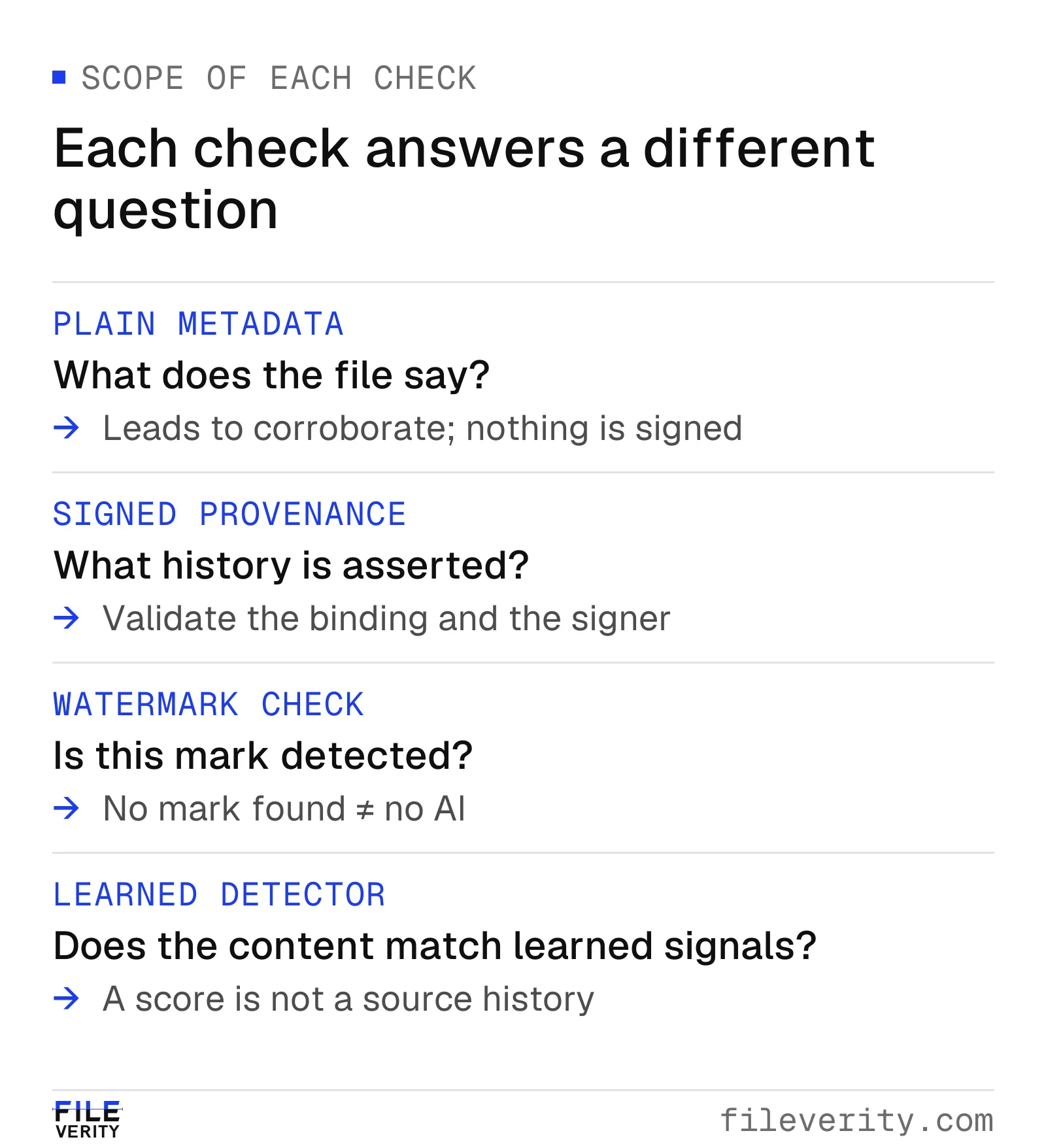
Metadata describes a file; signed provenance records assertions; watermark and learned-detector checks examine different signals.
Learned detection is useful when the source history is missing or when you want to check whether the content agrees with a claimed origin. Match the detector to the task: whole-image generation, local edits or both. Check whether its evaluation covers the input you received, such as an original export or compressed attachment. For consequential decisions, request evidence at the intended review threshold. NIST highlights false positives and the importance of evaluating detection at defined thresholds. NIST AI 100-4, section 4.2.2
Save the tool name, available version, run date, input identifier, output label and threshold. Do not silently reinterpret a number as “the probability this person cheated.” Unless the provider documents the meaning and calibration of its score for the relevant use, keep the number in the tool's own terms. Two agreeing services should not automatically count as two independent confirmations; establish whether they supply materially different evidence before increasing your confidence.
Fileverity reports a finding in the tool's own terms, shows the evidence behind it and states when an input is unsuitable, so your reviewer can record what was found without turning a score into an accusation.
Inside the check: how a detector turns pixels into evidence
Fileverity turns each submitted image into a set of learned features and scores how closely they match generated or camera-origin content. The score is one piece of evidence: it does not retrieve the file's creation history and it says nothing about the sender's intent. A useful public abstraction is z = φ(T(x)); s = h(z): x is the submitted image, T prepares it for analysis, φ produces learned numerical features, and h produces a classification score.
The representation is the important step. A feature need not correspond to a recognizable object or an obvious mistake. Training can make combinations of image patterns useful for separating labeled categories, even when a person finds both categories visually plausible. The resulting score concerns that learned distinction; it does not retrieve the creation history. Wang and colleagues demonstrated cross-generator classification in their CVPR 2020 experiments, providing an early example of learnable evidence beyond a checklist of visual defects. Wang et al., CVPR 2020
Two engineering issues follow from this mechanism. First, preparation changes the evidence available to the representation. For example, reducing a 4,032 × 3,024 image to 1,008 × 756 reduces each dimension by four and the number of pixels by sixteen. A feature 16 pixels wide in the source becomes about 4 pixels wide in the output. Interpolation determines the resulting values; the smaller array is not simply an equally informative copy.
Second, the model can learn correlations that do not hold in the deployment population. Imagine an evaluation containing camera JPEGs and generated PNGs. Good separation might reflect generation evidence, format-related differences, or both. To investigate, retain known labels and compare both classes under matched delivery conditions: camera originals and generated originals, then corresponding messaging exports from both. Keep all versions of one source together when separating development and test sets. Otherwise, a familiar scene can make generalization look easier than it is.
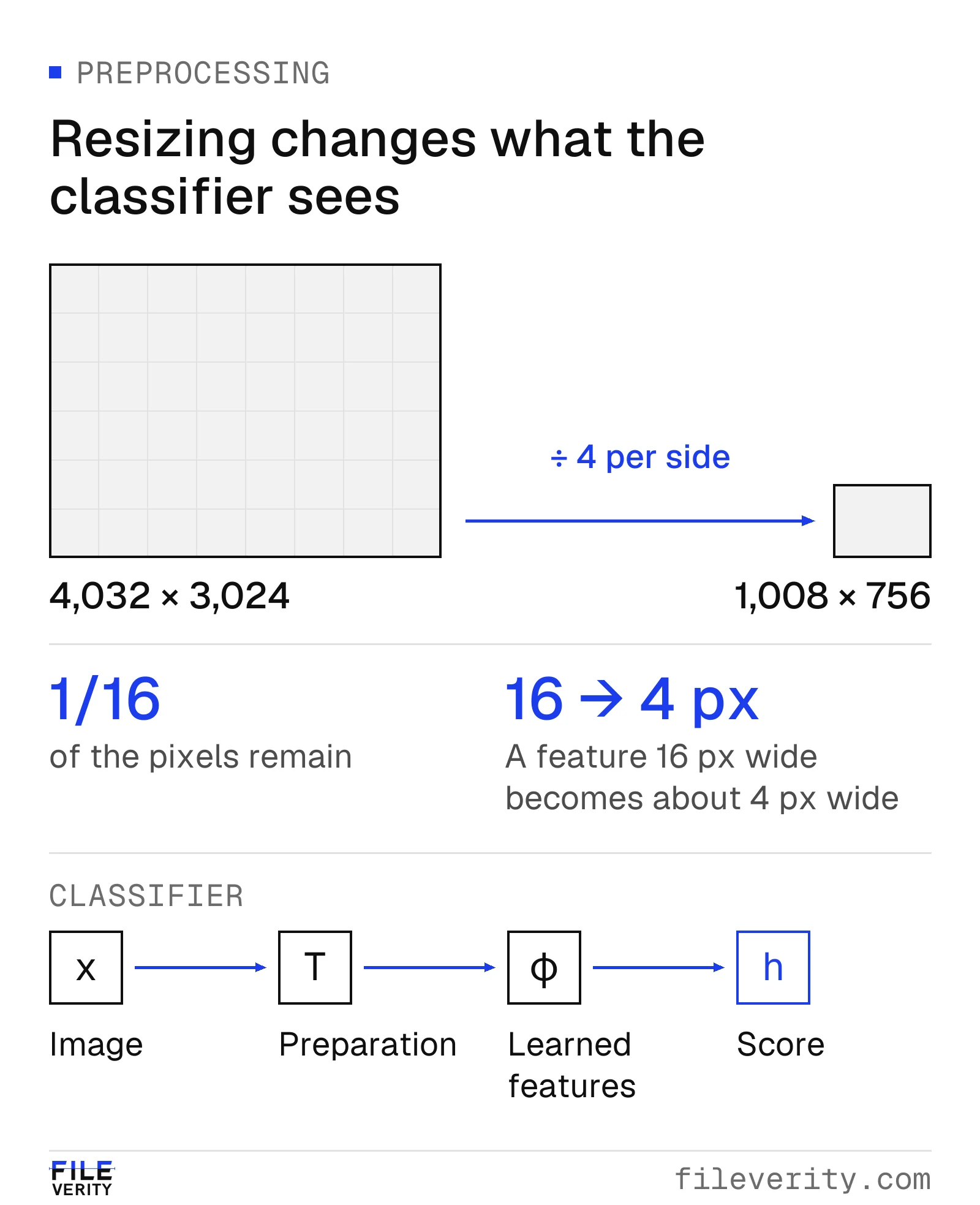
Illustrative preprocessing: reducing each dimension fourfold leaves one-sixteenth of the pixels available to the classifier.
For a buyer, this explains why “looks completely real” is a useful challenge case, but not a complete evaluation design. Test whether the detector's evidence survives the channels you receive, and whether legitimate files from those same channels remain distinguishable. Source history and corroboration then connect that classification to the image's claimed use.
6. Resolve contradictions before choosing a label
A camera-origin assertion and an AI flag need not refer to the same stage of a file's history. First establish whether both results concern the same attachment. Then inspect the recorded actions and the detector's task. A later edit, incomplete history, unsupported input or classification error is a possibility to investigate, not an explanation to assume.
A useful contradiction log has three columns: observation, possible explanation and discriminating evidence. For instance, “earlier attachment has a credential; screenshot does not” suggests comparing the versions and delivery path. It does not justify concluding that one sender is dishonest. “Watermark absent; detector positive” may simply pair a narrow ecosystem check with a broader content classifier.
Do not average unrelated outputs into a homemade authenticity percentage. Obtain evidence that can resolve the disagreement: the exact earlier attachment, a validator diagnostic, the creator's documented export history or an independent view of the disputed subject. If no available evidence separates the explanations, retain an unresolved finding.
Worked example: a bicycle damage submission
Illustrative review. A buyer submits a messaging screenshot showing a cracked bicycle frame and says it arrived damaged. The seller disputes the photograph. The review policy requires evidence of damage connected to the delivered item.
| Stage | Observation | Interpretation | Action |
|---|---|---|---|
| Intake | Screenshot shows a crack; frame identifier is unreadable | Visible damage is alleged, but item identity and timing are unresolved | Preserve screenshot; request original attachment and identifying view |
| Automated review | A learned detector flags the screenshot; a watermark verifier finds no supported mark | Results address different signals; neither resolves the transaction | Record both outputs without an authenticity verdict |
| File follow-up | An earlier attachment is supplied; no credential is found | More material is available, but signed origin remains unavailable | Review the earlier attachment and document its relationship to the screenshot |
| Context check | A matching photo appears in a listing that predates this purchase | The photo existed earlier; it does not establish this delivery's condition | Save the matching page and ask for transaction-specific evidence |
| Corroboration | Buyer supplies another view connecting the serial number and crack; serial matches the order record | Item identity is better supported; timing still requires support | Review delivery and inspection records under the normal policy |
The defensible interim finding is: “The submitted screenshot is insufficient to establish damage at delivery. A matching photograph predates the purchase. AI origin remains unresolved; additional evidence connects the defect to the ordered bicycle, but does not yet establish when it occurred.”
Where a Fileverity report helps: run the screenshot and the earlier attachment through the detector for AI-generated images. The report keeps provenance, such as Content Credentials and metadata, apart from the pixel evidence, states whether each input can support a conclusion, and records each file's SHA-256 fingerprint and timestamp validation status, so the case file shows exactly which versions were examined.
Here, source tracing and transaction evidence resolve questions the automated checks leave open. In a different submission, a validated generation assertion from a trusted signer could provide sufficient support for an AI-origin finding under the review policy. The next action would then be to establish whether the submitted illustration was acceptable for its stated purpose. Choose the next check for the missing fact; a second detector score is useful only if it adds relevant evidence.
How to tell if art is AI generated
To tell whether art is AI generated, do not rely on how the finished picture looks. Ask for evidence of how it was made, check what the file declares about itself, and treat any detector score as one input rather than a verdict.
Illustrations and digital paintings are harder to judge than photographs. Smooth surfaces, impossible lighting and invented architecture are often deliberate artistic choices, so most of the visual clues above say little about a drawing. A style that resembles a known artist does not identify who made the work either: people and models can both imitate a style.
Ask for evidence of the process:
- Working files. A layered source file from the drawing application, with sketch, line and color layers that build toward the final image.
- Work in progress. Dated sketches, earlier versions shared with a client or posted before the final piece.
- A recorded timelapse. Many drawing applications can record the painting process; a continuous recording is harder to produce after the fact than a single file.
Process evidence can also be manufactured, for example by painting over a generated image or assembling layers afterward. Check that it is consistent: early sketches should anticipate the final composition, and layers should contain the kind of work they claim to hold.
Then check what the image declares about itself. Meta applies an “AI info” label when it detects industry-standard AI image indicators or when the uploader discloses AI use. Meta, labeling AI-generated content Tools that support Content Credentials can record an AI action in the file's provenance through its digital source type field. C2PA 2.2 explainer, section 7.4.4 The IPTC vocabulary used for these values distinguishes “Created using Generative AI” from “Edited using Generative AI.” IPTC Digital Source Type vocabulary A missing label or credential is not evidence of human authorship, because provenance can be removed and many tools never add it.
If you use a detector on artwork, read Is there a reliable AI art detector? first. For a commission, contest or publication, state the AI-use rule and the process evidence you will accept before submissions arrive. That is fairer to artists than judging a finished image by a score alone.
A reusable review record and stopping rule
Keep enough detail for a second reviewer to reproduce the reasoning:
- Claim and requirement: what the image must establish and the applicable acceptance criteria.
- File and source: received version, sender, receipt time, earlier versions and identifiers.
- Observations: visible details, metadata, validator diagnostics and exact tool outputs.
- Corroboration: source links, matching records or independent views, including limitations.
- Finding and action: supported conclusion, unresolved questions, reviewer and next step.
Stop adding tools when another run cannot answer the remaining question. If the missing fact is capture time or ownership, seek evidence of time or ownership. If the available file is unsuitable for the selected analysis, report that limitation. Escalate consequential unresolved disputes through the established review process rather than converting uncertainty into rejection.
For a defensible result, use “AI generation is supported by a validated origin assertion,” “the detector flagged this file for review,” or “origin remains unresolved,” as applicable. Avoid collapsing these into a single “fake” label.
Common questions about spotting AI images
Can AI-generated images be detected reliably?
Sometimes, depending on the input and the method. A validated generation assertion from a trusted signer, or a positive result from a supported watermark verifier, is specific evidence. A content-based detector gives a finding at a stated threshold and can produce false positives, so treat it as evidence to weigh, not a verdict. No single technique covers every generator and editing method. See how to read AI image detector accuracy before relying on a provider's figures.
Is there a reliable AI art detector?
No detector should be treated as a verdict on a piece of art. Many AI image detectors are built and benchmarked mainly on photographs, and illustrations, paintings and digital art differ from photographs in style, surface and processing. Before you rely on an AI art detector, ask whether the provider's evaluation includes illustrations in the styles and from the generators you actually see, what its score and threshold mean, and what it reports when an input is outside its scope.
Research on art points toward combining methods. In an academic comparison of human art and AI-generated images, a commercial detector and expert artists both did very well but made mistakes in different ways, and the authors concluded that a combined team of human and automated detectors gave the best accuracy and robustness. Ha et al., “Organic or Diffused: Can We Distinguish Human Art from AI-generated Images?” Treat a score on artwork as one input next to process evidence (layered working files, dated sketches, a recorded timelapse) and any declared origin, as described in how to tell if art is AI generated. Do not reject a submission or accuse an artist on a score alone.
Are free AI image checkers accurate?
Price is not the deciding factor. Ask what the checker was evaluated on, what its threshold means, how it behaves on files like yours, whether it tells you when an input is unsuitable, and what happens to the uploaded file. A bare percentage without a documented meaning should not decide a consequential case. Fileverity's free check gives a risk level and a recommended action, and a credit unlocks the supporting evidence and a verifiable record with timestamp and seal status.
Does a screenshot or compression hide AI evidence?
It can. A screenshot is a new image of the screen, so it does not carry the original file's metadata or Content Credentials. Resizing and recompression also remove fine detail that a detector may rely on. Ask for the original file; the guide to checking screenshots and compressed images covers what can still be concluded from a lower-quality copy.
Can metadata prove an image is AI generated?
Plain metadata is a declaration. A “Created using Generative AI” field or a generator's name is a useful lead, but fields can be edited or removed. A validated Content Credential from a trusted signer is stronger evidence of the recorded history, though it still does not verify the event the picture shows. Missing metadata proves nothing either way.
Put the checks to work
To assess an image's origin, run it through Fileverity’s detector for AI-generated images and keep the file's source context beside the result. The free result summary gives a risk level and recommended action. A credit unlocks the supporting evidence and a verifiable report that records timestamp and seal validation status. If the issue is a changed region within a photograph, follow the local AI-edit workflow.
For a recurring process, tell us which images you receive, through which channels and what action a finding should trigger, and we will walk your team through real cases; talk to sales. Fileverity analyzes files on servers operated by Entogo in Toronto, Canada and deletes them once the analysis is complete. The Trust & security page sets out data handling, including private deployment for Enterprise on request.
By Yang Zheng