Images
How to Detect AI Edits in a Photo
Review photos for local AI edits with a practical workflow for source files, localization masks, provenance and independent corroboration.
Published · 13 min read
On this page
To detect AI edits in a photo, investigate the region that may have changed. Use analysis designed for local manipulation, check what any map or score represents, and compare the finding with available source history or reference evidence. Whole-image classification and local-edit analysis answer different questions: a photograph can retain most of its camera-captured scene while one important feature has been generated or removed.
Adobe's original Generative Fill announcement described adding, extending and removing image content—the kinds of changes a local-edit review may need to investigate. These edits can change a consequential detail while preserving the surrounding scene. Adobe's May 2023 announcement
The practical sequence is choose the task → read the local finding → compare the relevant evidence → act on what remains unresolved. A useful localization result gives you a place to investigate. Evidence of how that region was made is what supports a more specific AI-edit finding.
Define the question before choosing a detector
Start with the fact the photograph is being used to establish: “The returned appliance has a crack in its lower panel,” for example. Mark the relevant region and state what you need to know about it: whether the crack is visible, whether that part of the image changed, or whether the change involved generative AI.
Define which changes matter to the decision. Removing a background passerby may be acceptable for a product advertisement; replacing an identifying label may defeat the purpose of the record. Investigate the change that affects the claim.
Three technical tasks are particularly easy to confuse:
| Task | Typical output | What still needs evidence |
|---|---|---|
| Classification | Image-level label or score for a defined category | Where any relevant change occurred |
| Localization | Pixel or patch map of suspected alterations | Whether highlighted pixels were generated and what process caused them |
| Attribution | A supported association with a source, model family or editing process | The account, person, prompt or intent, unless separately established |
A detector may combine these tasks, but its evaluation should support each claimed capability. A tool trained to distinguish fully generated scenes from camera photographs is not automatically validated for local inpainting. A general manipulation detector may find conventional edits without distinguishing them from generative changes. NIST identifies partially synthetic content as a complication and discusses attribution as a richer task beyond basic detection. NIST AI 100-4, section 3.2
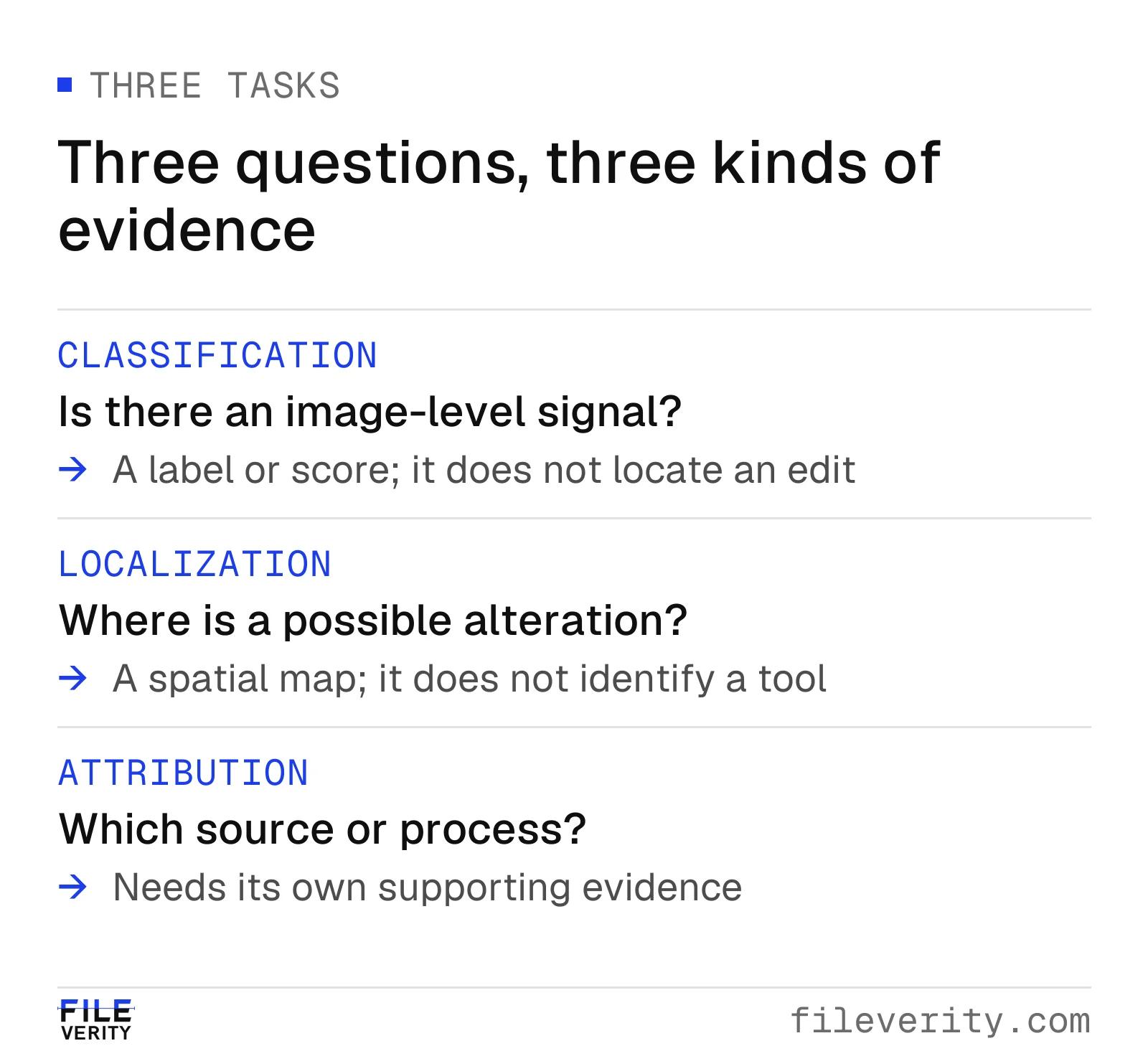
An image-level classification, a location and an attributed editing process require different evidence.
Check what a localization map actually means
Before interpreting a colored overlay, obtain the output definition. Is it a manipulation score, an anomaly score, a confidence estimate, or an attention visualization? Does a higher value mean more suspicious? Was a threshold applied? Are values comparable across images, or does the display rescale each map separately?
Read the legend before the colors. A vivid patch may represent the largest value in that display rather than a fixed level of concern. An image-level score of 0.8 does not mean 80 percent of the pixels were edited. Before treating it as a reliable 80 percent probability of the tool's target condition, check its definition and calibration for comparable inputs.
A localization tool can report three different things: where a region responds as anomalous, how reliable that response is, and a decision about the image as a whole. A strong response in an untouched region is a false alarm, and a reliability estimate can itself fail, particularly after compression or resizing. For a buyer, the distinction matters: ask how the tool separates a suspicious region from confidence in that finding.
Use this reading checklist before taking a map into a decision meeting:
| Check | Record | Why it matters |
|---|---|---|
| Input identity | File reference, dimensions and tool version | Prevents mixing outputs from different copies |
| Spatial alignment | Orientation, resizing and crop mapping | A shifted overlay can implicate the wrong feature |
| Display definition | Legend, scale and threshold | Colors alone have no stable interpretation |
| Claimed capability | Manipulation localization or AI-specific localization | Avoids turning a generic anomaly into AI attribution |
| Relevant overlap | Whether the signal touches the disputed feature | A background signal does not resolve a label dispute |
| Uncertainty | Unsupported input conditions and documented limitations | Preserves a reason to request more evidence |
A thresholded mask is an estimated region, not a recovered editing selection. Its boundary may extend beyond the feature, omit part of it, or reflect the model's spatial resolution. Do not calculate “percent of image edited” from that mask unless the tool's definition and validation justify that interpretation. Record overlap descriptively when precise localization is unsupported.
Turn the finding into a next action
The value of a map is what it helps you investigate. Start with the feature that matters, check whether the finding overlaps it, then choose evidence that can resolve that particular concern.
| Evidence state | Supported conclusion | Next action |
|---|---|---|
| A manipulation signal overlaps the disputed feature | That region warrants closer review | Compare a reliable earlier version or request a separate view tied to the same item |
| A signal concerns only an unrelated background region | The analysis raises a different image question | Keep the original claim question open; decide whether the background change matters under the policy |
| Validated provenance from a trusted signer records generation associated with the disputed region | The recorded action supports an AI-involvement finding within that scope | Check whether the changed feature affects the stated use |
| A map does not highlight the region | No local signal was returned for that region under this analysis | Consider the method's sensitivity and corroborating evidence before closing the concern |
| The file is too small, obscured or unsupported | The intended check could not be completed | Request a suitable source file or use an inspection or other independent record |
Fileverity image verification combines checks for AI generation, manipulation and provenance. For this task, focus on the local finding: an image analysis marks supported suspicious regions with pixel coordinates, separates regenerated areas from whole-image generation and states how strong the evidence is, so your reviewer can record what was found without turning a score into an accusation.
Why a small edit can disappear in a global summary
Fileverity analyzes whole-image generation and localized manipulation as distinct questions. One technical reason is spatial sparsity: evidence relevant to a local edit may occupy only a small fraction of the image. Reducing a spatial map to one number can discard information about both the strength and the location of that evidence.
Consider a deliberately simple, hypothetical map containing 10,000 equally sized cells. Suppose 100 cells have a manipulation score of 0.90 and the other 9,900 have a score of 0.10. If we summarize it using an ordinary mean, the result is:
Mean score = (100 × 0.90 + 9,900 × 0.10) / 10,000 = 0.108.
More generally, if a fraction f has score a and the rest has score b, the mean is b + f(a − b). The local contribution shrinks with its area fraction. Here, the high-scoring region changes the average by only 0.008, despite containing values far above the background. This simple mean illustrates the aggregation problem; it does not specify Fileverity's scoring method.
Taking the maximum gives 0.90, which preserves an extreme value but creates a different problem: one isolated false response can determine the entire summary. Location and spatial organization add information neither number contains. One compact group beside a disputed crack and a hundred scattered cells can have identical mean and maximum scores. They create different inspection tasks, even though neither pattern by itself proves alteration.
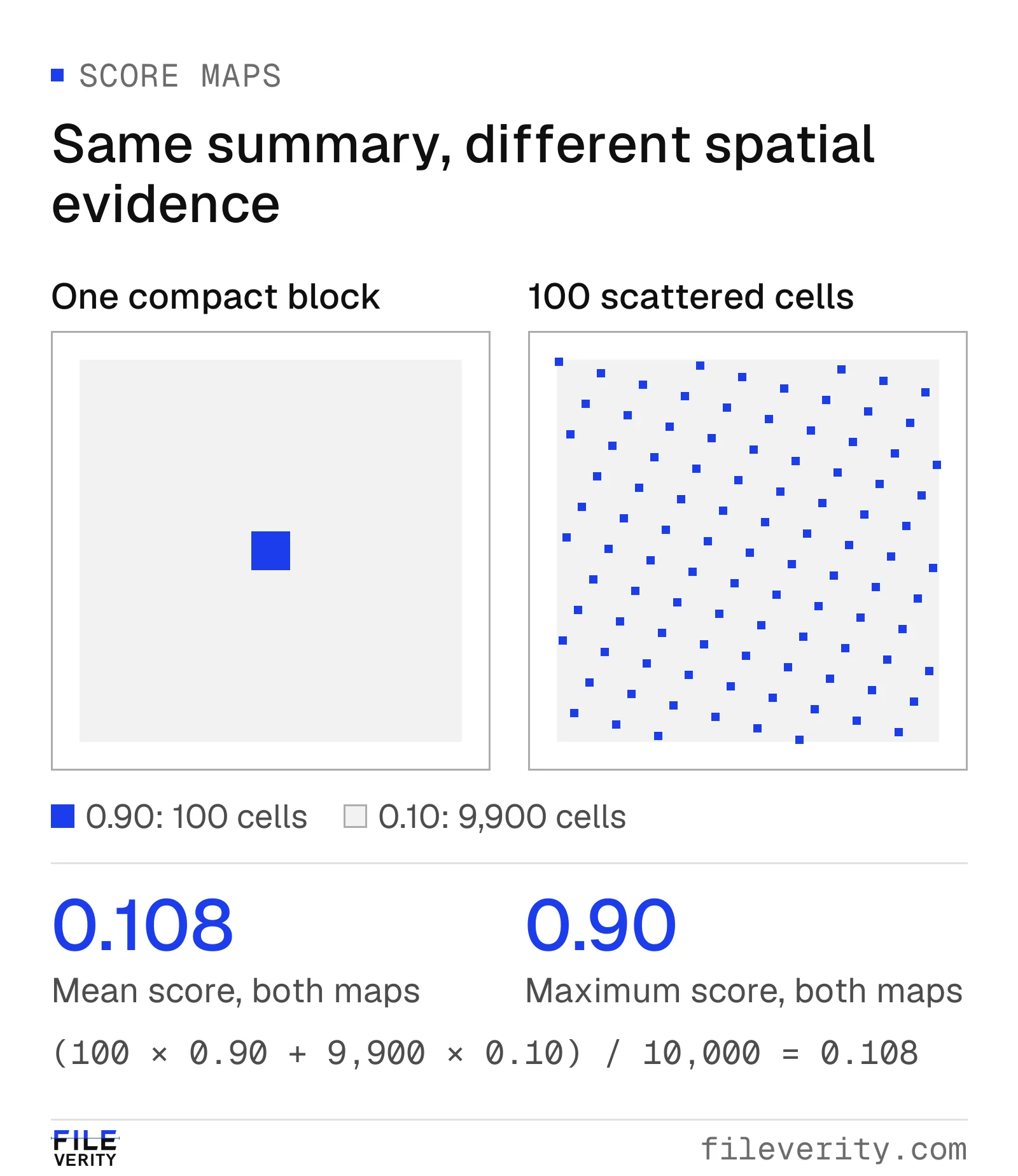
Illustrative score maps: compact and scattered responses can share a mean of 0.108 and a maximum of 0.90, while directing reviewers to different evidence.
The engineering lesson is to retain enough spatial information to interpret an image-level finding, and to weigh how reliable a regional response is alongside how strong it is.
A whole-image generation classifier is not necessarily averaging a manipulation map at all: it may estimate a different target from different learned evidence. Therefore, a low generation signal cannot be substituted for the absent local question. For a damaged-device submission, keep the finding's location attached to the crack under review, then request evidence of that feature on the same item. In a pilot, vary both edit size and delivery quality; a benchmark of fully generated scenes does not answer whether consequential small edits remain reviewable.
Keep the file and its history connected
The comparison below starts with a real 2019 kitchen photograph by Eli Christman. Fileverity used AI to add a fictional crack to the blender jug in a derivative. The matched crops make the added defect easy to compare with the original jug wall.
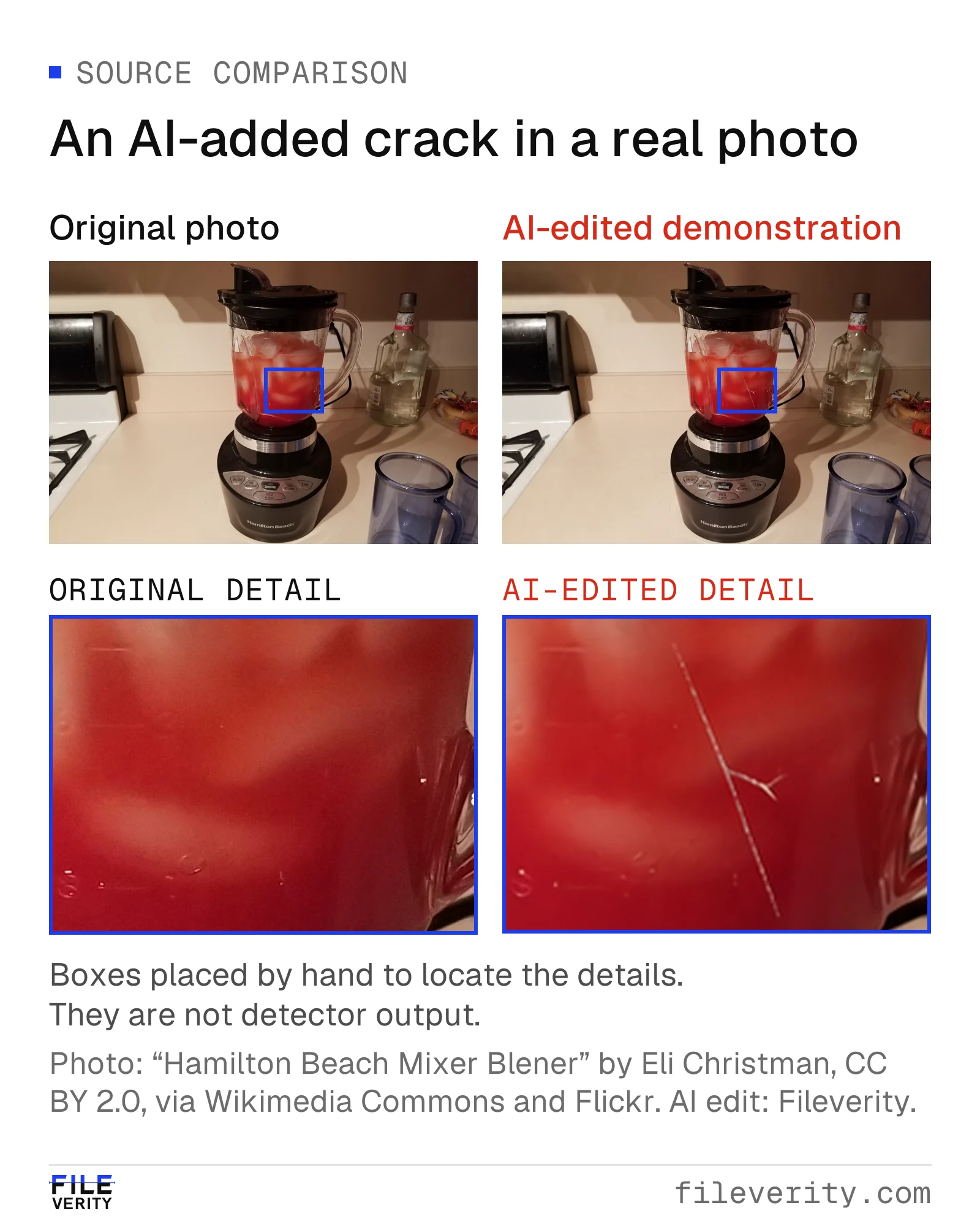
AI-edit demonstration using a real photograph: an added crack changes the apparent condition of the blender while preserving the kitchen context.
Source: “Hamilton Beach Mixer Blener” by Eli Christman (Gamma Man), CC BY 2.0, via Wikimedia Commons and Flickr. AI crack alteration and layout: Fileverity.

The surrounding scene remains plausible. In a return review, however, the added crack could determine the outcome—making the jug wall the priority for local analysis and follow-up evidence.
Preserve the received file and assign it a stable reference. Record its dimensions, receipt channel and known processing. Define the region of interest, or ROI, with coordinates and a short description, stating whether the coordinates refer to the stored file or an orientation-corrected view. Keep crops and outputs linked to their parent file. A review box identifies where you are looking; it is not an editing mask.
If you received a screenshot, request the photograph as an attachment. Inspect the full scene as well as the region: reflections, shadows and surrounding objects may explain a boundary or connect the item to its setting.
Content Credentials can add signed information about creation or editing. Record the validation result, signer information, relevant actions and relationship to the received file. Determine whether an action concerns the disputed region or an unspecified part of the image. The C2PA explainer describes these tamper-evident assertions and their limits: histories may be incomplete, and they do not establish the truth of the depicted event. C2PA explainer, sections 2 and 7.2
Ordinary metadata offers leads about software and dates. Use those leads to ask about the processing history, while keeping any conclusion about the disputed region grounded in the available evidence.
Account for resizing, compression and analytical copies
A submitted image may have been resized, compressed, cropped or captured from a screen before review. Record these known conditions and check whether the tool was evaluated on comparable inputs. Avoid transferring a result from a clean-file evaluation to a heavily transformed submission without evidence that the comparison is appropriate.
Cropping can make a disputed feature easier for a person to inspect. It also changes the detector's input and removes context. If crop analysis is supported, keep the full-frame result and crop result separately, with the crop coordinates. A change in score between them is not itself proof that the crop contains an edit.
Similarly, an enlarged or sharpened copy can assist discussion, but it is a derivative. Label it and preserve the source. Generative enhancement should not be used to reconstruct supposedly evidential detail: an inferred edge or character cannot establish what the received pixels originally recorded. When a feature is unreadable, “unreadable in the supplied file” is often the most useful observation.
This stage should end with one of two clear positions: the available file is suitable for the stated analysis, or a material limitation remains. Do not quietly turn the second position into “no edit found.”
Worked example: a crack in an appliance panel
Consider a hypothetical return review. The submitted photograph is 4,000 × 3,000 pixels. A 400 × 300 pixel box encloses the claimed crack and nearby panel surface. Its area is 120,000 pixels out of 12,000,000, or 1 percent of the image.
The review box covers 1 percent of the image, yet the crack can determine the return. That is why local analysis matters: the business question concerns this feature, regardless of how much of the rest of the photograph is unchanged. The area of the box is geometry, not a measure of edited pixels or detector sensitivity.
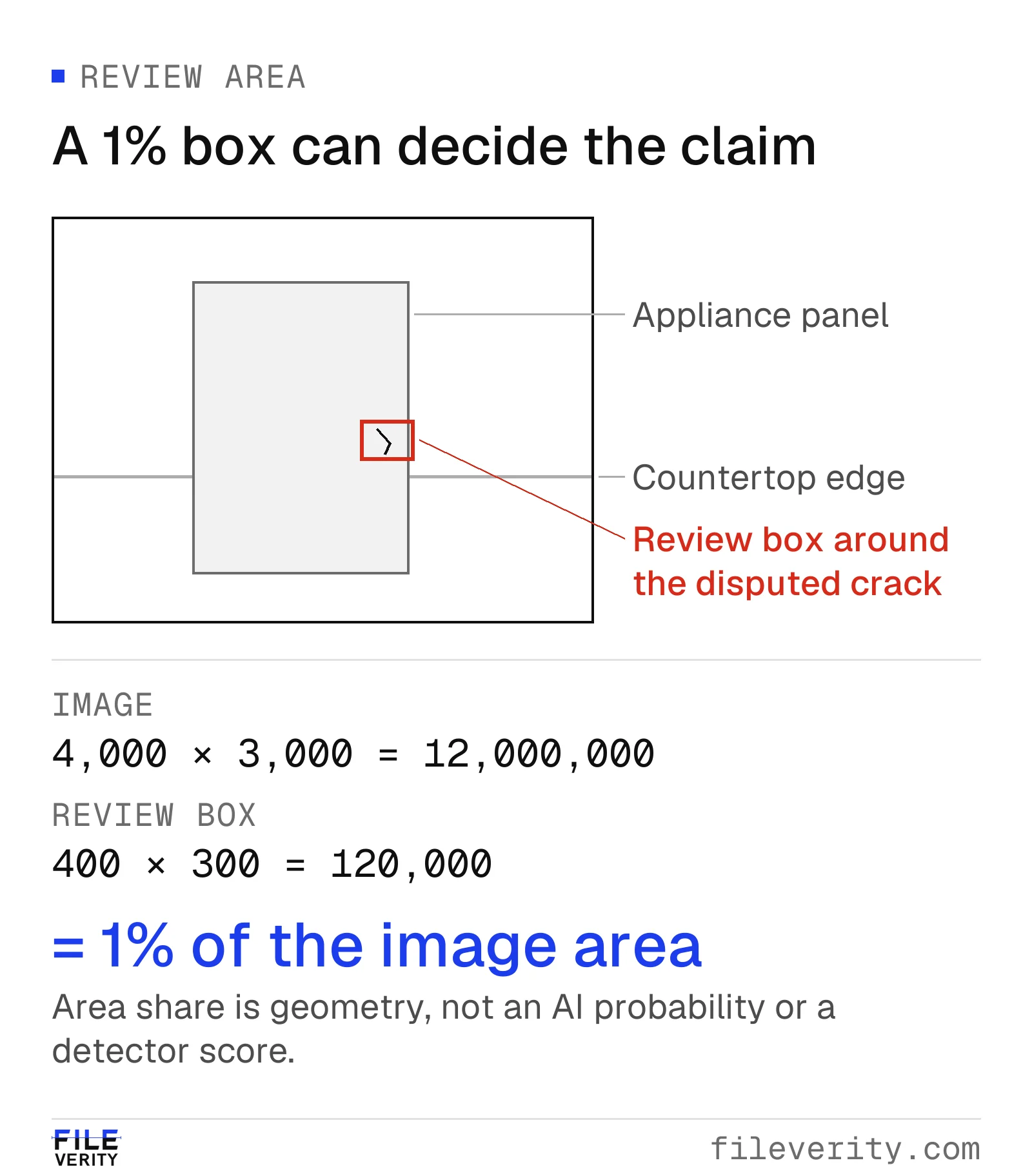
A review box covering just 1% of the image can contain the feature that determines a return: (400 × 300) ÷ (4,000 × 3,000) = 1%.
Suppose a general manipulation tool highlights part of the panel near the crack, while the image-level classifier does not flag the photo. These hypothetical outputs address different tasks. Keep both, along with their definitions; the local signal gives the reviewer a specific part of the submission to investigate.
The highlighted area overlaps part of the relevant box but does not trace the full crack. Record a possible local alteration and ask for evidence about that panel. The general manipulation output leaves AI involvement unresolved; a processing artifact or scene-related explanation also remains possible.
With a Fileverity full report, this step is more specific: the report marks supported suspicious regions with pixel coordinates, tells a real photo with regenerated areas apart from an image generated as a whole, shows provenance separately from the pixel evidence, and records the file's SHA-256 fingerprint and timestamp validation status. The returns lead can see whether the marked region is the crack or another part of the panel.
Request a view of the same panel through the established returns process, with enough of the item visible to connect it to the transaction: “Please show the lower panel and identifying label together, then provide a closer view of the crack.” If an inspection is available, ask it to address that feature directly. This targets the unresolved issue instead of requesting repeated copies of the same photograph.
If the inspection confirms the damage, that can support the claim even if the first file's edit history remains unresolved. If the new view appears inconsistent, first check that it shows the same item, area and relevant time. The condition may have changed. A disagreement calls for reconciliation; it does not establish deceptive intent by itself.
Keep a review record that another person can use
Fill each row with the case information and use “unknown” where appropriate. Keeping separate columns for observations and inferences reduces the chance that a tentative signal becomes a factual allegation during handoff.
| Field | What to write |
|---|---|
| Claim and decision | The exact fact at issue and why it matters |
| Received evidence | File reference, receipt channel, dimensions and known transformations |
| Region | Coordinates, coordinate convention and feature description |
| Direct observations | Visible features, metadata facts and verbatim tool result labels |
| Technical interpretation | What the defined output supports, with limitations |
| Alternatives | Plausible explanations still unresolved and evidence needed to distinguish them |
| Corroboration | Separate capture, inspection or record; how it connects to this item and time |
| Disposition | Resolved for this purpose, more evidence requested, or specialist review |
| Ownership | Reviewer, date, next action and responsible person |
For the hypothetical example, defensible wording would be: “A manipulation-analysis output overlaps part of the panel region. It does not establish generative AI use. The supplied file and output do not resolve whether the claimed crack was present on the item. Request a separately captured view or inspection tied to the same item.”
Set the next action according to what is missing. Request a better file for an input-quality problem, an explanation for a provenance inconsistency, or physical corroboration for an unresolved scene claim. Escalate technical interpretation when specialist analysis could change the decision. Closure should state which question was resolved and which file-history questions remain open.
Evaluate the local-edit task you need
Run the photo through Fileverity image verification with the disputed feature identified before you interpret the result. The analysis looks for suspicious regions. Where the evidence supports a finding, the report explains the type of change, its location and the strength of the evidence.
For a recurring process, tell us the local changes you need to review, typical image sizes and submission channels, and the action a regional finding should trigger, and we will walk your team through real cases; talk to sales. Treat detecting a change, locating it and identifying AI involvement as separate requirements. Fileverity analyzes files on servers operated by Entogo in Toronto, Canada and deletes them once the analysis is complete. The Trust & security page sets out data handling, including private deployment for Enterprise on request.
For comparison of conventional and generative changes against earlier versions, see how to tell if a photo has been edited.
Common questions
Can an AI detector detect Generative Fill?
Only if its supported task and evaluation cover the relevant local edits and input conditions. A general “AI image detector” label is not enough to establish that capability.
Does an unmarked region mean it is original?
No. It means the particular analysis did not highlight that region under the conditions used. Whether that is useful negative evidence depends on the tool's validated sensitivity for comparable cases.
Can a map identify the editor or prompt?
A generic localization map cannot. Attribution needs specific supporting evidence. Do not infer the editing account, prompt or intent from the shape of a highlighted region.
By Yang Zheng