Evaluating detection
How to Choose an AI Detection API: Ten Checks Before You Integrate
A buyer's checklist for AI detection APIs: input limits, sync or async results, webhooks, evidence output, data retention, test mode and pricing.
Published · 17 min read
On this page
Choose an AI detection API by checking ten things that decide whether it holds up in production: what it checks and returns, its input limits, how results are delivered, whether webhooks are signed, whether retries are safe, how errors and rate limits behave, what it keeps and for how long, whether results can be audited and pinned to a model version, and what a failed or test request costs. Most of these can be answered from a provider's documentation before you write any code. The rest need a short pilot.
This guide is for engineers and technical buyers who connect a detection service to an intake, claims, onboarding or moderation workflow. It tests the interface, not the detector. For accuracy, false positives and review workload, use the buying guide for image detection software and the accuracy guide. A detector that scores well on your files can still fail in production if the API around it is hard to retry, audit or pay for.
Each check below says why it matters, how to verify it in any provider's documentation, and what the Fileverity API documents, with links to the API documentation. The same ten questions work for every candidate, and this guide names and ranks no provider.
The ten checks at a glance
The figure shows where each check can be answered. Documentation tells you what a provider promises, a test key shows request and response shapes, and only a pilot on your own files shows timing, deletion and billing.
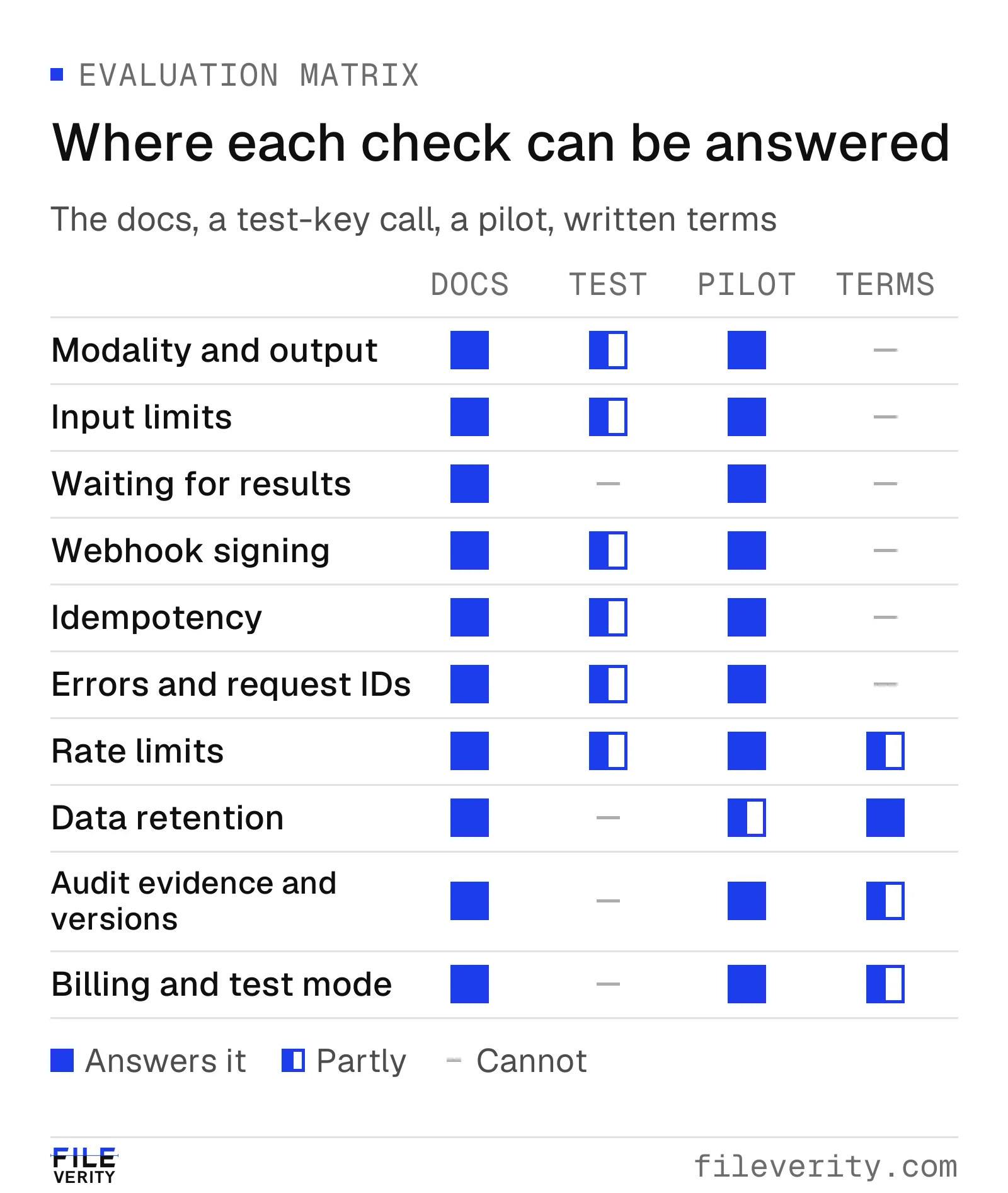
Documentation states what a provider promises and a test key shows request and response shapes; only a pilot on your files shows timing, deletion and billing.
| Check | The question to answer | Fileverity documents |
|---|---|---|
| Modality and output | Does it check what you need and return a verdict plus evidence a reviewer can use? | Overview, Analyses |
| Input limits | Do your real files fit, and what happens when one does not? | Files |
| Waiting for results | Is the result in the response, or do you wait, poll or subscribe? | Analyses |
| Webhook signing | Can you prove an event came from the provider and handle duplicates? | Webhooks |
| Idempotency and retries | Can a retry run, or bill, a check twice? | Idempotency |
| Errors and request IDs | Can code tell errors apart, and can support find the request? | Errors |
| Rate limits | Can you pace requests and recover from a 429? | Rate limits |
| Data retention | What is stored, where and for how long? | Data retention and security |
| Audit evidence and model versions | Can you show later what was checked, when and by which model version? | Analyses, Changelog |
| Billing and test mode | What does a check, a failed check and a test cost? | Pricing, Authentication |
Scope and inputs
Modality and output
Why it matters. "AI detection" covers different tasks: whether an image was generated or edited, whether a document was altered or contains AI-written passages, whether plain text is AI-written. A provider that supports one may not support another. A response that is only a number, with no scope or evidence, is hard to act on and hard to defend. Reviewers need to know what a finding concerns, and your routing code needs a stable machine-readable field.
How to verify it. List the tasks you need and find each one in the documentation by name. Open the response schema and look for four things: a machine-readable summary (verdict, level or recommended action) separate from the detailed findings; evidence a person can read; a state for "could not assess" that differs from "negative"; and a schema version. Ask for sample responses covering a flag, a clean result, an inconclusive result and a failure. The coverage matrix in the buying guide shows how to record the answers.
What Fileverity documents. Three models, each listed with its limits and snapshot by GET /models: fvimg-2 for images, fvdoc-3 for documents and fvdoc-3-text for plain text. Image and document checks return a full report with a summary level and recommended action, the detailed findings, a report ID and a sealed PDF. Text checks return a result with a verdict (AI-written, mixed or human-written), scores and the marked passages. The text documentation states that a result is a statistical estimate, not proof of authorship, and should not alone decide anything that affects a person. See Overview, The report object and Text detections, or the AI image detection API and document fraud detection API pages.
Input limits
Why it matters. Limits decide whether your real intake fits: phone photos, screenshots, scans, multi-page PDFs, password-protected files, long text. A limit you meet for the first time in production shows up as failed requests and frustrated users.
How to verify it. Find the limits for each modality: accepted formats, maximum size, pixels or pages, text length and languages. Check how large files are uploaded (one request or a pre-signed upload), whether the format is detected from the content or trusted from the file name, and what each violation returns. A distinct error code is a good sign; silent truncation or a generic 400 is not. Then submit the largest, smallest and most awkward files you actually receive.
What Fileverity documents. Files lists the supported formats and limits for each model, a direct multipart upload and a pre-signed upload for larger files, format detection from the file contents and one error code per limit. Encrypted documents take a password option (Analyses). Text length and languages are in Text detections.
Results and delivery
Waiting for results
Why it matters. A call that takes seconds in a lab can take longer under load, and your own platform has timeouts: serverless functions, gateways and user-facing requests. Providers answer in one of two ways. A synchronous call returns the result in the response. An asynchronous call returns at once with a status, and you collect the result later. An integration written for the first that meets the second drops results or blocks users. The figure shows the three ways an asynchronous result reaches your code.
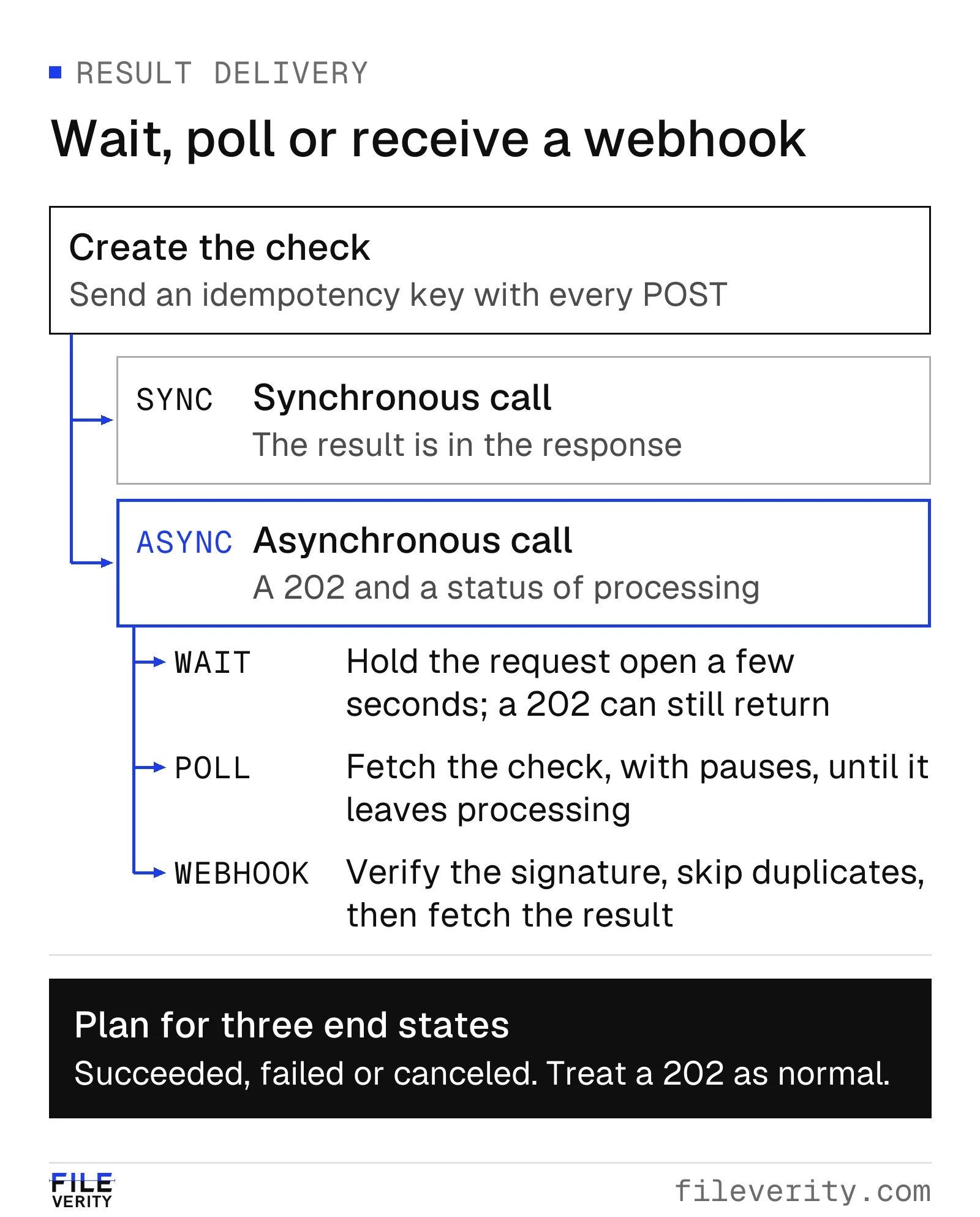
Whichever way a result arrives, handle a pending response, verify a webhook's signature and skip event IDs you have already processed.
How to verify it. Look for the status lifecycle (processing, succeeded, failed, canceled) and, if the provider can hold a request open, the documented maximum wait. Check how to poll and how often, what happens when capacity is busy, whether queued work reports its position and whether work can be canceled without charge. A 503 with a Retry-After header, defined in RFC 9110, tells your code what to do. In the pilot, measure end-to-end time at your expected volume for your slowest file type. A test mode that answers instantly says nothing about this.
What Fileverity documents. A text check is synchronous: the result is in the response. Image and document checks are asynchronous: creating one returns 202 with status: processing. You can hold the request with a Prefer: wait header, poll GET /analyses/{id} or subscribe to a webhook, and you should handle 202 even when you wait, because documents can be queued. When capacity is busy the create call returns 503 service_unavailable with retry-after and is not charged. A document check still processing can be canceled without charge. See Wait, poll or use webhooks and When the service is busy.
Webhook signing
Why it matters. A webhook endpoint is a public URL that accepts requests changing your case data. Without verification, anyone who finds it can send a fake "clean" result. Delivery is also unreliable by nature: your server restarts, so the sender must retry, which produces duplicates and out-of-order events.
How to verify it. Look for a documented signature scheme: a per-endpoint secret, a signature over the raw request body and a timestamp so old requests can be rejected. The Standard Webhooks specification is an open convention with webhook-id, webhook-timestamp and webhook-signature headers and an HMAC-SHA256 signature, so existing libraries can verify it. Also look for how secrets are rolled, the retry schedule and when retries stop, a stable event ID for deduplication, whether the payload carries the result or only an ID, how failures are reported to you (delivery log, resend, disabled endpoints) and a test event you can trigger. In the pilot, make your endpoint return an error once, then send a tampered body and a stale timestamp.
What Fileverity documents. Webhooks follow Standard Webhooks, with the three headers and an HMAC-SHA256 signature over the event ID, the timestamp and the raw body. The signing secret is shown once and can be rolled, and the documentation includes verification code in JavaScript and Python. Delivery is at least once with no ordering guarantee, so deduplicate on webhook-id. Failed deliveries are retried with growing delays for several days, an endpoint that keeps failing is disabled and the workspace owners are emailed, and the Console lists recent deliveries and can resend one. Send test delivers a signed sample event. The event does not carry the result: fetch it with GET /analyses/{id}. Text checks are synchronous and send no webhooks, and test keys never send events. See Verify the signature and Delivery and retries.
Reliability under retries and load
Idempotency and retries
Why it matters. Networks fail between your request and the response. If a retry can create a second check, you pay twice and may open a duplicate case. If you never retry, you lose work. An idempotency key lets the provider recognize a retry and return the first outcome.
How to verify it. Look for an idempotency-key request header on every endpoint that creates something or costs money. Read what happens when the same key is replayed (the same response, flagged as a replay), when it is reused with a different body (it should be refused, not silently accepted), while the first request is still running and after an error, plus how long keys are kept and what they are scoped to. The header is described by an IETF Internet-Draft that was still a draft in November 2026, so providers differ in detail: test it. In the pilot, send the same request twice and drop the connection mid-request, then confirm one result and one charge.
What Fileverity documents. An Idempotency-Key header works on every POST endpoint: text checks, file uploads, check creation and cancellation. A replay returns the saved response with idempotent-replayed: true and nothing runs or bills again. The same key with a different body returns 409 idempotency_mismatch, and the same key while the first request runs returns 409 idempotency_in_progress. Error responses are not saved, so a retry after an error runs the request again. Keys are scoped to the workspace, the mode (live or test) and the endpoint, and are kept for a documented window. See Idempotency.
Errors and request IDs
Why it matters. Your code must decide what to retry, what to fix, what to show a user and what to send to the provider's support. Error messages written as prose change over time, so code that parses them breaks. A request ID lets both sides find the same request later.
How to verify it. Look for errors in one consistent JSON shape with a stable machine-readable code separate from the human message, a table of every code with its HTTP status and whether to retry, and a request ID in a response header on every response, including successes. Check that the documentation says whether a failed check is billed. In the pilot, trigger each class of failure (bad key, oversize file, unsupported format, unknown ID, empty balance) and confirm you can tell them apart from the code alone.
What Fileverity documents. Errors carry type, code, message, param and request_id, and the documentation says to branch on code rather than the message. Every response has an x-request-id header, and the table of error codes is generated from the API's own definitions. The documentation lists which errors to retry and which to fix first, and a check that ends in an error is not charged. Quote the request ID when you write to hello@fileverity.com or use the contact page. See Errors.
Rate limits
Why it matters. A burst, such as a backlog import or an end-of-month batch, can trip limits. Unmanaged, it turns into failures and retries that make it worse. Limits also tell you how the provider expects to be used: spread work out, and prefer webhooks to tight polling.
How to verify it. Look for the limit per key or account and its window, response headers that show the limit, what remains and when it resets, and a 429 response with a Retry-After header (RFC 6585 defines the 429 status). Look for other caps, such as concurrent or pending uploads, and for how to ask for higher limits. If the provider's test mode applies the same limits, run a burst there first.
What Fileverity documents. Each API key has a per-minute limit that covers every endpoint, including requests that return an error. Every authenticated response carries x-ratelimit-limit-requests, x-ratelimit-remaining-requests and x-ratelimit-reset-requests, and 429 rate_limited carries retry-after. A separate cap on unexpired uploaded files returns pending_files_limit, without retry-after. Test and live keys share the rate limits, so you can rehearse backoff with a test key. Higher limits are arranged through sales. See Rate limits and headers.
Data, evidence and cost
Data retention
Why it matters. Files sent for review are often personal or commercially sensitive: claim photos, pay stubs, contracts. The provider becomes a processor of that data. You need to know what is stored, where, for how long, who can see it and whether it is used to train models.
How to verify it. Ask for an answer for each data category: uploaded files, text input, derived data, results, logs and backups. "We delete files" is not an answer until it says what is deleted, when, and what remains. Look for a retention table in the documentation, an endpoint to delete earlier, the processing locations and subprocessors, a statement on training use, a data processing agreement and a private deployment option. Where files hold personal data, the GDPR requires a written contract with each processor (Article 28) and a legal basis for transfers outside the EU (Chapter V), and your data protection officer decides what applies. In the pilot, confirm that a file is gone after its check and that stored results expire as documented.
What Fileverity documents. A retention table in Data retention and security covers each data category. Uploaded files are deleted when a check starts and in any case after a stated window, and DELETE /files/{id} removes one sooner. Submitted text is evaluated and discarded, never stored. Check results are kept for a limited period, text results without the text. Document page evidence is kept for a shorter time than the result, so download the PDF report when the check finishes if you need the evidence in it. Request logs record no request or response bodies. Processing locations and subprocessors are on the Trust & security page, the terms are in the data processing agreement, and private deployment is offered to Enterprise customers on request.
Audit evidence and model versions
Why it matters. When a flagged case is disputed months later, you must show what was checked, when, by which version of which model, and that the file has not changed since. A bare score in your database cannot do that. If a provider changes its model without telling you, results on the same file can change, and you cannot compare a pilot result with production or explain a difference between two checks.
How to verify it. Look for a stable ID for each result that you can store with the case, a fingerprint (hash) of the examined file, a trusted timestamp from a time-stamping authority (RFC 3161) so the time does not rest on the provider's clock alone, a downloadable report and a way for a third party to confirm it without an account. Check that each result names the exact model version, whether you can pin a request to a version and for how long it stays available, and how changes and retirements are announced. The guide to SHA-256 checksums and trusted timestamps explains what a hash and a timestamp each prove.
What Fileverity documents. Image and document reports carry a report ID, the SHA-256 fingerprint of the examined file, an RFC 3161 timestamp and a public verification page that anyone with the link can use without an account, plus a sealed PDF. Every result names the snapshot that produced it, a model ID such as fvimg-2 points to a dated snapshot, and passing a snapshot ID as model pins a request to it. Changes to v1 are additive and listed in the changelog, so clients should ignore fields they do not recognize. Text results carry a detection ID and the snapshot that produced them. Notice periods for retiring a snapshot belong in your agreement, so ask for them in writing. See The report object, Conventions and the Changelog.
Billing and test mode
Why it matters. A price list hides the rules that decide the bill: the billable unit, whether failed, canceled or retried checks are charged, how amounts are rounded and what a runaway job can cost. You also need to build and test the integration without spending money or polluting production data.
How to verify it. Find the billing unit for each modality (per image, per document, per block of characters) and the rounding rule. Check whether failed, canceled and rejected requests are charged, whether the model is prepaid or a subscription, and whether there are spend limits, low-balance alerts and a usage report you can reconcile with your own counts. A good test mode never charges, applies the same validation, and states exactly what it simulates and what it does not: timing, webhooks and real results are the usual gaps. In the pilot, reconcile the provider's usage report against your own log, including a deliberate failure.
What Fileverity documents. The API is prepaid from a workspace balance, with no subscription. Prices are per image check, per document check and per block of text characters, rounded up per request. For image and document checks the price is reserved when a check is created and released if it fails or is canceled, and requests rejected before evaluation are not charged. A free start is used before the balance. Each key can have a monthly spend limit, a low-balance alert sends an email and a balance.low webhook, and each check reports its charge in usage. Test keys never charge or use the free start, return a fixed sample immediately, apply the same validation, rate limits and error codes, and send no webhooks except the Console's test event. Sample report IDs start with FV-TEST- and have no public verification page. Current prices are on Pricing and billing and the API page; the test-key behavior is in Authentication and keys.
Common questions
Should I choose a synchronous or an asynchronous API?
Neither is better in itself. Short inputs such as plain text suit a synchronous call, and files that need heavier analysis usually return a status first. What matters is that the documentation defines the lifecycle, supports waiting, polling and webhooks, and that your code handles a pending status.
Do I need webhooks, or is polling enough?
Polling is enough for a prototype or a low volume. Webhooks save requests and rate-limit budget and suit production. Either way, verify the signature and handle duplicates and a pending state.
Is an idempotency key a standard?
It is a common convention, and an IETF Internet-Draft describes it but had not become an RFC in November 2026. Treat the exact behavior as provider-specific and test it. Fileverity's is documented on the Idempotency page.
Does a good API mean an accurate detector?
No. These checks cover the integration, not detection quality. Evaluate detection on your own files, with labels you trust, using the accuracy guide and the buying guide.
Can I try the Fileverity API without paying?
Yes. Your first workspace includes a free start, and test keys never charge. Follow the Quickstart and see Pricing and billing for the terms.
A pilot checklist
Run the pilot in three passes and keep a dated record of every answer. First, a desk pass: answer all ten checks from each candidate's documentation and drop clear mismatches before writing code. Second, a test-key pass: build the integration against test mode. Third, a live pass: use a live key with a low spend limit and a sample of files you are authorized to send. For sampling, labels and scoring of detection quality itself, follow the pilot design in How to Choose Software for Detecting AI-Generated Images.
| Test | Do this | Pass when |
|---|---|---|
| Output | Send one flagged, one clean and one unsupported file. | You can tell all three apart from the response alone and store their IDs. |
| Limits | Submit your largest and most awkward real files. | Each rejected file gets a distinct documented error, with no silent truncation. |
| Delivery | Time end-to-end at your expected peak, in each wait mode you plan to use. | Pending states are handled and your own timeouts exceed the documented waits. |
| Webhooks | Send a test event, a tampered body, a stale timestamp and a duplicate, and make the endpoint fail once. | Only valid events are accepted, duplicates are ignored and the retry arrives. |
| Retries | Repeat a request with the same key, reuse the key with a different body and drop a connection mid-request. | You get one result and one charge, and the mismatch is refused. |
| Errors | Trigger a bad key, an unknown ID, an empty balance and an invalid file. | Each failure is identifiable by code and its request ID is in your logs. |
| Rate limits | Send a burst beyond the documented rate on one key. | You receive a 429 with a wait time, and the client backs off without losing work. |
| Data | Confirm that uploaded files are gone and results expire as documented, and obtain the agreement and subprocessor list in writing. | Observed behavior matches the documentation and the paper. |
| Evidence | Open a report's verification page as someone without an account, and store the report ID and model version with the case. | A colleague can reproduce what was checked, when and by which version. |
| Billing | Compare the usage report with your own count, including a failed check. | The totals match and the failed check was not charged. |
Keep the answers beside the coverage matrix and the scoring from the buying guide. To start with Fileverity, read the API page, the image and document detection pages and the Quickstart.
By Yang Zheng · Reviewed by Bill Liu