Chrome extension
AI detector Chrome extension for any page and Google Docs
Select text, right-click and see which passages read as AI-written, in a side panel next to the page. One click checks a whole article or a Google Doc. It runs on Veread, the model behind the Fileverity AI text detector.
What the extension does
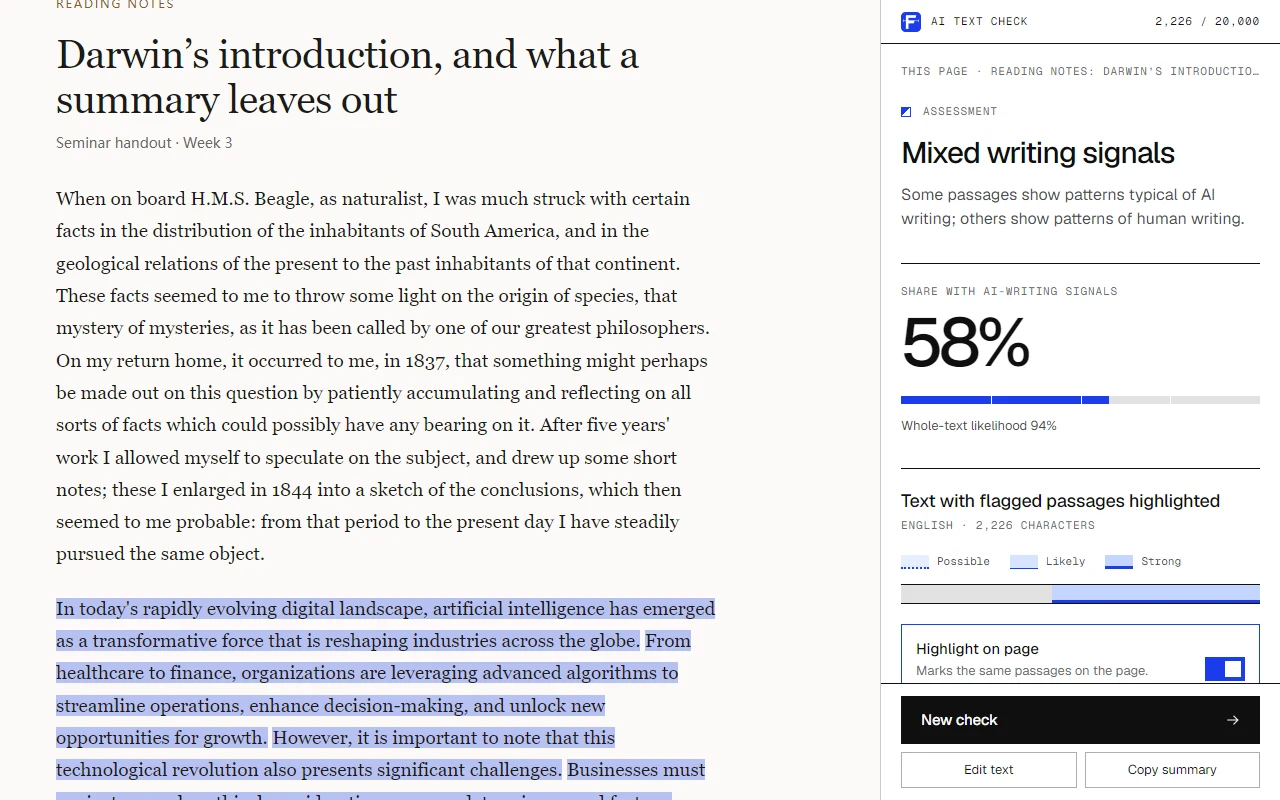
The Fileverity extension checks text for AI writing inside Chrome. It reads the text you select, the main text of the page you are on or an open Google Doc, and sends it to Fileverity only when you start a check. The result appears in the browser side panel: an overall assessment, the share of the text with AI-writing signals, and every flagged passage marked at one of three strengths. It works in English, French, German, Spanish, Chinese, Vietnamese and Arabic.
How to start a check
Right-click a selection
Select text on any page, right-click and choose “Check for AI writing”. The check starts at once.
Press Alt+Shift+F
The shortcut checks the selected text, or the whole page when nothing is selected. You can change it in Chrome's extension settings.
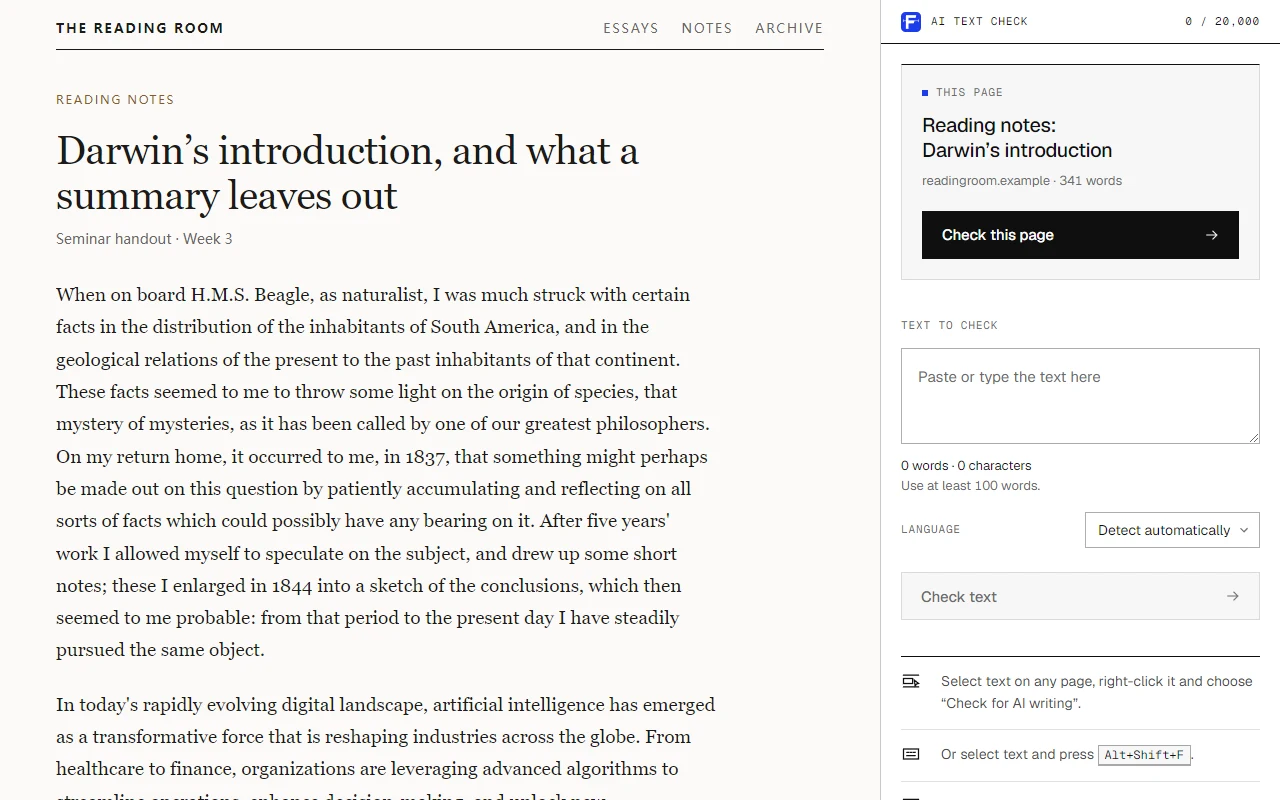
Click the Fileverity icon
The panel reads the main text of the page and leaves out menus, sidebars and footers. It shows the word count before you run it.
Paste text
Paste or type text into the panel when it comes from an email, a PDF or another app.
What the result shows
An overall assessment
Likely written by AI, mixed, or likely written by a person, with the likelihood for the whole text.
The share of AI writing
How much of the text carries AI-writing signals.
Flagged passages
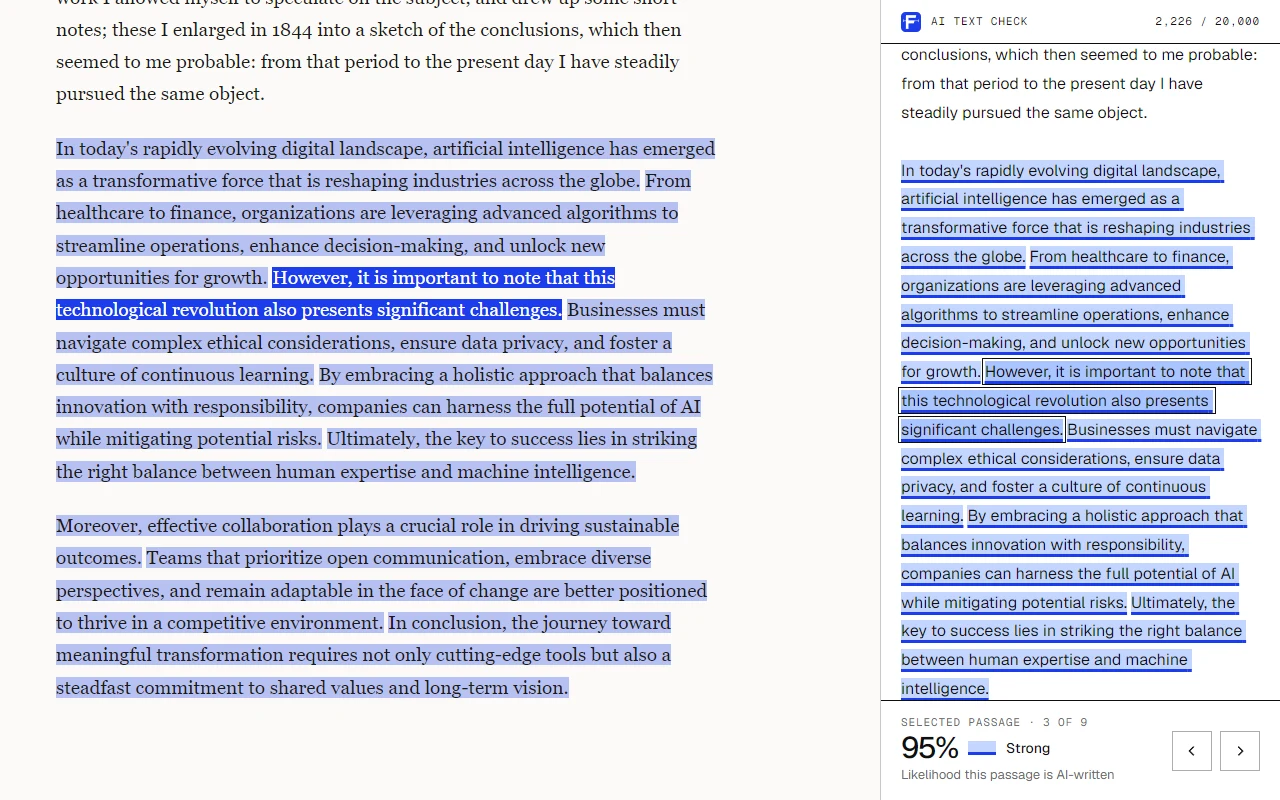
The text itself, with each flagged passage marked as possible, likely or strong.
Highlights on the page
The same passages are highlighted on the web page. Select one in the panel and the page scrolls to it; click one on the page and the panel shows its detail.
Closest writing style
The AI model family whose writing style is closest to the flagged passages.
Recent checks
Your latest results stay in the panel until you close the browser, so you can reopen one without running the check again.
Install it and run your first check
- 01 / 04
Add the extension
Click “Add to Chrome” on the Chrome Web Store page. A welcome tab opens when the installation is done.
- 02 / 04
Sign in
Sign in with Google or with a code sent to your email; there is no password. A free account includes 10,000 characters of AI text detection a month.
- 03 / 04
Pin the icon
Open the Extensions menu in the Chrome toolbar and pin Fileverity, so that a page check is one click away.
- 04 / 04
Check a text
Select at least 100 words on any page, right-click and choose “Check for AI writing”.
Use it in Google Docs
Open the document and click the Fileverity icon to check the whole document. To check one part, select the text and press Alt+Shift+F.
In Google Docs the flagged passages are shown in the side panel, not inside the document. The extension reads the document only when you start a check and never changes it.
Measured on held-out text in seven languages
Veread 1.1 is Fileverity's own text model. One model covers English, French, German, Spanish, Chinese, Vietnamese and Arabic, and every language is measured.
Human writing
0.28%
of human-written text received an AI finding, across seven languages.
Fully AI-written
98.6%
of fully AI-written texts were detected.
AI-written and AI-assisted
95.9%
of AI-written and AI-assisted text was detected: fully written, continued, rewritten and edited.
Unseen models
94.9%
of texts from AI models never used in development were detected.
Held-out validation of Veread 1.1, November 2026Explore evaluation results
What the extension can access
The extension does not ask for access to every website. It reads a tab only after you click the icon, use the menu or press the shortcut.
| Permission | What it is used for |
|---|---|
| The current tab, after you act | Reads the selected text or the page text and highlights the flagged passages on that tab. |
| Scripting | Runs the two functions that read the text and draw the highlights. |
| Context menu | Adds “Check for AI writing” and “Check this page for AI writing” to the right-click menu. |
| Side panel | Shows the text and the result next to the page. |
| Storage | Keeps the current text and recent results in session memory, cleared when the browser closes, and remembers whether page highlighting is on. |
| fileverity.com | Sends the text you chose to the analysis service and uses your Fileverity sign-in. |
Text is sent only when you run a check. It is analyzed and not stored, and the address and title of the page are not sent.
Free to install, counted in your plan
The extension is free. Each check counts toward the monthly allowance of AI text detection in your Fileverity plan: 10,000 characters on a free account, 500,000 on Personal and 2,000,000 on Pro.
The same allowance covers checks on fileverity.com, in the Console and in the extension. Beyond it, a check uses credits from your workspace balance.
Good to know
- A check needs at least 100 words and accepts up to 100,000 characters.
- Some pages do not expose their text, for example when the text is part of an image. Paste the text into the panel instead.
- A result guides your review. It does not establish who wrote a text.
More ways to check with Fileverity
- AI text detectorPaste text on the web and get the same passage-level result, with nothing to install.
- Document verificationCheck PDF, Word and PowerPoint files for AI-written text, edits and altered images.
- AI image detectionCheck whether a photo was generated or edited with AI.
- APIRun text, image and document checks from your own systems.
Frequently asked questions
Is the AI detector extension free?
The extension is free to install. Checks count toward your plan’s monthly allowance of AI text detection, and a free account includes 10,000 characters a month. The pricing page lists the plans.
Does it work in Google Docs?
Yes. Click the Fileverity icon to check the whole document, or select part of it and press Alt+Shift+F. The flagged passages are shown in the side panel.
Does the extension read every page I visit?
No. It has no access to websites in general and does nothing in the background. It reads the current tab only after you click the icon, choose the menu item or press the shortcut.
Is my text stored?
No. The text you check is sent to Fileverity for analysis and is not stored. Recent results are kept only in your browser and are cleared when you close it.
How accurate is it?
The extension uses Veread, the same model as the Fileverity website and API. In held-out validation, 98.6% of fully AI-written texts were detected and 0.28% of human-written text received an AI finding. The accuracy page lists the results by language.
Which languages can it check?
English, French, German, Spanish, Chinese, Vietnamese and Arabic. The language is detected automatically, and you can also choose it in the panel.
Why did my selection not run?
A check needs at least 100 words. A shorter selection is placed in the panel with its word count, so you can add more text. Selections longer than 100,000 characters need to be checked in parts.
Guides
Practical guidance for review teams.
What each check establishes, where it stops and which evidence to request next.
Evaluating detection
Which AI Wrote This? How ChatGPT, Claude, Gemini, Grok, DeepSeek, Qwen and GLM Write
The phrases, punctuation and structure that set seven AI model families apart from human writers, with multipliers, the method and why they are not proof.
6 min read ·
Evaluating detection
What to Do When an AI Detector Flags a Student's Essay
How teachers can review a flagged essay: read passages in context, examine the writing process, talk with the student and document a fair decision.
11 min read ·
Evaluating detection
AI Text Watermarks in 2026: Who Marks ChatGPT, Claude, Gemini and Grok Text
Which AI vendors watermark text in 2026, from OpenAI textGrain to SynthID, who can verify it, what the EU AI Act requires and what a mark proves.
7 min read ·
Evaluating detection
Veread 1.1 detects 98.6% of fully AI-written text with 0.28% false positives
Veread 1.1 detected 98.6% of fully AI-written text and 95.9% of AI-assisted text, with 0.28% false positives across seven languages. See every result.
8 min read ·
Check the next text without leaving the page.
Add the extension to Chrome, sign in once, and every check is a right-click away.